

When GA4 and Shopify show different revenue totals, start by asking what each number includes. Tax, shipping, sales channels, refunds and reporting dates can explain a large part of the difference before any tracking repair is needed. This tutorial takes you from a shared reporting definition to a revenue bridge, an order-level check and a verified fix.
You need Shopify reporting and export access, GA4 analysis access, and an implementation owner for purchase tracking. Work on a completed period, keep the original exports, and record when you downloaded them. The five screenshots below show the actual report controls in Beecommercer Merch. They contain no customer-order details and show no sales in the selected window. The separate $13,200 example is entirely hypothetical.
1 Agree on what you are comparing
Create a short measurement contract before exporting data. A useful first comparison is online merchandise revenue after discounts, excluding tax and shipping, with a separately documented treatment of reversals and refunds. Use that basis only if it matches the values your purchase implementation actually sends.
| Setting | What to record | Check before continuing |
|---|---|---|
| Period and time zone | Start and end dates, Shopify store time zone, GA4 property time zone, and export timestamp. | The same calendar dates can cover different hours. For exact matching, convert timestamps to one agreed zone without changing production settings merely for this exercise. |
| Currency | Shop currency, customer presentment currency, GA4 event currency and reporting currency. | Compare original amounts within the same currency first. If conversion is needed, record the rate, date and method instead of mixing converted totals silently. |
| Sales scope | Online Store, POS, draft/manual orders, other channels, test orders and payment/order status rules. | A web purchase stream does not necessarily observe every Shopify channel or every order in a sales report. |
| Revenue components | Discounted merchandise, shipping, tax, duties, fees and any other included amounts. | Specify what the event value represents; do not assume the checkout total is merchandise revenue. |
| Adjustments | Returns, cancellations, edits, partial refunds and their dates. | Choose period activity or an order cohort, and keep the same basis on both sides. |
Shopify sales reversals cover more than merchandise refunds. Sales reports and payment reports also answer different questions. Use the current Shopify sales-report definitions to identify the components in your selected report. Gross sales can include pending, canceled and unpaid orders, so write down the eligibility rule rather than assuming every reported sale is a successfully paid web purchase.
Choose the GA4 revenue metric deliberately
In the GA4 Data API metric reference, grossPurchaseRevenue is purchase revenue before refund deductions, while purchaseRevenue deducts refunded transaction revenue. itemRevenue is an item-level measure excluding tax and shipping. Total revenue can include other revenue streams. Keep event-level purchase values separate from item-level values and avoid summing a repeated order total once for every product row.
The GA4 ecommerce metrics guide also distinguishes Ecommerce purchases, which counts purchase events, from Transactions, which can include refunds and other transaction events. Neither raw CSV row counts nor the Transactions metric should be treated automatically as Shopify order counts.
For a net comparison, include the relevant refund activity in the report or query; a purchase-only event filter can remove the refund side. Do not subtract refunds a second time from an already net Purchase revenue figure. If the property mixes websites, apps or stores, restrict the comparison to the appropriate source without accidentally excluding relevant adjustments.
2 Open the matching reports and set the dates
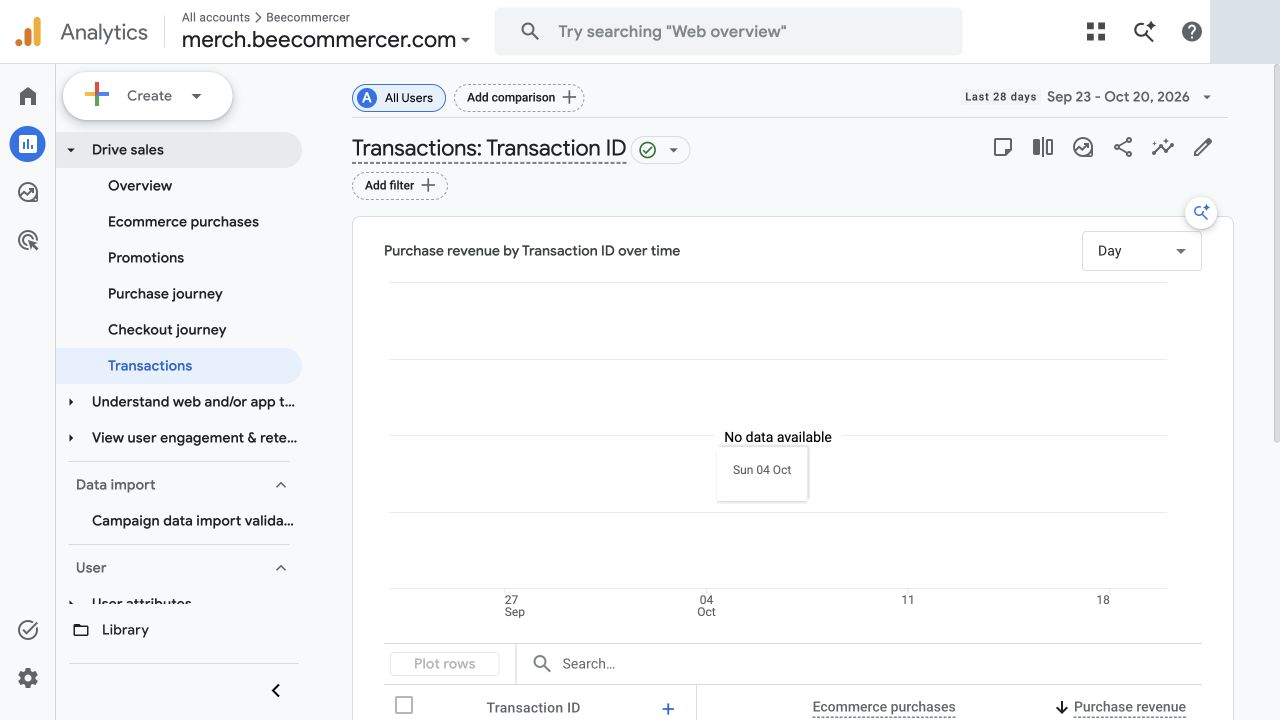
Open GA4 Transactions
- Select the actual GA4 property used by the store. A demo property cannot reconcile a different merchant’s orders.
- Open Reports and find Transactions. In the illustrated collection, the path is Drive sales → Transactions; report collections and navigation can vary by property.
- Inspect Transaction ID, Ecommerce purchases and Purchase revenue. Scroll to the table if the chart fills the first screen.
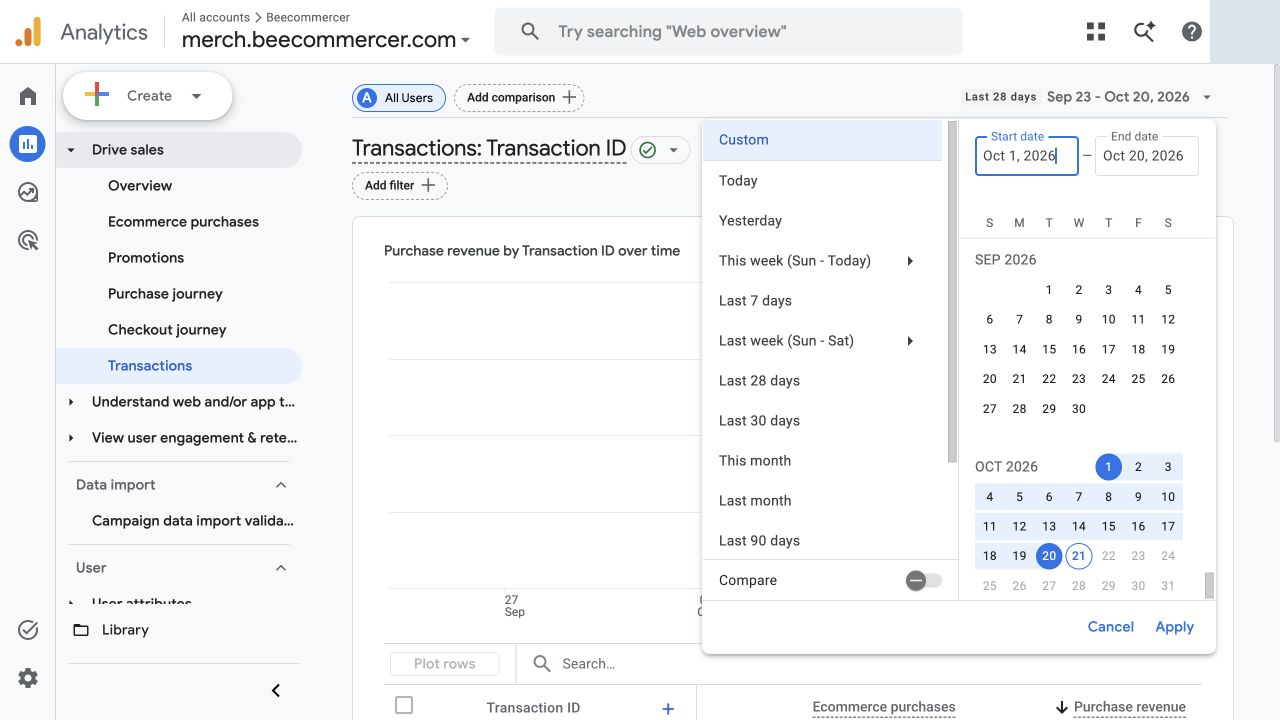
- Open the date picker and enter the common period. The example uses October 1–20, 2026.
- Click Apply, then confirm the report header and record the property’s reporting time zone and currency.
Open Shopify sales reporting
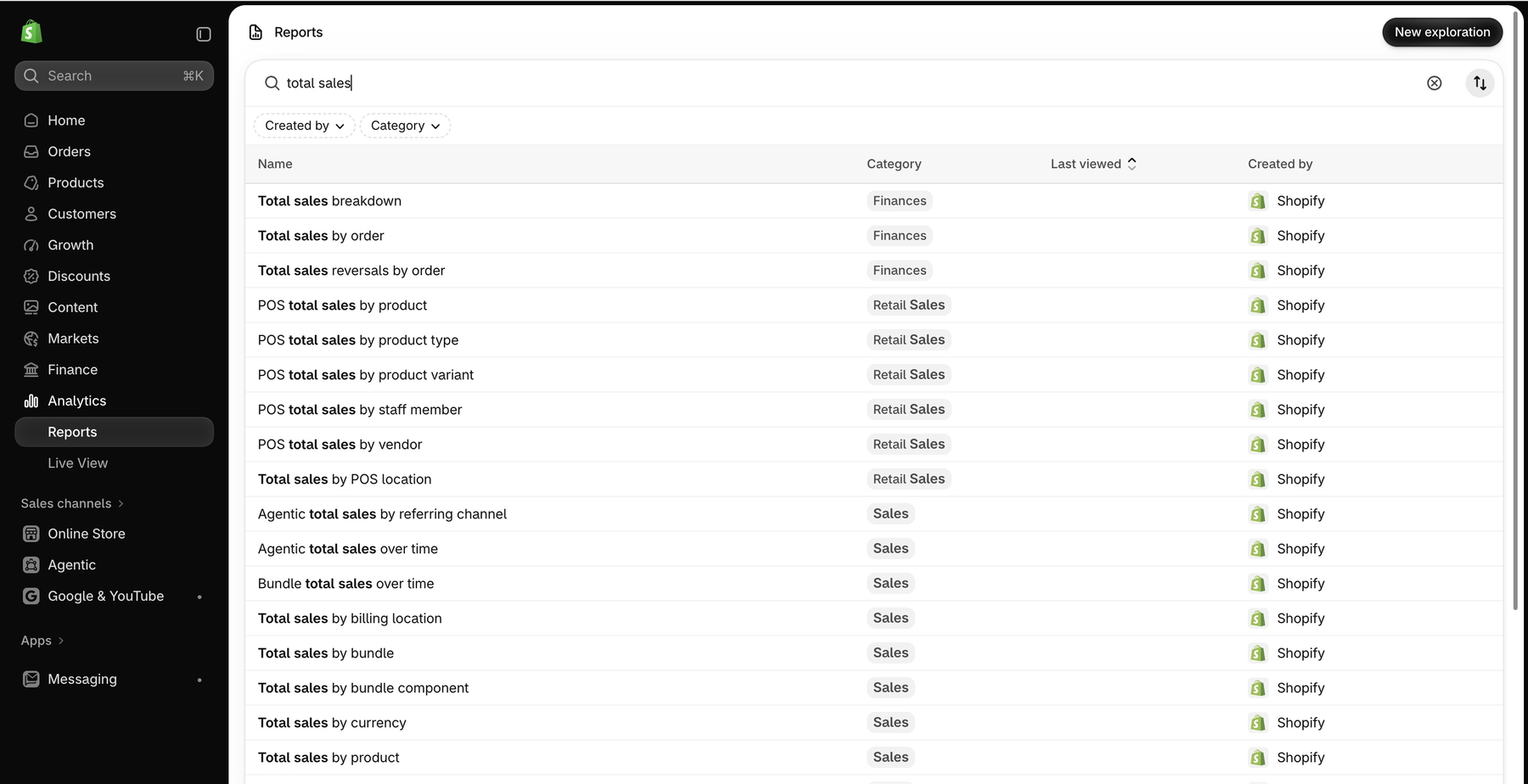
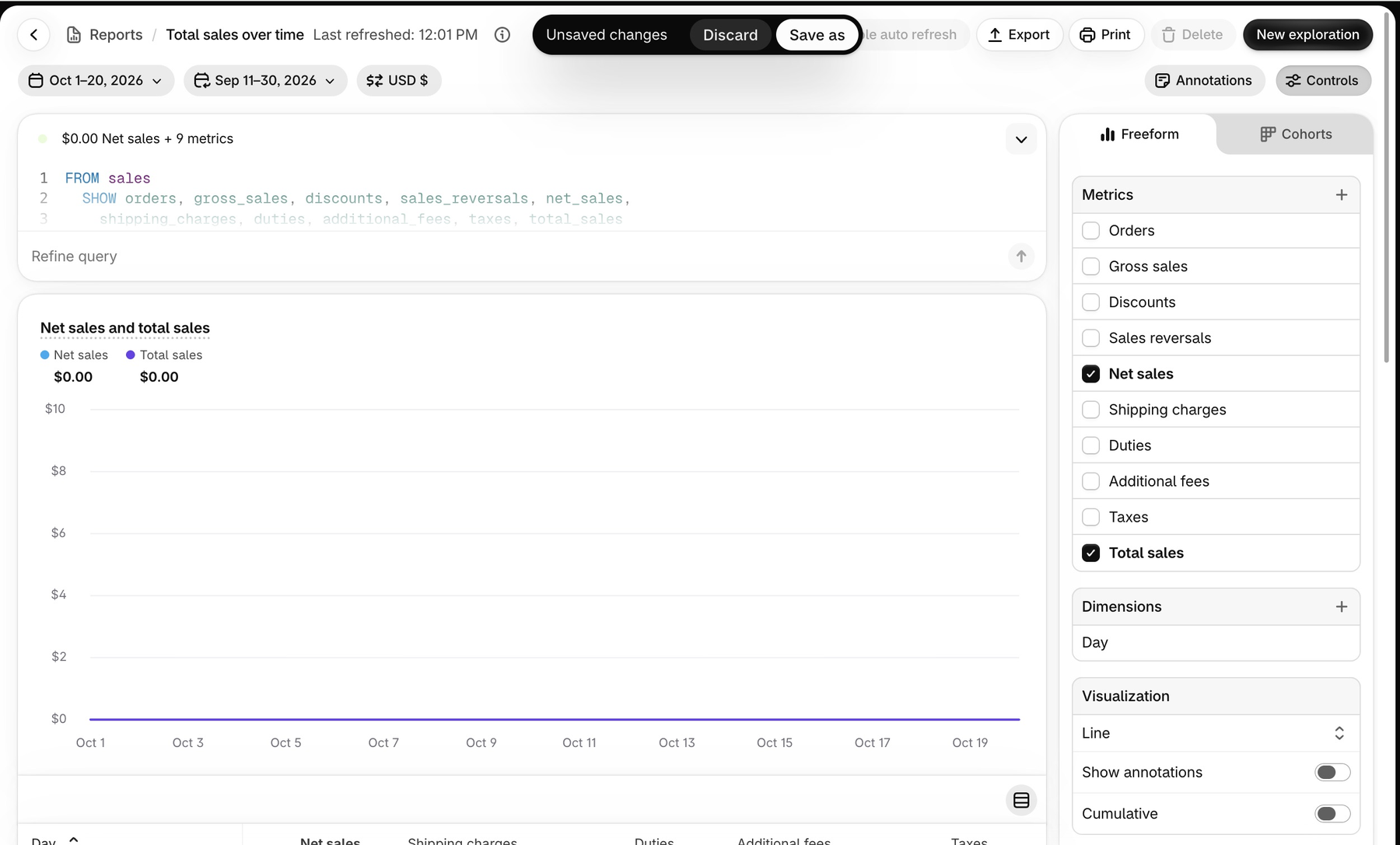
- In Shopify, open Analytics → Reports and search for total sales.
- Find Total sales over time, scrolling the results if necessary. The screenshot shows the report family search, rather than that particular report row.
- Open the report, inspect its metrics and filters, and set the same main date range.
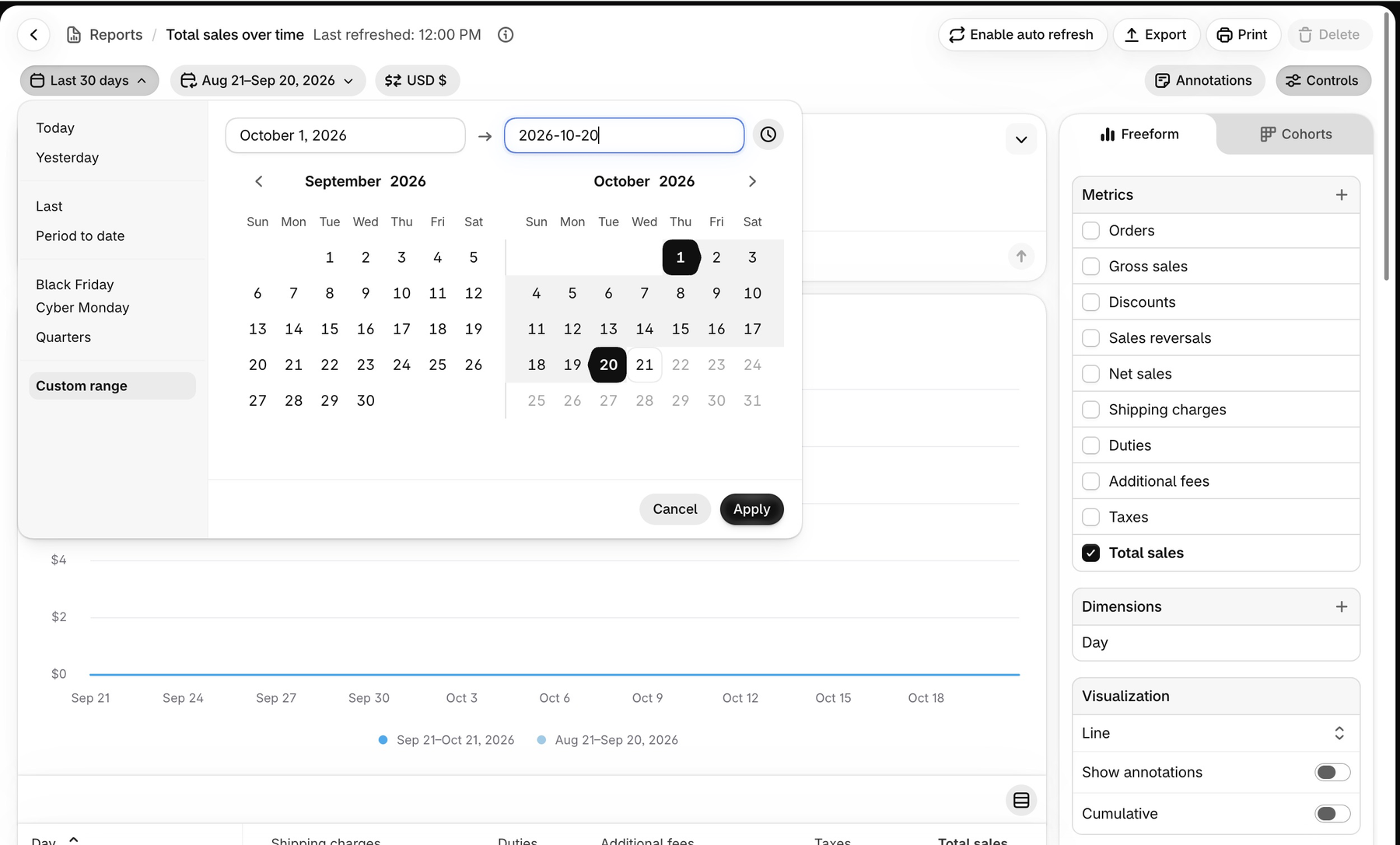
- Click Apply and confirm the active dates.
- Add Net sales alongside Total sales where your report permissions allow it. Inspect shipping, tax and other components before exporting.
- Apply the agreed channel and eligibility filters and retain a record of the configuration.
3 Build a revenue bridge before naming a tracking bug
Use the following invented USD example to practise. It is unrelated to the zero-sales screenshots. The simplified starting total contains no duties, tips or extra fees, and each adjustment is non-overlapping.
| Bridge line | Adjustment or comparison | Balance |
|---|---|---|
| Shopify total sales | Starting point | $13,200 |
| Remove net shipping | −$800 | $12,400 |
| Remove net tax | −$900 | $11,500 |
| Remove POS/manual net merchandise | −$1,000 | $10,500 |
| Comparable online merchandise | Baseline | $10,500 |
| GA4 net Purchase revenue | Comparison value | $10,100 |
| Unexplained residual | $10,500 − $10,100 | $400 |
Remove shipping and tax first to reach net merchandise across channels, then remove only the out-of-scope merchandise amount. Subtracting a full POS checkout total after already removing its shipping and tax would count those exclusions twice.
Assume the $10,500 baseline already includes $500 of merchandise reversals in the period, and the GA4 $10,100 figure includes the correctly collected relevant refunds on the agreed basis. The residual is 400 / 10500 = 3.81%. The headline gap was $3,100; $2,700 is explained by components and scope. The remaining $400 still needs evidence.
For another account, reverse or add bridge lines as its definitions require. A Shopify reversal is not automatically a GA4 refund event. Record the adjustment present in each system, its amount and its date before deciding how it affects the bridge.
4 Keep period activity separate from order cohorts
Suppose an order is placed on September 30 and refunded on October 3. An October activity report can contain the negative adjustment without the original sale. An October order-created cohort can exclude that order entirely. Both results may be consistent with their definitions.
Choose one method: reconcile sales and adjustments occurring in the reporting period, or reconcile orders created in a defined period with a stated refund cutoff. For a cohort, gather the relevant later adjustments as well. Do not combine an event-date revenue report with a current-state order export and call the difference missing tracking.
Shopify’s sales discrepancy guidance explains why order exports, sales reports and payment movements can diverge. Preserve order, adjustment and event timestamps separately. Inspect orders close to midnight and around changes in time-zone offsets.
5 Export and match actual transactions
- Start with a small sample spanning devices, payment paths, currencies and period boundaries. Expand to the complete eligible population once the mapping is reliable.
- Export the Shopify order or report detail needed for the selected basis. Orders CSV files can contain several line-item rows for one order. Establish one row per order for order totals, or aggregate line-item amounts deliberately; do not sum repeated order totals.
- In GA4, use Transactions or a free-form exploration with Transaction ID and compatible purchase metrics. Export all available rows and check row limits and data-quality notices. Record the report filters and whether amounts are gross or net.
- Determine exactly how the implementation maps a Shopify order key to
transaction_id. An order name, numeric ID and checkout ID are not interchangeable. Keep a documented mapping and exclude personal details. - Compare discounted merchandise, currency, timestamps, tax, shipping and refund linkage. Record missing IDs, repeated IDs and amount differences separately.
For a purchase-only match, compare pre-refund discounted merchandise with observed gross purchase values, then reconcile refund activity in a separate log. For a net match, deliberately include the adjustments required by the chosen period or cohort. Do not interpret a refund-only row as a new purchase.
A report export does not necessarily provide raw events or unlimited history. If already configured, BigQuery event exports can support more detailed investigation, but they use a different reporting surface. A new export link does not reconstruct every past event. Check the GA4 and BigQuery reporting comparison guidance only when applicable to your setup.
6 Use Google Sheets to organise the checks
Download the sample revenue-bridge CSV and import it into a new sheet named Bridge. It contains static example amounts and notes, not live formulas. Keep an unchanged reference copy and replace the sample with your verified report components.
Create Orders and GA4 tabs for a purchase-only matching exercise. In each tab, use column A for the mapped transaction key as text and column B for numeric, pre-refund discounted merchandise in one currency. Keep currency, timestamp and source reference in additional columns. Use a separate file or matching block for each currency; do not sum USD and EUR. Reject missing or nonnumeric amounts before matching.
- Resolve repeated line-item rows into one order record, and establish the GA4 record grain. Keep raw exports in separate reference tabs.
- In a Match tab, paste IDs from both A columns into column A, remove blanks, then use Data → Data cleanup → Remove duplicates. This union includes IDs that exist on only one side.
- Preserve leading zeros. Trim accidental whitespace only after checking the real ID format. Remove a prefix such as # only when the documented mapping proves it is cosmetic; otherwise it can merge different orders.
- Add columns B and C for record counts and D for the amount difference. Enter the following formulas in B2, C2 and D2, then fill down.
=IF(A2="","",COUNTIF(Orders!A$2:A$10000,A2))=IF(A2="","",COUNTIF(GA4!A$2:A$10000,A2))=IF(A2="","",IF(AND(B2=1,C2=1),SUMIF(Orders!A$2:A$10000,A2,Orders!B$2:B$10000)-SUMIF(GA4!A$2:A$10000,A2,GA4!B$2:B$10000),"review"))The formulas cover rows 2–10000; extend every range together for larger exports. English function names and commas are shown; your regional settings may require different separators. These counts refer to rows in the prepared tabs, not automatically to raw event counts. COUNTIF is case-insensitive and can interpret wildcard characters and numeric-looking keys. Use this simple method only for a checked ID format without *, ? or ~, where keys cannot differ solely by letter case or numeric padding. If those conditions do not hold, use a case-sensitive, literal text matching workflow instead.
B=1 and C=0 flags an order without a matching exported GA4 purchase; B=0 and C=1 flags a GA4 record without a matching eligible order. Counts greater than 1 require grain or duplicate review before comparing amounts. When both equal 1, D is Shopify minus GA4: positive means Shopify is higher. A genuine zero-value order remains different from an absent row.
Add an Adjustments tab with transaction key, adjustment date, merchandise amount, tax/shipping treatment and GA4 refund evidence. Add an Issues tab with classification, evidence, owner and next action. Keep customer names, email addresses and payment details out of shared working copies.
7 Diagnose each exception with evidence
| Exception | What to inspect | Do not conclude prematurely |
|---|---|---|
| Order missing from GA4 | Eligibility, channel, date boundary, consent state, report limits, data filters, property/stream and checkout path. | An unmatched exported record alone does not prove a broken tag. |
| Repeated or reused key | App/integration, tag manager and custom senders; page refresh; ID format and uniqueness. | A duplicate raw send and a duplicated reported purchase are different observations. |
| Matched ID, different value | Discount allocation, quantity, tax, shipping, order edits and currency conversion. | Do not overwrite one system’s amount just to force equality. |
| Refund mismatch | Full versus partial amount, merchandise versus checkout total, event date and original transaction linkage. | A Shopify refund or cancellation does not guarantee that the integration sent a GA4 refund. |
| Total matches, channels differ | Acquisition dimension, attribution model, session versus event scope, referral and cross-domain setup. | Channel credit can change while the underlying order total stays the same. |
Use the official ecommerce event guide to inspect the implemented purchase and refund payloads. For a purchase, verify the correct property, a unique nonempty transaction ID, numeric value, currency and items. The intended purchase value should reflect the discounted item amounts, with tax and shipping supplied separately according to the documented schema.
Google’s transaction-ID guidance describes web-stream deduplication. Do not reuse a constant ID across orders or assume this mechanism makes overlapping senders harmless. Identify the responsible purchase sender before changing collection, and test refunds separately.
Perform a consent-eligible test through the actual checkout and payment-return path. Inspect browser requests and GA4 DebugView where available, then check processed reporting. Keep privacy choices intact; do not bypass consent or add a second purchase sender simply to raise the total. Modeled reporting, observed events and raw exports can differ, so label the surface you are reconciling.
8 Close confirmed issues and retain the unexplained balance
In the hypothetical $400 residual, suppose timestamp evidence explains $100 and controlled checks establish $100 of missing collection. Keep the remaining $200 unresolved. Consent, browser restrictions and another implementation issue are possible explanations until evidence distinguishes them.
- Assign a confirmed collection issue to its owner with the affected path, expected payload, observed payload and fix date.
- Run permitted test purchases and relevant partial/full refund tests. Verify IDs, values and duplicate behaviour.
- Allow the relevant reporting delay before reading the result. Google notes that many reports and explorations can take 24–48 hours to process data; an immediate DebugView event is not proof that all reporting has settled.
- Repeat the same reconciliation on the next completed period. Compare the unexplained amount and percentage under unchanged definitions, while retaining the original evidence.
Track three outcomes separately: scope differences explained, collection defects fixed, and residual differences still open. A smaller gap is useful only when the comparison basis remains consistent. Do not fabricate historical events or promise that a new tag deployment will repair previous reports.
9 Common questions
What discrepancy percentage is acceptable?
There is no universal threshold. Establish the expected differences for your implementation, then monitor unexplained change and financial exposure. If the comparable baseline is zero, do not calculate a percentage by dividing by it; report the amount and investigate the scope.
Which system should guide decisions?
Use appropriately defined order and financial records for sales operations, and GA4 for measured behaviour and acquisition analysis within its coverage. Reconciliation connects these purposes. It does not require all dashboards to display the same number.
Where should I start if purchase collection has never been checked?
Follow the GA4 setup tutorial, then use the tracking diagnostics tutorial to inspect purchase values, currency and duplicate collection before interpreting a revenue gap.