

Last updated on November 1, 2026 at 11:33 AM
Meta reports purchases, GA4 attributes a different number of conversions to paid social, and Shopify shows another order total. Start by asking what each number counts. A store order, a recorded purchase event and an attributed conversion are related records, but they answer different questions. Reconciliation should identify explainable differences and actionable faults, while keeping any unexplained remainder visible.
What you will produce: a record of the settings used for comparison, a small transaction exception ledger and a decision about what to fix. This tutorial concerns website purchases. Record other destinations, offline events and shops separately. For the underlying revenue bridge and spreadsheet matching, use the existing GA4 versus Shopify reconciliation tutorial; for initial campaign setup, use Meta Ads for Beginners.
Reviewed November 1, 2026. Report names, access and available attribution controls can vary. Read the actual metric definitions and settings in your account, and retain them with the export. All numerical examples below are fictional teaching data.
1. Separate real orders, tracking records and attribution
First check where the difference occurs: whether the store recorded a real order, whether the purchase event was received correctly, or whether reports assigned credit to different channels. Work through these three questions before opening another dashboard:
| What to confirm | Records to check first | What these records do not prove |
|---|---|---|
| Does the store contain an order that belongs in this comparison? | Store order and payment status, sales channel, cancellations and refunds. | Which advertisement caused the order. |
| Was the purchase event recorded and sent correctly? | Event setup, transaction reference, value, currency and platform receipt records. | How every reporting model will assign credit. |
| Which channel receives reported credit? | The exact attribution report, window, dimension scope and model. | Sales that would not have happened without the advertisement. |
A purchase event can arrive without receiving credit in a Meta campaign. A store can have a real order even when the browser purchase was not measured. A platform may report attributed conversions without providing an exportable list of the order IDs behind each total. Investigate these situations separately. To find out what advertising added, you need an appropriate incrementality experiment; matching dashboard totals cannot answer that question.
Orders, transaction IDs and attributed purchases answer different questions. Read their units before comparing totals.
2. Set consistent reporting settings
Choose a completed reporting period and save the original reports before editing tracking. Record when you exported them as well as the dates they cover. Recent figures can still change as events arrive, attribution is processed or refunds are recorded. Allow for each source’s actual processing delay; there is no single waiting period that guarantees every report is final.
| Setting | What to record |
|---|---|
| Store and sales channel | Store, ad account, GA4 property and web stream; website channel versus all sales channels. |
| Dates | Start and end, report timezone, date basis and extraction timestamp. |
| Orders included | Payment status, test orders, cancellations, refunds and non-website exclusions. |
| Metric being compared | Whether you are comparing purchase counts or revenue; records actually received versus modeled or attributed results. |
| Attribution | Model; selected click, view and engagement windows; whether the source dimension refers to a user, session or event; comparison columns. |
| Money | Currency, discounts, tax, shipping, refund treatment and exchange-rate convention. |
Keep native timestamps when matching transactions. If you normalize them to a common timezone, document the conversion, including daylight-saving effects. A sale near midnight may belong to different report dates. Do not change a production account’s timezone or attribution model simply to make an exported total look closer.
Also check which date the report uses: the conversion date or the date of the advertising interaction. Confirm this in the export you selected rather than assuming every platform works the same way. Reports showing the same calendar dates may include different transactions.
Example export header: “Paid website orders created October 19–25, 2026; native store timezone retained; merchandise after discounts, tax and shipping excluded; refunds through October 29; extracted November 1.” Attach a separate header to the GA4 transaction export and each attributed report. The dates are illustrative, not a required reporting schedule. If a platform cannot reproduce that exact group of orders, state the mismatch instead of silently replacing it with the nearest dashboard total.
Save report names and filters, not only a cropped number. Record whether a count means orders, purchase events, key-event credit or sessions containing a purchase. Keep currency codes alongside every amount; converting a total with a convenient exchange rate does not reproduce each platform’s transaction-date conversion. Decide whether you need native-currency matching first, and let the finance owner specify the conversion method. Keep the original exports unchanged and put adjustments in a separate working file.
3. Check the 2026 Meta attribution definition
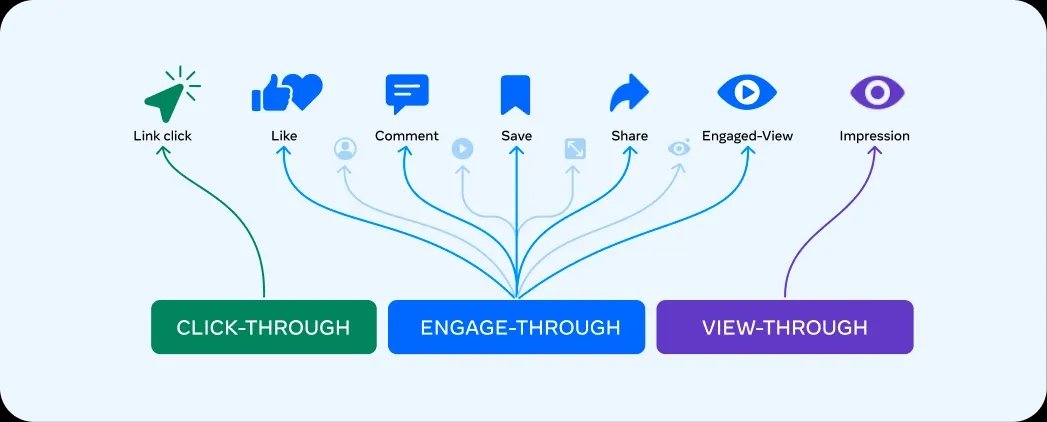
Meta’s March 3, 2026 announcement described a staggered change for website and in-store conversion campaigns: click-through credit narrows to link clicks, while non-link social interactions move into the renamed engage-through category. It also changes the video engagement criterion from 10 seconds to 5 seconds. Advertisers can encounter the rollout at different times; inspect your account rather than assuming identical controls or completed rollout everywhere.
The video seconds describe qualifying engagement, not the number of days allowed for a conversion. Save the actual attribution settings and comparison columns shown. Keep click-only, engage-through and view-through observations distinguishable where available. A category change can alter reported results without a corresponding change in orders. Meta’s announcement also distinguishes attribution from incrementality.
Compare like settings across periods. If an older export used a different definition, label the break in the series instead of interpreting every shift as creative fatigue or improved demand. Changing delivery settings is a separate business decision; investigating a reporting difference does not require changing campaign optimization.
4. Build a clear list of orders to compare
Use order and payment records to decide which orders belong in the comparison. Shopify’s sales reports and payment reports serve different purposes. Its sales discrepancy guidance explains that returns and refunds differ and that gross sales can include canceled, pending or unpaid orders. A convenient sales total is not automatically a count of paid website orders.
In our constructed example, 124 records were created during one period: 4 are tests, 6 are unpaid and excluded, and 14 are paid point-of-sale orders. The remaining 100 are eligible paid website orders under this worksheet’s rules. Preserve excluded records and reasons; do not delete them to improve agreement.
Assume each eligible order contains $60 of merchandise after discount, excluding tax and shipping. That makes $6,000 for the selected orders. Five full $60 refunds recorded by a declared later cutoff reduce their retained merchandise revenue by $300 to $5,700. This calculation follows the selected orders; a report of sales activity during a calendar period may show a different net amount. Keep the cutoff and money basis attached.
Define the paid website-order cohort before comparing tracking records.
5 full refunds by the stated cutoff: 5 × USD 60 = USD 300
Retained merchandise value for this cohort: 6,000 − 300 = USD 5,700
5. Check that purchase events arrived before reading attribution
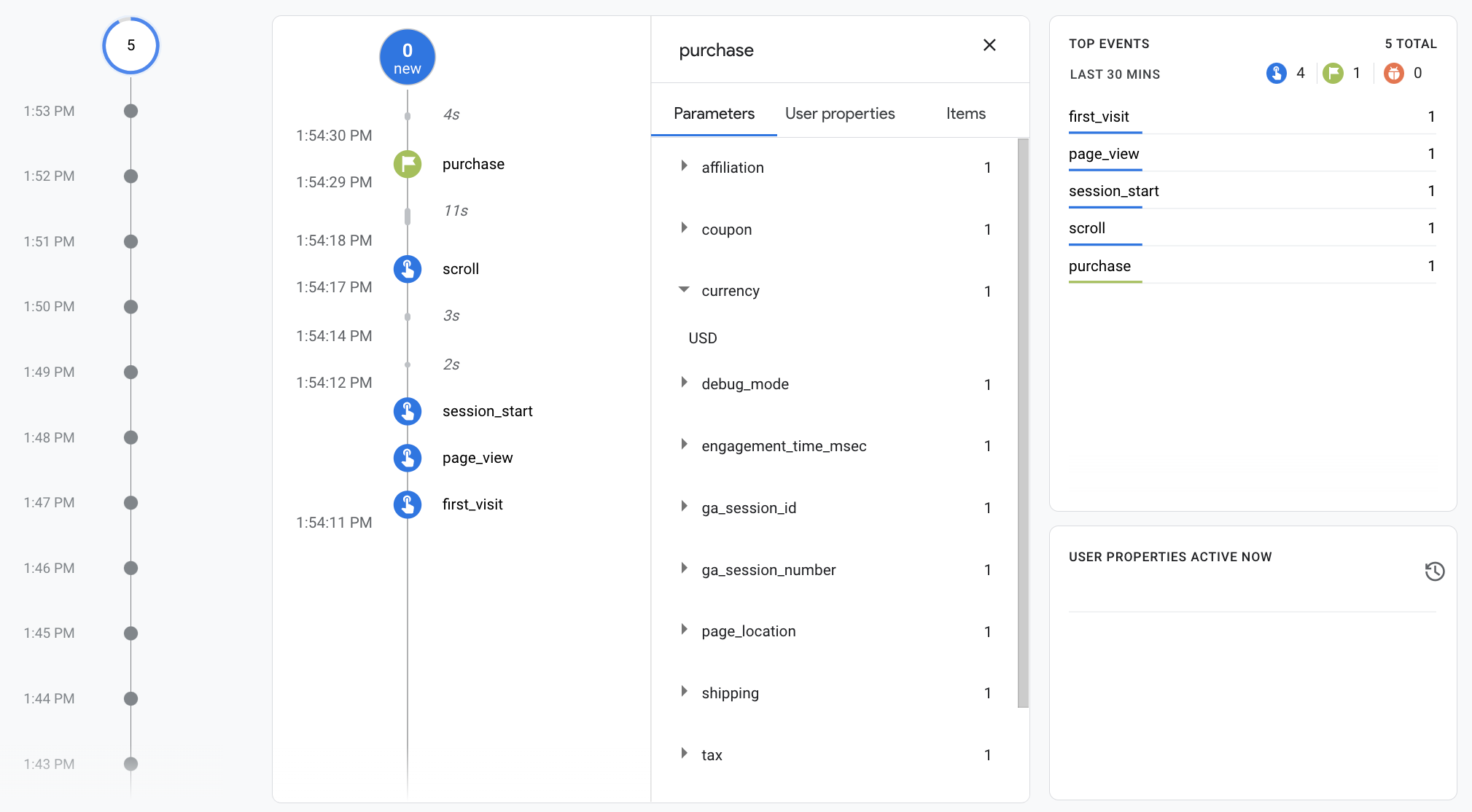
Follow a supported test purchase with an identifiable non-personal order reference. Check the item, amount, currency and purchase trigger in the implementation and receiving tools. Confirm which integration owns delivery to GA4 and which owns delivery to Meta. A Shopify channel integration, a tag manager and custom theme code may overlap; adding another pixel is not a reconciliation method.
For GA4, use the ecommerce specification and transaction-ID guidance. Use a unique, nonempty transaction ID without customer-identifying information, and test a confirmation-page revisit. The documented purchase deduplication applies to web-stream collection; do not turn it into a promise that every multi-source implementation will deduplicate correctly.
Shopify’s Meta data-sharing documentation describes browser and server purchase delivery. Record the installed integration and selected sharing level. Server delivery does not remove privacy obligations or guarantee advertising attribution. Test allowed consent choices; never “repair” a gap by disabling required controls or inventing a purchase.
Check the ID, amount and currency first. Explain attribution differences only as far as each report supports.
event_name = purchaseConfirm that the event is a purchase, rather than an ordinary page view.transaction_id = DEMO-1001Keep a stable, non-empty link to the order and retain its original ID.value = 60Check the value definition. Do not accidentally include tax or shipping in this merchandise amount.currency = USDSpecify the currency when sending value; a dollar sign alone is insufficient.items[0].item_id = SKU-DEMOExample item: price = 60, quantity = 1. Check the product and quantity.
6. Match transactions and list exceptions
Our fictional GA4 export contains 92 distinct purchase transaction references: 90 match the 100 eligible store orders and 2 are not yet explained. This leaves 10 store orders without a matched GA4 record. Write both equations: 100 = 90 matched + 10 missing, and 92 = 90 matched + 2 unexplained. The matched share is 90%, not a recommended collection benchmark.
If all these example purchases carry $60, GA4’s 92 records total $5,520. The 90 matched records total $5,400. Excluding the unexplained $120 from this particular comparison leaves a $600 gap against the store’s $6,000. These calculations identify amounts to investigate; they do not establish whether every missing record should have been collected.
Both bars use the same scale: full width represents 100 records.
Store USD 6,000 − matched USD 5,400 = USD 600 to investigate
| Observed exception | Evidence to inspect | Owner and next action |
|---|---|---|
| Store order missing from GA4. | Order inclusion rules, appropriately recorded consent status, event trigger, stream and delivery. | The analytics owner checks the path for a specific order. |
| GA4 reference absent from the selected store cohort. | Other store, date, prefix, test status or inconsistent reference format. | Store and analytics owners identify its origin. |
| Matched order with different value. | Items, discounts, tax, shipping, currency and refund basis. | Finance defines the comparable amount before code changes. |
| Repeated purchase delivery. | Integration inventory, transaction reference and retry/revisit behavior. | Implementation owner confirms the duplicate source. |
Keep the original transaction references. If you standardize their format for matching, save the matching key separately and document the changes. Preserve leading zeros and meaningful prefixes. Do not merge different orders just because their amounts match. Leave unexplained records open instead of assigning a convenient cause to every difference.
7. Compare attribution reports without adding their totals
Now imagine Meta reports 34 website purchases, a GA4 event-scoped paid-social report assigns 22.5 purchase key events, and Shopify’s selected marketing report credits 22 orders to the channel. These are outputs from separately defined reports. They are not verified groups of orders that you can subtract from the order ledger or add together.
Google explains that traffic-source dimensions have different scopes. Session source describes session acquisition; event-scoped source can allocate purchase credit under the selected reporting model. Attribution reporting can produce fractional credit. A value of 22.5 does not mean the store created half an order.
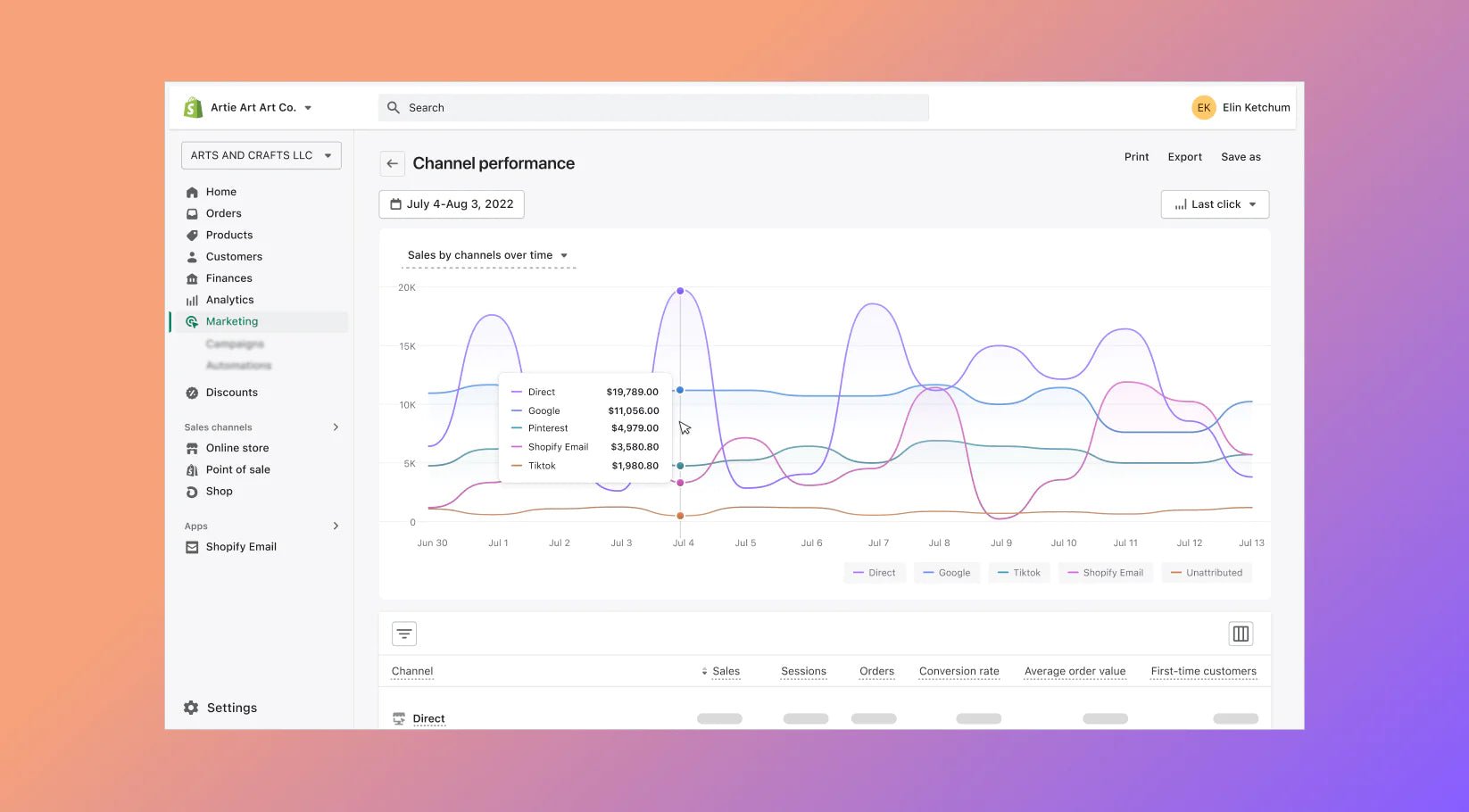
Record the Shopify marketing model too, using its marketing performance guidance. One customer might click an ad, return through email, purchase later and receive a refund. Different models can credit different touchpoints. UTMs help identify tagged arrivals; they do not reproduce impression-based matching or make every platform share an identity graph.
Use consistent campaign names with the UTM Builder, test the final destination and redirects, and keep personal information out of URLs. A Meta-attributed total may not come with an accessible list of transactions. Check purchase-event delivery at transaction level where records are available, and explain attribution differences only at the level the report supports.
| Report or record | Unit and value | Scope and attribution settings | Amount definition and cutoff | Next verification |
|---|---|---|---|---|
| Store order records | 100 paid website orders included | Rules for including orders; selected period. | $6,000 merchandise; $5,700 after declared refund cutoff. | Confirm exclusions and payment status. |
| GA4 collection export | 92 distinct references: 90 matched, 2 unresolved | Property, stream, event dates and reference normalization. | $5,520 raw purchase value; preserve currency and export cutoff. | Review 10 missing store orders and 2 unresolved references. |
| Meta attribution report | 34 attributed website purchases | Saved window, interaction definition and reporting date basis. | Record selected value column, currency and refund treatment. | Check why purchases qualify; do not invent order-level matches. |
| GA4 event-scoped paid-social view | Purchase-key-event attribution: 22.5 | Selected source scope, reporting model and lookback. | Record value field, currency and extraction cutoff. | Check fractional credit and dimension scope. |
| Shopify marketing attribution view | 22 channel-credited orders | Selected marketing report, model and dates. | Record sales definition, currency and refund cutoff. | Confirm model; keep separate from all store orders. |
Copy the rows and fill in your actual settings. These reports can overlap, so do not add their totals or force them into separate portions of the selected store orders.
Reconstruct the journey, then check how each report assigns credit.
The customer follows an ad link but does not buy yet.
An email brings another visit and adds a touchpoint to the journey.
The store records one order; separately check whether purchase events arrived.
A refund has its own date. Record the reporting cutoff.
8. Decide what needs fixing and what the reports explain
For each finding, record whether it is a confirmed fault, an explained difference in scope or model, a reporting-delay question or an unresolved issue. Add the evidence, owner, next action and review date. Have the responsible implementation owner correct a confirmed currency error or duplicate installation, then repeat the relevant checks. Do not rewrite historic events just to make totals match.
Shopify also documents a September 2026 session-measurement rollout. A session or conversion-rate series can change after a definition update without an equivalent change in paid orders. Keep annotations for those changes alongside campaign, theme, checkout and consent changes.
For an unexplained missing purchase, assign a concrete next step, such as “the implementation owner checks the consented confirmation-page route for this reference,” with a due date and event trace. A timezone difference might be resolved by preserving the original timestamps and documenting their conversion. A difference in attributed credit may need only a scope explanation, with no tracking change. Record which outcome applies rather than treating them all as tracking faults.
At the next review, run the same query and check which open records have been resolved. Keep a short log of repairs and reporting-definition changes, so a later increase is not automatically described as recovered revenue. Leave a residual unexplained rather than making a spreadsheet balance through invented assumptions.
Some findings require a technical fix; others need a documented explanation. Record the evidence first.
For example, wrong amount or currency, or duplicate sending. Assign an engineer and repeat the same test path after repair.
For example, timezone, order scope or model differences. Retain the export and explanation; do not change settings merely to align totals.
Record extraction time and source freshness. Requery on an agreed date; do not treat a suspected delay as confirmed.
Keep the amount, ID, owner and evidence needed. Leave it open rather than assigning an unsupported cause.
End with three statements: what the store confirms, what collection confirms, and what each attribution view claims. Keep the unexplained balance visible. Budget decisions should consider contribution, cash and an appropriate incrementality test—not a rule that Meta, GA4 and Shopify must display one identical answer. If the actual store has no sales, continue with the separate clicks but no sales diagnostic.