
Email marketing connects permission to contact people, audience needs, business data and measurement. This tutorial is for marketers and business teams building a system from scratch or improving an existing one. It covers the full process from signup forms and the first campaign to automation and performance reviews.
Ecommerce and B2B each have a complete industry-specific section. Ecommerce covers first purchases, abandoned carts, post-purchase support and repeat purchases. B2B covers lead nurturing, sales handoff and opportunity progression. Examples for SaaS, publishers, education, appointments, nonprofits and associations show how to adapt the methods to actual business goals.
If you are starting out, read the first six chapters to configure authentication, lists, segmentation and your first email. Then choose the general automation, ecommerce or B2B workflows. Established teams can move directly to business integrations, experiments and measurement. The final chapter provides a 30-day plan, review checklists and reusable templates.
Brevo provides the operational examples throughout, alongside connections to ecommerce platforms, CRMs and website analytics. The general methods can be used with other platforms. Check menus, fields and permissions against your own account.
The email copy, scores, timing and financial examples are teaching examples that require validation in your business. Product interfaces vary by version and account permissions, so follow the options available in your account.
Email marketing goals and an operating framework
Email marketing uses messages sent on an applicable basis for contacting the recipient to provide information and support the next step in a decision, product use or continuing relationship. It can support ecommerce purchases, business procurement, software trials, course enrollment, content subscriptions and appointments. Start by identifying what recipients need, what action you want them to take and how you will determine whether that action creates business value.
Different businesses can share authentication, list management, production and measurement methods while needing distinct workflows and success criteria. An ecommerce order, a B2B opportunity, software activation and attendance at an appointment represent different stages. Treating them all as conversions in a dashboard does not make them directly comparable.
Industries that can use email marketing
| Business | Typical uses | Business outcomes to prioritize |
|---|---|---|
| Ecommerce and retail | Buying guidance, abandoned carts, product use, replenishment and membership | Purchases, net revenue, contribution profit and repeat purchases |
| B2B products and professional services | Nurturing after downloads, webinars, evaluation and sales handoff | Qualified leads, sales acceptance, opportunities and closed deals |
| SaaS and subscriptions | Trial onboarding, feature adoption, renewals and expansion | Activation, trial-to-paid conversion and retention |
| Publishers and member communities | Welcome messages, topic updates, preference subscriptions and membership | Meaningful readership, return visits and paid memberships |
| Education and knowledge products | Course selection, sample lessons, learning reminders and progression | Enrollment, attendance, completion and subsequent conversions |
| Appointments and local services | Consultation details, appointment preparation and aftercare | Valid bookings, attendance and repeat appointments |
| Nonprofits and associations | Project updates, event invitations and supporter relationships | Participation, donations and supporter retention |
Use the table as a starting point for workflow design. Select workflows you can sustain with useful information, a valid basis for contacting people and reliable outcome identification. An industrial equipment supplier with infrequent transactions can build relationships through procurement guidance, technical answers and maintenance information, using a schedule suited to that buying cycle.
Distinguish the sending method from the message purpose
| Type | Trigger | Typical purpose | Measurement focus |
|---|---|---|---|
| Campaign | The team chooses recipients and timing | Product launches, offers, case studies and editorial content | Genuine engagement and the selected business goal |
| Automation | Behavior or a status condition triggers the message | Welcome, nurturing, activation and post-purchase support | Goal completion and subsequent value among eligible entrants |
| Transactional or service notification | A specific transaction or service request | Order, booking, login or requested resource delivery | Accurate delivery and completion of the service task |
Campaign and Automation describe how a message is sent. Marketing and transactional or service describe its purpose. An automated abandoned-cart message, renewal promotion or lead-nurturing email may still be marketing. Check sending eligibility and unsubscribe status in automated workflows too.
A transactional email must fulfill its service purpose. Unsubscribing from marketing usually does not stop necessary order or appointment notifications. Keep promotional content from being disguised as a service message. The actual content and primary purpose determine the applicable rules, regardless of the label in the platform.
Write an actionable email brief
Before designing the email, describe its audience, problem, promise and next action. An ecommerce example is a buying guide for people who have agreed to marketing, recently browsed a category and have not purchased. Help them check compatibility and delivery, link the main button to the relevant collection and measure purchases and net contribution within seven days. Decide whether to offer a discount using purchase barriers, margin and experiment results.
A B2B example is an implementation case study for suitable business contacts who downloaded a procurement checklist and are eligible for follow-up marketing. Help them assess rollout effort and link the main button to the case study. The near-term goal is a meaningful reply or demo request, followed by sales acceptance and opportunity progression. Distinguish resource downloads from demo requests when assessing buying readiness.
Give each email one main business goal, supported by limits for unsubscribes, complaints, cost or service quality. A course provider might choose a booked sample lesson. A SaaS company might choose completion of a key activation step. Define the numerator, denominator and observation window before sending.
Diagnose the complete journey
Review contact eligibility, server acceptance, genuine engagement, website or reply actions, business-stage progression and long-term value in sequence. Unclear list sources can generate complaints despite good copy. Normal clicks with low appointment attendance point toward booking arrangements and reminders. Many B2B downloads followed by sales rejection call for a review of the acquisition promise and customer fit.
A basic dashboard should cover the active audience you can contact lawfully, unique clicks after filtering abnormal activity, the predefined business goal, unsubscribes and complaints. Opens can provide context, but privacy protections affect them. An open alone does not establish genuine interest, purchase intent or sales qualification.
Tool selection and project preparation
Define the data and workflows before comparing platforms. A content newsletter needs forms, segmentation and dependable sending. Ecommerce needs products, carts, orders and refunds. B2B needs relationships between people, companies, owners and opportunities. SaaS needs product usage and subscription status. Advanced capabilities become useful when the underlying data and operating rules are reliable.
Select a platform for your business complexity
| Need | Platforms or combinations to evaluate | What to verify before choosing |
|---|---|---|
| General marketing and automation | Email platforms such as Brevo | Event synchronization, forms, workflows, A/B tests, frequency controls and permissions |
| Ecommerce lifecycle marketing | Klaviyo or Brevo integrated with the store | Actual events, product data, attribution, unsubscribe synchronization and billing scope |
| Basic marketing inside Shopify | Shopify Messaging | Current channels, automation coverage, allowances and fees |
| B2B marketing and sales coordination | A CRM suite such as HubSpot, or an email platform connected to the existing CRM | Company and opportunity relationships, stage fields, owners, tasks and two-way synchronization |
| SaaS and services | Email platform connected to product, appointment or subscription systems | Accurate, available activation, cancellation, renewal and attendance events |
These options illustrate selection approaches. Klaviyo publishes specific data and event documentation for its Shopify integration. Shopify currently provides the relevant features through Shopify Messaging, while Brevo’s Shopify connection also needs its current setup route checked. For B2B, verify company records, lifecycle stages and the sales process alongside contact-list capabilities.
The tutorial uses Brevo to demonstrate forms, lists, campaigns, automation and reporting. The methods transfer to other platforms, whose menus, data models, plans and integrations differ. Verify critical connections with a controlled sample before migrating production data.
Compare costs at your current scale and your expected scale in a year. Clarify whether billing is based on contacts, active contacts, email volume or seats. Include unsubscribed contacts, overage, sales seats and integration costs. In B2B, CRM synchronization, sales adoption and ongoing data maintenance can matter more than the cost per email.
Prepare the assets and assign responsibilities
Prepare a domain whose DNS you can manage, a monitored branded mailbox, a list with source and contact-eligibility records, privacy and unsubscribe pages, working landing pages and an integration plan. Assign responsibility for content approval, replies, fields, lead follow-up and anomaly monitoring. A small team can share roles, provided replies and sales tasks have an owner.
Use consistent names, such as 2026w48_en_productguide_v1 for a campaign, en_flow_welcome for a welcome workflow and en_flow_evaluation for B2B nurturing. Maintain language, market and business stage separately instead of inferring them all from a country field.
Launch in stages. Establish the sender and basis for contacting recipients, connect the form and welcome sequence, test a regular campaign, then add the most valuable industry workflow. Ecommerce might choose cart recovery, B2B might choose resource nurturing and demo handoff, and SaaS might choose initial activation. Verify the outcome at each stage before moving on.
Sender domains and email delivery fundamentals
Sender identity, authentication and recipient feedback all affect delivery. A sent status does not prove inbox placement. Delivered usually means the receiving server accepted the message, which may still reach spam. Complete authentication and consistently send useful content to people who want it.
Choose a recognizable sender who can receive replies
Use a recognizable sender name, such as the brand or a named adviser and company. A dedicated marketing subdomain can use an address such as [email protected], with Reply-To directed to a monitored support or editorial mailbox. Prefer a sending subdomain that another service is not already using. Replace example.com and all example addresses with your own during setup.
Subdomains can organize different sending purposes, but do not guarantee completely separate reputations. Gmail combines relevant sending under the same primary domain when identifying bulk senders, so splitting subdomains does not avoid its requirements. Once Gmail identifies a sender as bulk, that classification remains even if volume later falls.
Understand SPF, DKIM and DMARC
| Item | Main function | What to check |
|---|---|---|
| SPF | Declares servers authorized to send for the envelope sender domain | Confirm the sending service is authorized and avoid conflicting records |
| DKIM | Adds a digital signature that receiving servers can verify | After domain validation, check that actual messages pass signature verification |
| DMARC | Aligns the visible From domain with a passing SPF or DKIM identity and publishes a handling policy | Verify alignment and compatibility with existing sending systems |
| Brevo code | Proves domain control during Brevo authentication | Use the names and values from your account, rather than tutorial examples |
DMARC needs alignment through at least one authenticated mechanism. Applicable bulk-sender requirements from Gmail, Yahoo and Outlook.com also require both SPF and DKIM authentication. A DNS record is one configuration step. Verify the authentication results of actual messages.
Set up your domain in Brevo
Open Settings, then Senders Domains IPs and Domains. Brevo is gradually introducing a new domain setup flow. Some accounts show the integrated Set up your domain flow, while others still show Authenticate domain. Use the entry available in your account and the DNS records it generates.
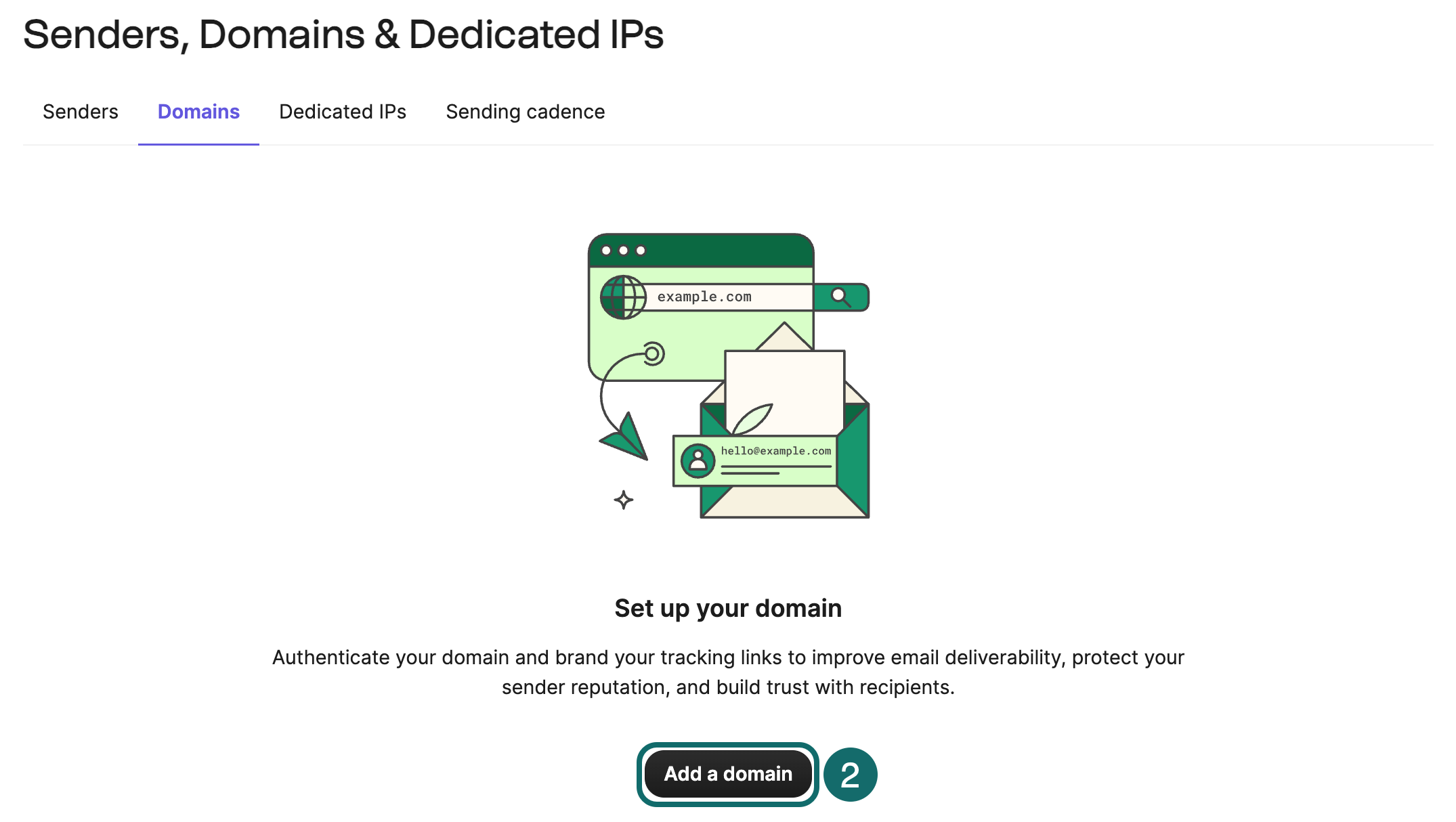
Read the authorization scope of automatic authentication carefully. If the domain already serves Google Workspace, Microsoft 365, support software or another email platform, record existing DNS first, particularly the DMARC policy. Brevo’s automatic flow may ask to replace an existing DMARC record. Use manual setup where the existing policy must remain, then verify compatibility across senders.
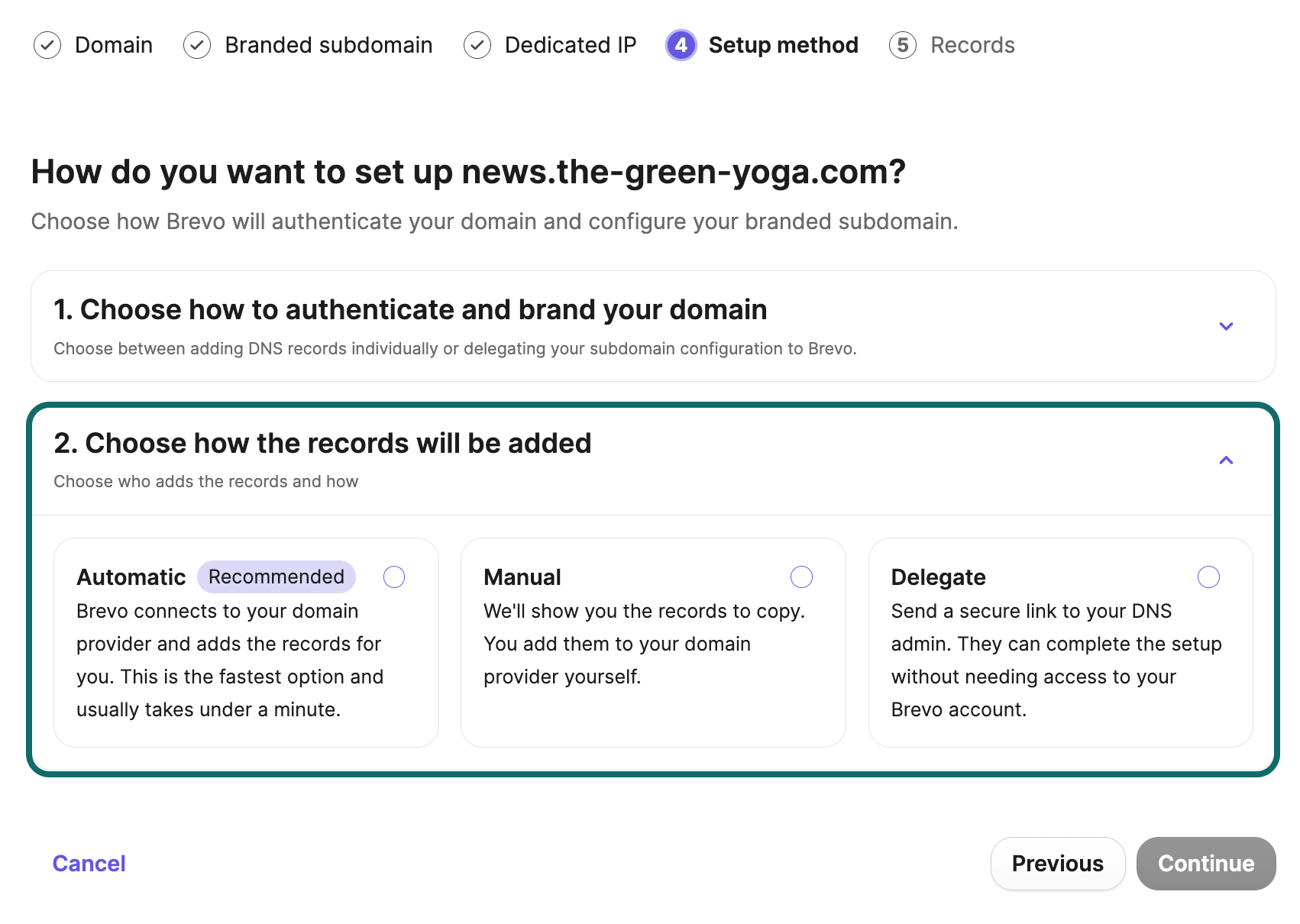
For manual setup, copy each Hostname, Type and Value from the account. Brevo may show one TXT DKIM record or two CNAME DKIM records. Follow your account’s records. Save them and return to verify the domain, allowing for DNS propagation. Send to Gmail or Outlook test inboxes you control and inspect SPF, DKIM and DMARC in the original message headers.
Current bulk-sender requirements at major mailbox providers
| Recipient provider | Scope | Key requirements |
|---|---|---|
| Personal Gmail accounts | Around 5,000 or more messages to personal Gmail accounts from the same primary domain in 24 hours triggers bulk-sender classification | Configure SPF, DKIM and DMARC, domain alignment and required one-click unsubscribe for marketing messages |
| Yahoo | Determines bulk senders using significant volume and other factors, without a universal published numerical threshold | Meet applicable authentication, easy unsubscribe and complaint-control requirements |
| Outlook.com consumer accounts | Stronger authentication applies to high-volume domains sending more than 5,000 messages daily | Under the official update, noncompliant messages have been rejected since May 5, 2025 |
Gmail recommends keeping the user-reported spam rate in Postmaster Tools below 0.1% and avoiding 0.3% or higher. Do not treat 0.29% as an acceptable operating target. An upward trend calls for reviewing sources, content and frequency. Your platform’s complaint rate and Gmail’s own metric can use different denominators.
The unsubscribe link in the body and the one-click unsubscribe header are separate mechanisms. The body offers a visible exit route, while the provider supplies protocol-based headers for the mailbox client. Verify both the working body link and support for the required one-click headers. For Gmail, inspect the raw test message for an HTTPS URL in List-Unsubscribe and the header List-Unsubscribe-Post: List-Unsubscribe=One-Click. A mailto link or a redirect to a preferences page cannot replace the RFC 8058 POST mechanism. Also confirm with your platform or technical owner that the sending IP has valid forward and reverse DNS (PTR), uses TLS and meets the applicable message-format requirements. Complete authentication, unsubscribe handling and list-quality checks together.
Signup forms and contact management
Possessing an email address does not establish marketing permission. A customer, support requester or resource downloader may have agreed only to a specific purpose. Record where the address came from, the wording shown, what was confirmed, when it was confirmed and any later withdrawal. This supports both compliance and acquisition-quality analysis.
Explain the value of subscribing
A newsletter can promise a specific topic and cadence, such as a weekly industry analysis and practical guide. A retailer can offer buying guidance or launch updates. B2B teams can offer procurement checklists, research or webinars. Clearly distinguish delivery of a requested resource from subscription to later marketing. Explain the value beyond simply asking people to join a newsletter.
A basic content form may need only an email address, with language or interests added where useful. A B2B inquiry form may need company, role and requirements. Give each required field a purpose. Requiring birthday, phone, job title and full address together adds friction. Collect further details through welcome emails or a preference center when you have a use for them. State the sender, content categories and exit method, and link to the relevant privacy notice.
Create the form and choose confirmation settings
In Brevo, open Marketing > Forms, choose Sign-up and Create sign-up form, then select a full-page or embedded form. Prepare the contact attributes and map email, language and interest inputs to them. Edit the explanation and submit button, then select the destination list for new subscribers.
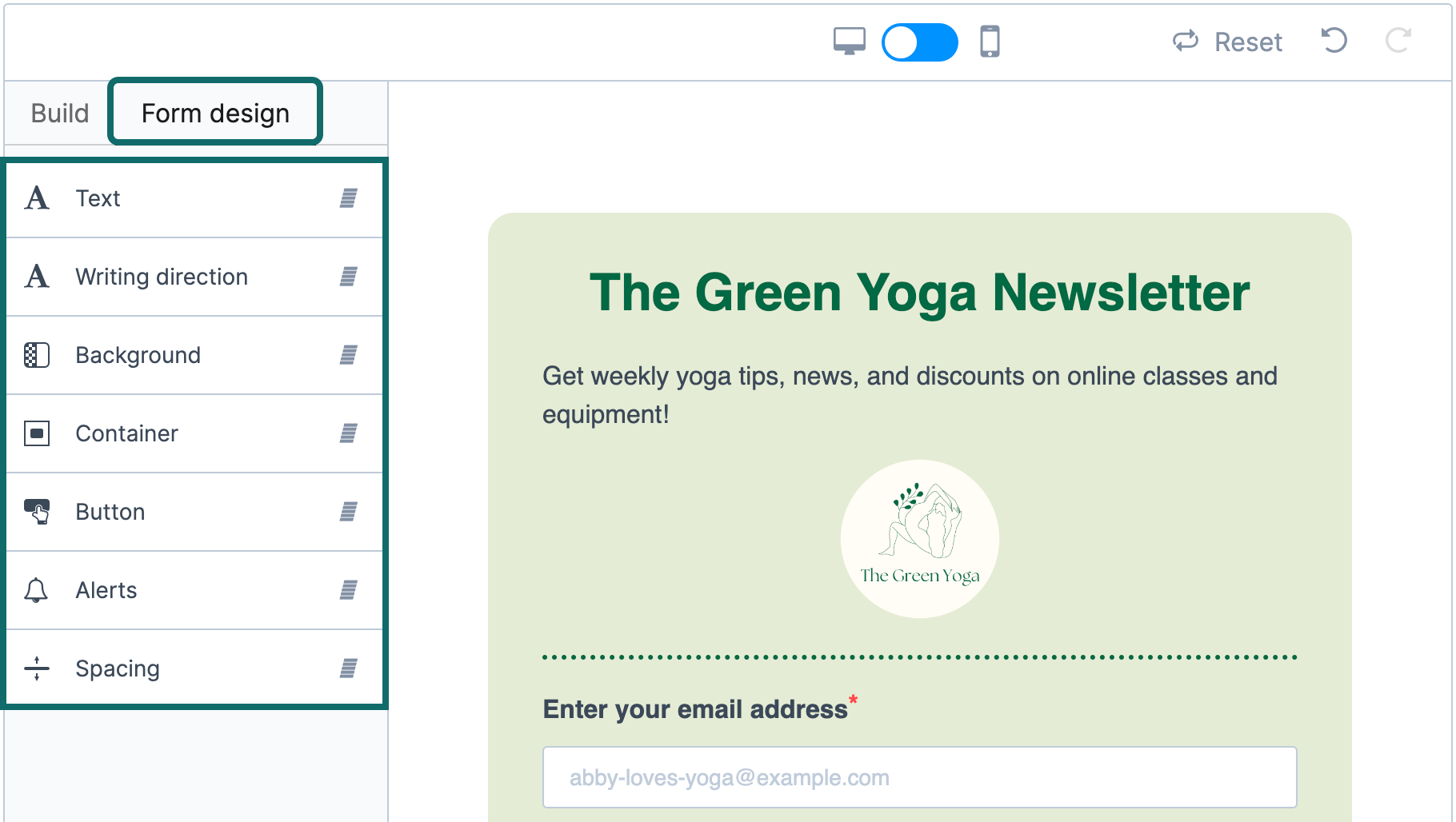
With double opt-in, a person submits the form, receives a confirmation email and subscribes after clicking its link. This helps verify ownership, reduce typing errors and bot addresses, and preserve clearer confirmation evidence. Its use depends on local rules and business risk. It is not a universal legal requirement in every country and scenario.
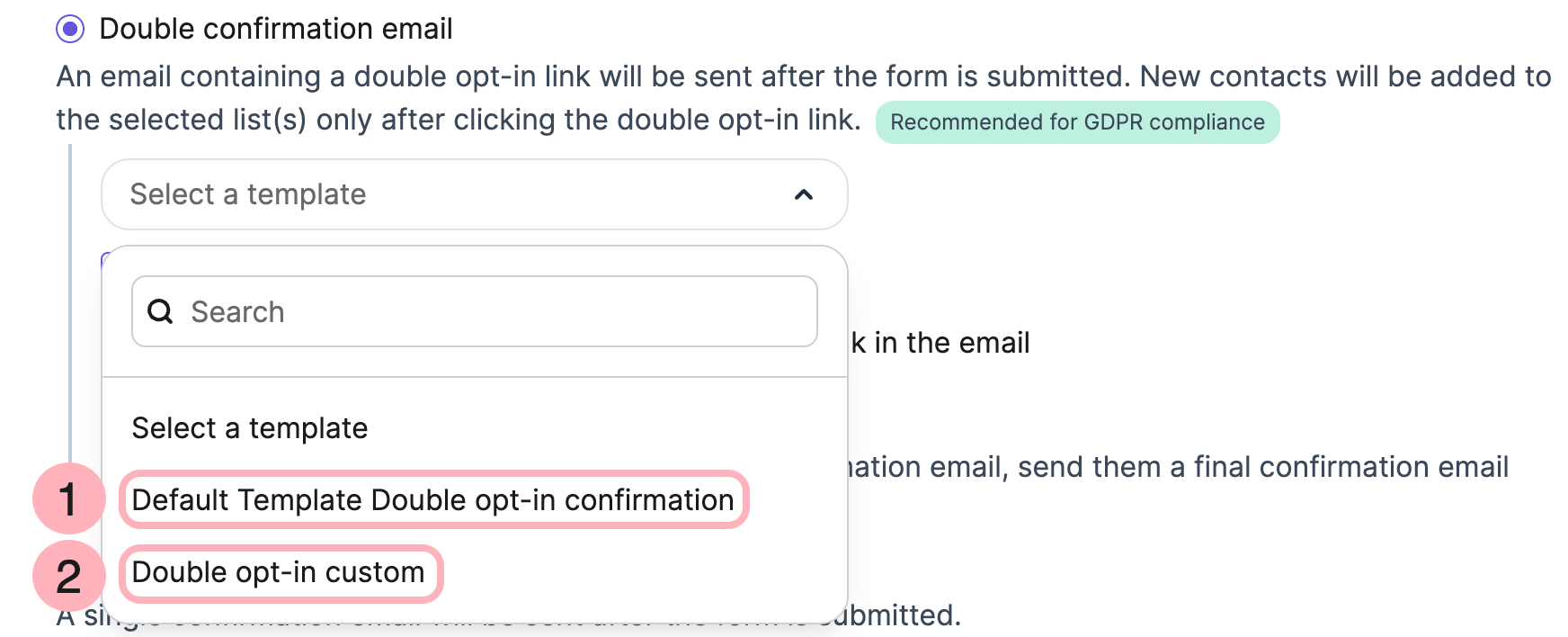
Make the confirmation email, button and success page clear and focused on confirming the subscription. Keep unconfirmed users out of the regular promotional welcome sequence. With a WordPress plugin or external form, test whether it actually performs double opt-in, rather than simply setting a custom field to true.
Test normal submissions, duplicates, invalid addresses, unchecked permissions, confirmation links and unsubscribe paths. Inspect the list, source, language and timestamps in the contact record. Verify that welcome automation starts once. On advertising landing pages, ensure the form does not block purchasing or become impossible to dismiss on mobile.
Build a minimum useful data dictionary
The fields below illustrate a data design. Create custom attributes or maintain mappings in the business system as needed. Always preserve the platform’s native subscription and blocklist status.
| Logical field | Example | Purpose |
|---|---|---|
| [email protected] | Identify the address and remove spaces or obvious errors | |
| language | en or zh-CN | Choose the language, preferably from the user’s selection |
| signup_source | resource_form | Compare audience quality by acquisition source |
| consent_record | Purpose, basis, timestamp and notice version | Trace contact eligibility and changes with more detail than a Boolean |
| interests | Product category or problem topic | Provide relevant content and preference management |
| last_engagement | Latest reliable click or reply timestamp | Support segmentation while retaining behavior type and source |
| suppression_status | unsubscribed and similar states | Preserve unsubscribes, complaints, hard bounces and other suppressions |
Add business-specific data alongside the shared fields. These are logical examples, not API fields you can assume exist in the platform. Native status and valid evidence govern marketing permission, preferences and blocklisting.
| Business data group | Suggested information | Uses |
|---|---|---|
| Ecommerce | Order ID, timestamp, net amount, products and refund status | First and repeat purchases, post-purchase workflows and cart exits |
| B2B | Company ID, role, lifecycle stage, owner and opportunity ID | Company relationships, nurturing and sales handoff |
| SaaS | Account ID, trial status, activation, plan and expiration | Product onboarding and renewals |
| Education and events | Course or event ID, registration, attendance and completion | Preparation, no-show follow-up and progression |
| Appointment services | Appointment ID, time, service status and cancellations | Preparation reminders, attendance and follow-up |
A company can have multiple contacts, a software account multiple users, and an order multiple service emails. Define the relationships between people, companies or accounts and transactions before choosing deduplication keys. Avoid overwriting a person’s records for distinct purposes.
Import existing contacts safely
Organize the list by source and permission status before importing. Migrate unsubscribes, complaints and blocklist records alongside active subscribers. Otherwise a later import of historical customers may unintentionally restore sending. Balance retention of necessary suppression records with data minimization, and never bypass unsubscribes by repeatedly deleting and recreating contacts.
In CRM > Contacts, choose Import contacts, upload the cleaned file and verify each column’s email and attribute mapping. Do not give new contacts Brevo CONTACT_ID values from an old system without checking their relevance. Rehearse with a small authorized sample, then import the production file. Review the import report and sample profiles for misplaced fields.
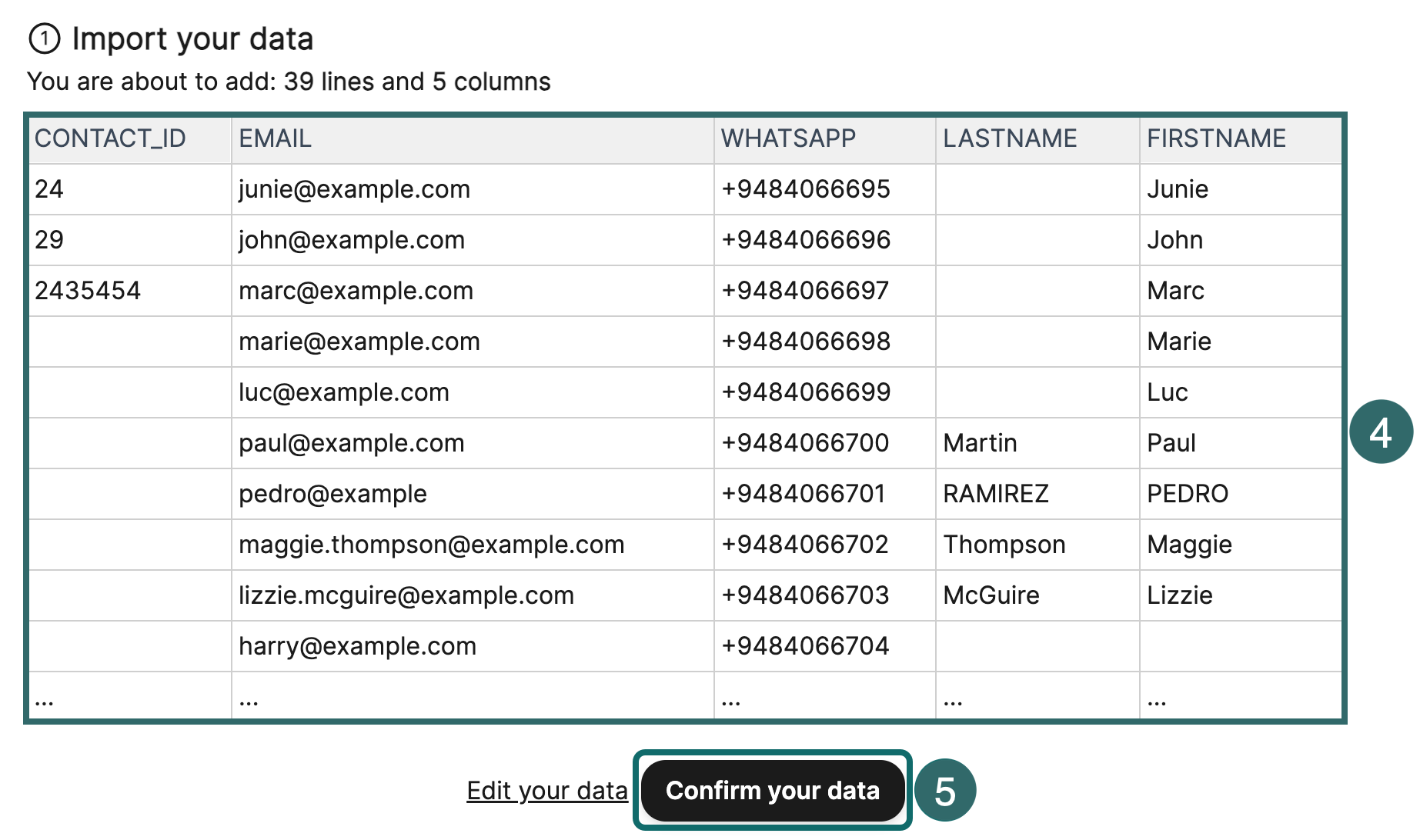
Resubscription needs fresh valid authorization. Another purchase or inclusion in a new imported list does not automatically restore marketing eligibility. Keep these events separate from the existing unsubscribe state so a migration does not restart marketing to suppressed recipients.
Segmentation and sending frequency
A List can organize contacts by source or ongoing purpose, such as English-language industry subscribers. A Segment filters by conditions, such as eligible contacts interested in a topic who have not completed the target action. Its membership should update with behavior. A static list exported from one selection does not keep those conditions synchronized afterward.
Begin with segments that change the message
| Segment | Suggested conditions | Suitable content |
|---|---|---|
| New subscribers | Eligible, confirmation complete where needed, not yet in the welcome sequence | Deliver the promise and explain future content |
| Prospects evaluating options | Relevant reliable activity, target action not completed | Buying guides, case studies and answers |
| Leads already handled by sales | Accepted by sales or linked to an active opportunity | Coordinated evaluation resources, with conflicting nurture paused |
| New customers or users | Recent purchase, registration or enrollment | Usage, activation or participation preparation |
| Ongoing customers | Valid repeat purchases, continued usage or renewal eligibility | Support, progression, renewal and appropriate expansion |
| Low-engagement audience | No reliable activity over a complete observation cycle | Lower frequency, preferences and limited reengagement |
| Contacts ineligible for marketing | Unsubscribed, complained, hard-bounced or without an applicable basis | Exclude from marketing campaigns and workflows |
Define recent, high-value and inactive for the business. A daily newsletter, a durable product bought annually and a six-month enterprise purchase cannot share a universal 30-day inactivity rule. In B2B, distinguish one person’s reading behavior from company procurement progress. A contact temporarily not clicking does not establish a lost opportunity.
Combine AND and OR correctly
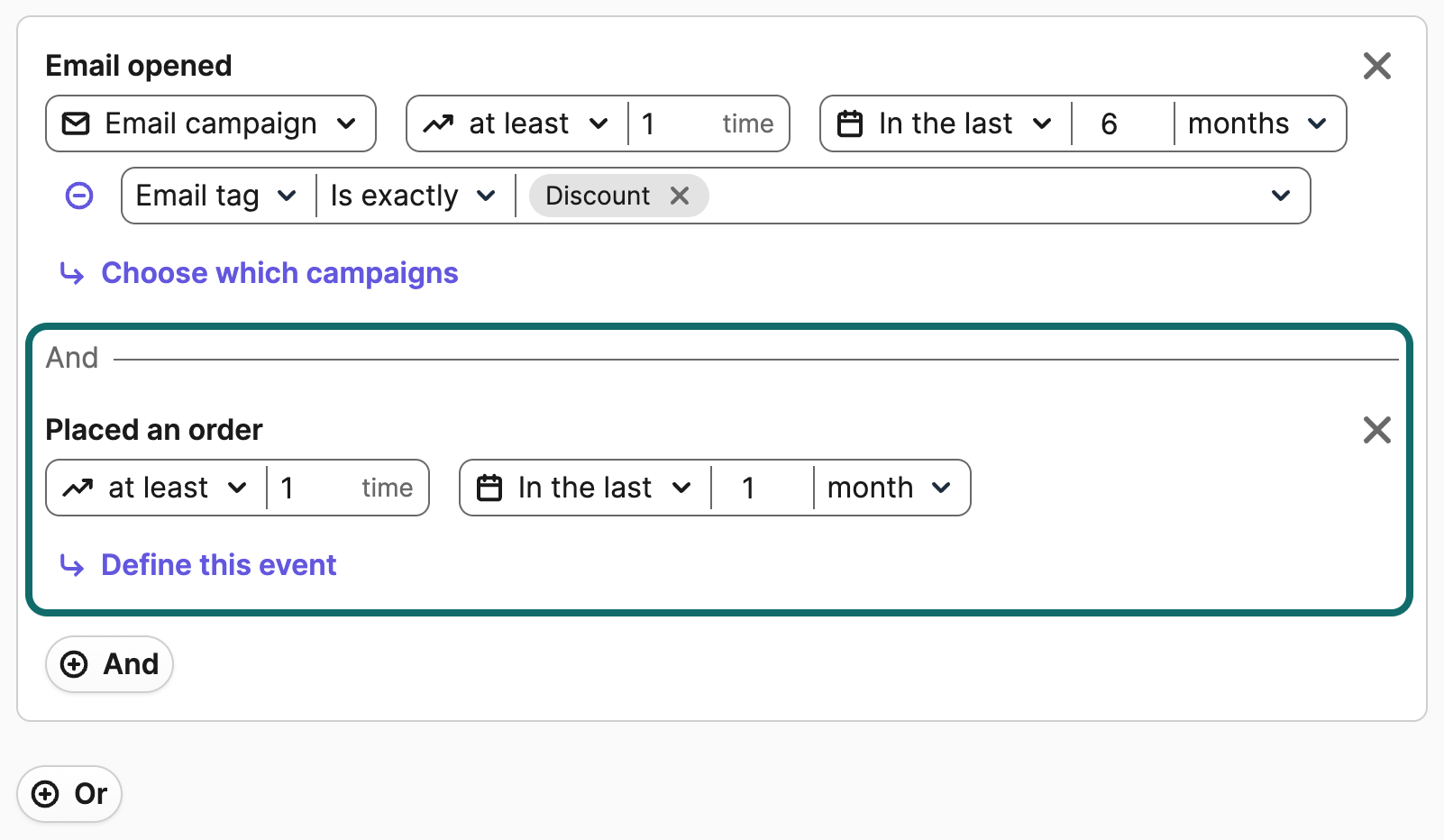
To reach English speakers who recently clicked a tutorial or purchased a course, use language is English AND (recent tutorial click OR past course purchase). Connecting the language condition to just one branch can admit other languages through the second branch. Inspect several included and excluded contacts whenever you combine conditions.
Create a segment in CRM > Contacts > Segments. Add the conditions, check AND and OR connections, then save its name. Brevo currently uses Segments for dynamic filtering. Avoid assuming an old tutorial’s Dynamic lists still update automatically.
Coordinate campaigns and automation
A person may enter a welcome sequence, receive a campaign and trigger a cart, trial or sales follow-up on the same day. Reasonable individual messages can become excessive together. Prioritize necessary transactional notices, current-behavior workflows and regular campaigns, then specify which marketing messages may wait or be skipped.
You could test an internal starting rule of at most one regular marketing email per person in 24 hours. It is a business hypothesis and should allow necessary order notifications through. Document exceptions for high-intent flows or promotions, and monitor complaints, unsubscribes and business quality. In B2B, check contact volume across one company and active sales follow-up. Stop conflicting reminders after a booking, demo request or human reply. For less active users, test lower frequency before repeatedly changing subjects and resending.
Brevo’s global Frequency cap is currently an Enterprise feature. Check its application in each automation sending action. Without that access, implement rules through available segments, workflow conditions or external send records. If data cannot support reliable cross-workflow frequency limits, run fewer concurrent campaigns and manually review overlap.
Create your first marketing email
This chapter uses an English product buying guide. Ecommerce can measure purchases, B2B can measure useful replies or demo bookings, and publishers can measure meaningful reading. The interface walkthrough starts with an ecommerce audience, followed by B2B copy. Subjects, email copy and experiment figures are teaching examples. Replace products, policies and offers with verified information before use.
Create the campaign and choose the sender
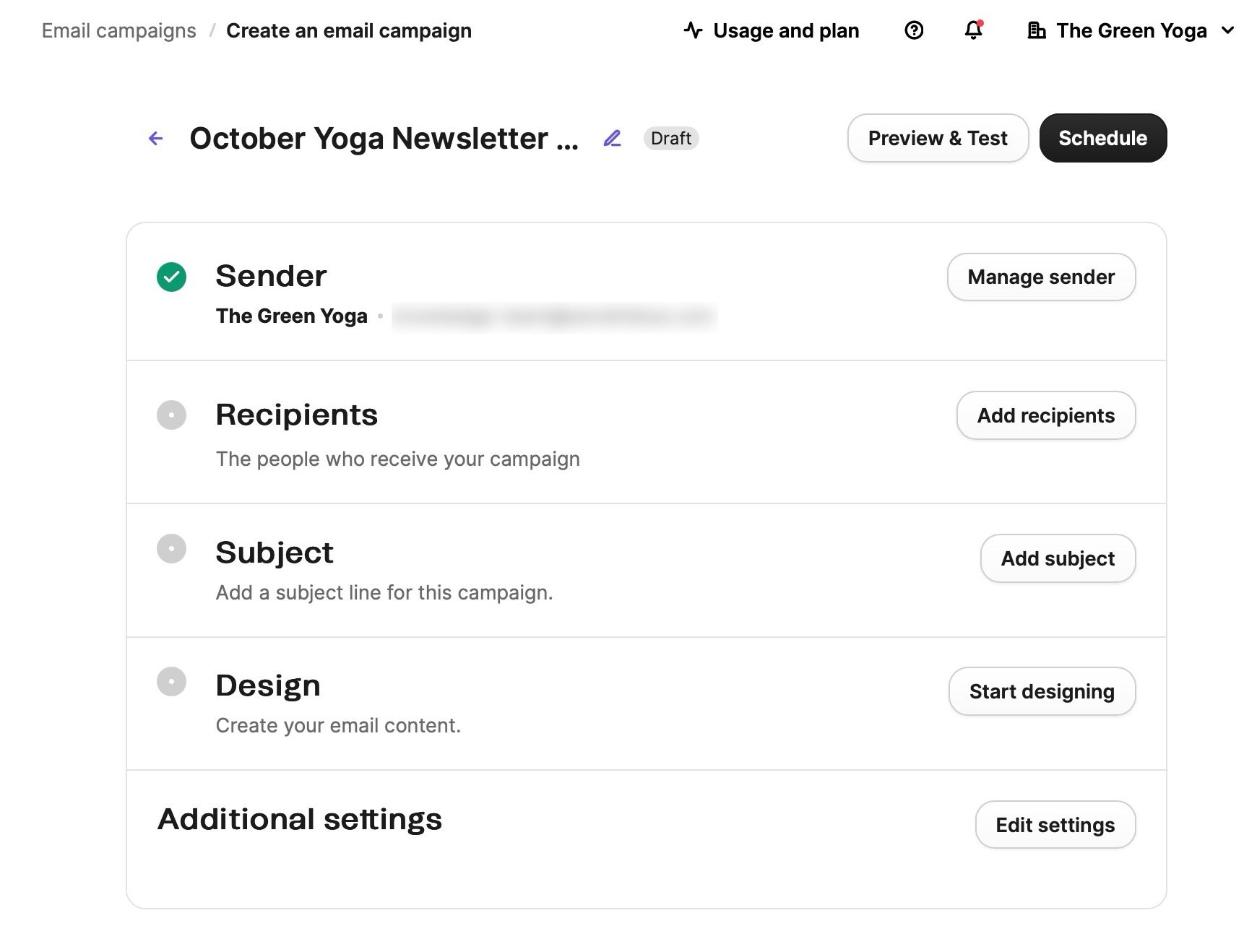
Open Marketing > Campaigns and select Create campaign > Email, then create a Regular campaign. Use an internal name identifying date, language, audience and topic. This differs from the subject recipients see. In Sender, choose the verified branded address, a clear sender name and a working Reply-To.
Select recipients and apply exclusions
In Recipients, select the relevant list or segment and check exclusions under Advanced options. For this example, choose subscribed English-language contacts and exclude unsubscribed or otherwise ineligible people, customers who already bought the promoted product and do not need another offer, and contacts recently reached by other marketing. Built-in blocklisting still needs your business-specific exclusions alongside it.
Investigate a recipient count that differs substantially from expectations. Common causes include overlapping lists and segments, misplaced logic brackets, empty language fields, unsynchronized activity or overly broad exclusions. Keep permission and unsubscribe restrictions in place while resolving the count.
Make the subject and preview text explain the value together
The subject states the benefit and preview text adds context. For example, pair “Find a setup that fits your workflow” with “Compare the essentials before you choose your next upgrade.” One states the outcome and the other the scope, without repeating the same brand name and promotional line.
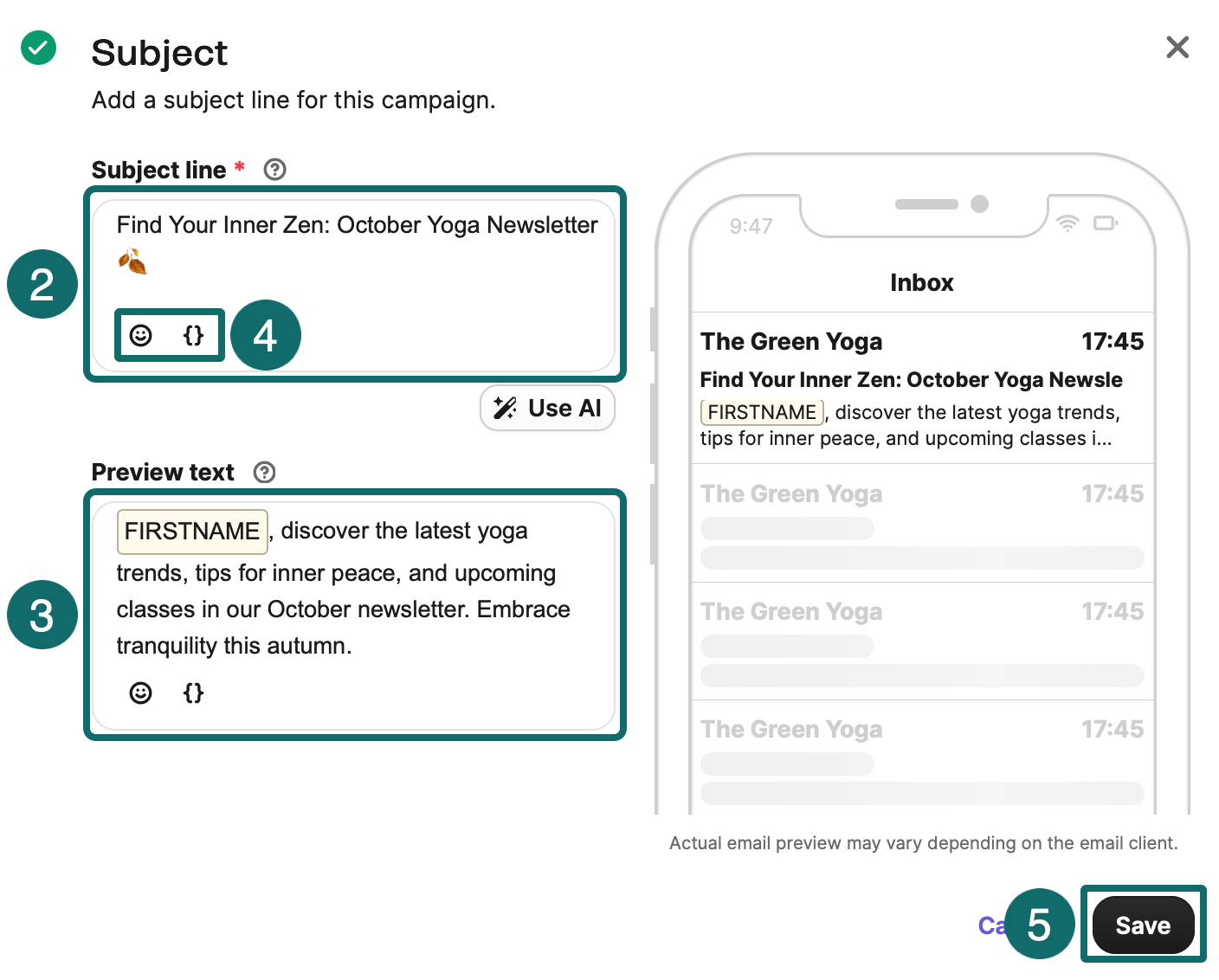
Align the subject with the message and landing page. Claims about deadlines, limited stock, exclusivity or a final notice need genuine conditions behind them. Subject length has no universal optimum. Check whether the important information survives truncation in a mobile inbox.
Organize the message around one main action
State the reader’s problem, provide guidance or evidence and offer the next-step button. Supporting links can remain, provided the main action is clear. If the goal is to read a buying guide, avoid giving all-product browsing, four social profiles and another download equally prominent buttons.
Start with one heading, an explanation, an informative image or a few product cards, a primary button and the required footer. Keep body text selectable. Add alternative text to images and make prices, offer conditions and important details understandable even when images fail to load.
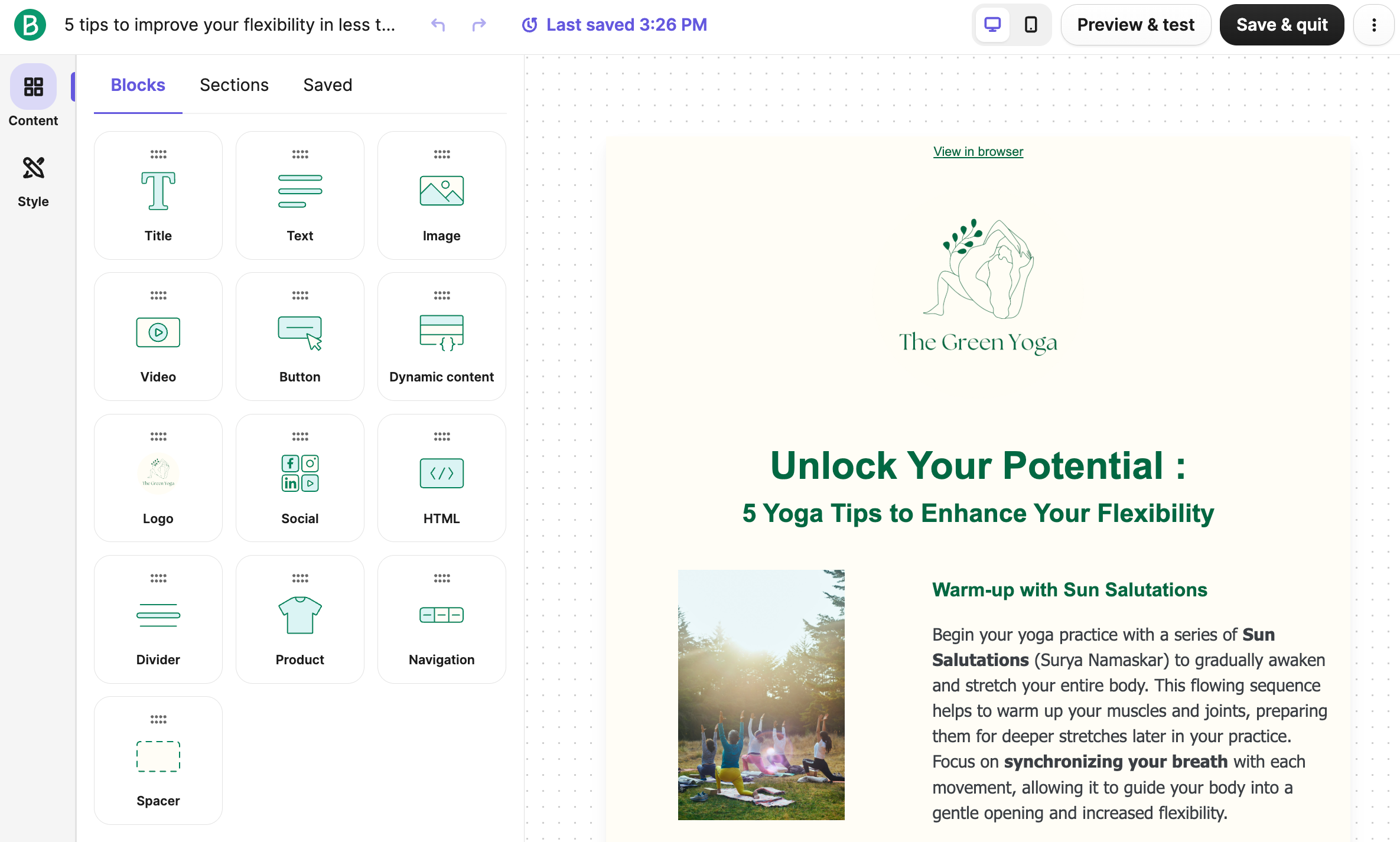
Adapt the English example below. Replace bracketed fields with the real brand and policy details. The example does not assume an unverified discount.
Subject: A clearer way to choose your next upgrade
Preview text: Start with your workflow, then compare the details that matter.
Hi there,
Choosing a new tool is easier when you know what you need it to do. We put together a short guide to help you compare everyday use, portability and the features that matter to your work.
Start with the section that matches your routine. Each recommendation explains who it suits and what to check before you buy.
Button: Explore the buying guide
Have a question about compatibility or delivery? Reply to this email and our team can help.
[Brand name]
[Business address] · Manage preferences · Unsubscribe
This copy helps readers make a choice. An ecommerce campaign can add verified products and offers. A publisher can adapt it to topic discovery, reader fit and article links. For B2B, explain evaluation criteria, implementation conditions and the next conversation, adapting the underlying promise to the buying context.
The next email nurtures B2B contacts who requested a resource and are eligible for subsequent marketing. It provides an evaluation tool without inventing customer results or requiring every reader to book a sales meeting.
Subject: A practical checklist for evaluating your next solution
Preview text: Compare requirements, rollout effort and ongoing support.
Hi there,
As you review your options, it helps to agree on the problem your team needs to solve before comparing features.
Our evaluation checklist covers requirements, integration, implementation responsibilities and ongoing support. Use it to collect input from the people involved in the decision.
Button: View the evaluation checklist
If you already have a project in mind, reply with your main requirement and we can suggest a useful next step.
[Company name]
[Business address] · Manage preferences · Unsubscribe
Provide fallbacks for missing personalization data
Check that contact attributes match template variables exactly. In Brevo, insert the attribute with Add variable and set Value if empty. Use a personal greeting where a name exists and a natural general greeting where it does not. Preview missing names, long names, different character sets and actual recipient records.
Personalization goes beyond names. A new entry-level product owner may need usage instructions. A business prospect may need an implementation checklist. Education and appointment messages should reflect course stage or booking status. Use explainable data to select relevant content and avoid intrusive claims based on weak inferences.
Check mobile layouts and real inboxes
Switch between desktop and mobile in the editor, then send tests to team-controlled accounts in different email clients. Check width, button size, image loading, alternative text, dark mode, unsubscribe and all destination links. Actual clients can render differently, especially in dark mode and with unsupported styles.
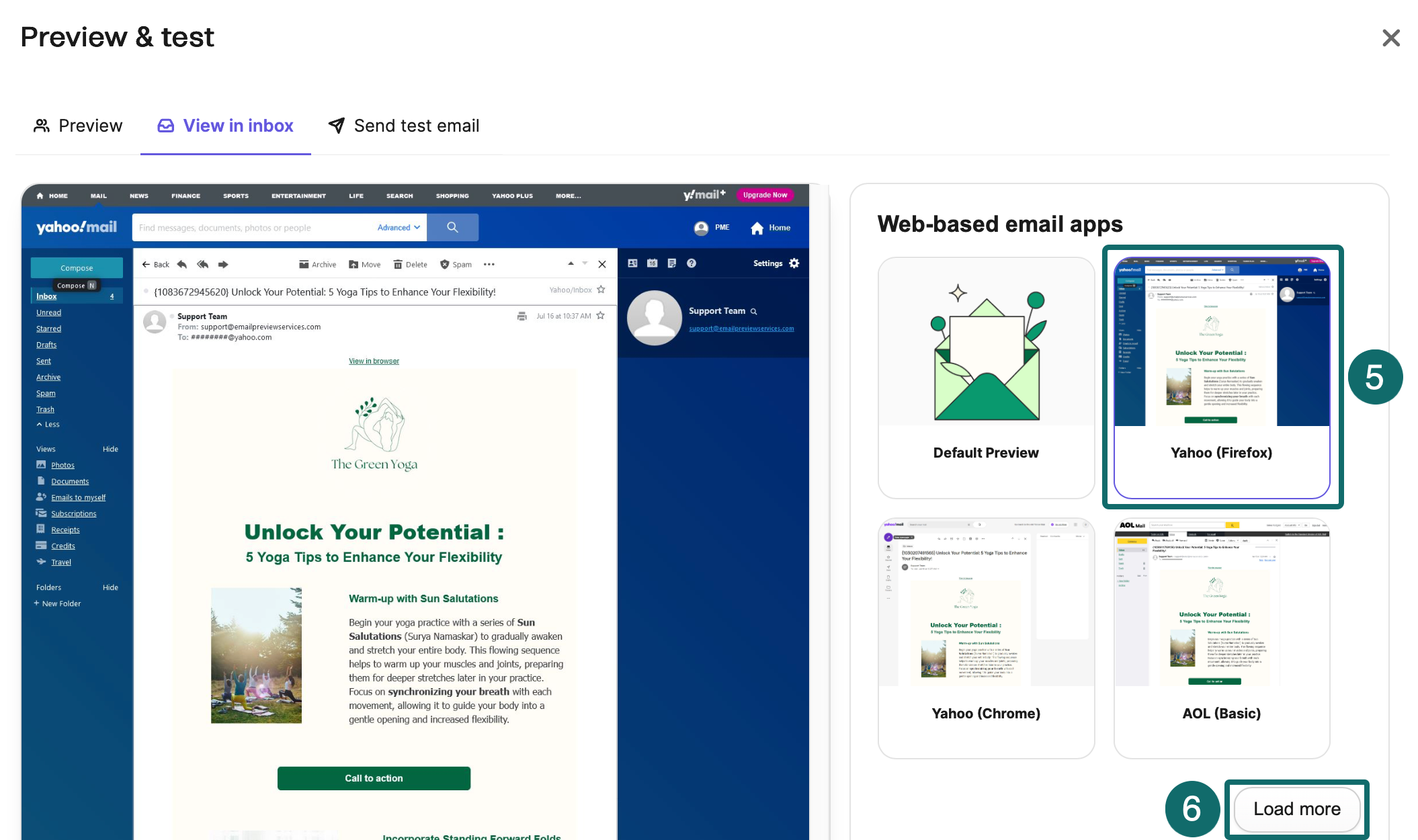
As a starting point, use a content width of about 600–640 pixels, readable body text and generous button touch targets. Adjust after device testing. These are design suggestions rather than universal client requirements. For multilingual messages, check font substitution, punctuation wrapping and longer button labels.
Finish the checks before scheduling
Verify the name, time zone, count, exclusions, subject, preview, main link, UTM parameters, offer terms and reply address. Schedule a specific time. For international sends, record the difference between account time and the audience’s local time. Test timing with your own recipients instead of adopting another industry’s average.
After launch, first check sends, bounces and unusual complaints, then clicks and website activity. Verify products, links and offers before scheduling, because a sent email cannot be fully recalled like a webpage can be edited. For a serious error, stop outstanding sends, determine who was affected and decide whether a correction is warranted.
General automation and ecommerce lifecycle marketing
A workflow needs a defined entry event, eligibility conditions, delays or branches, content, and exit and reentry rules. Beyond a delay between emails, specify what happens when someone purchases, books, activates or is accepted by sales. Handle unsubscribes, duplicate events and parallel workflows. This chapter covers common nodes, welcome flows and ecommerce. B2B follows in its own chapter.
Understand what each node actually does
Brevo’s new automation editor provides triggers, actions and rules. Inspect each preset’s events, parameters and templates to adapt it to your business. For Send an email, check recipient eligibility, sender, tracking and the template’s current state.
Recheck subscription and material business conditions before every send. Order and cart status can change during a delay. Test the normal route, exit after goal completion, skipping after unsubscribe, duplicate events and missing data. Purchase exits can become sales-handoff exits in B2B or activation exits in SaaS when linked to the corresponding business event.
Check which event the template reads. Brevo’s sending node can use the event that started the workflow or the latest event of a selected kind. If someone places two orders, these options may display different orders. Tie order-specific guidance to the right order and verify it using two controlled test purchases.
Welcome workflows
Entry can follow completion of subscription confirmation and addition to the designated list. Deliver the promised resource or valid offer promptly and explain future content and frequency. After a day or two, introduce helpful guidance, buying criteria or brand differences. A third message a few days later can answer important questions and offer the next step. Treat these intervals as hypotheses to test.
Publishers can deliver a starter resource before guiding readers by topic. B2B can provide the requested material and identify needs. SaaS can support a key setup step. Ecommerce purchasers should leave first-purchase promotions and enter product-use guidance. Stop first-purchase reminders once the person has ordered.
By default, let people enter a standard welcome sequence once. Create another route only when they provide fresh valid permission and there is a clear need. Test the entire form-to-confirmation-to-welcome journey with controlled inboxes. Record timings and look for duplicate welcomes or sends before confirmation.
Build a welcome workflow in Brevo
Create a list for new subscribers who have completed any required confirmation, for example Welcome EN. Then follow these steps.
1. Open Automations > Workflows, click Create an automation, choose Welcome message, confirm the preset’s language and create the workflow.
2. Select Welcome EN and configure Time delay. This trigger recognizes joining the list, so add the subscriber only after confirmation. Remove an unnecessary delay before activation if the resource should arrive immediately.
3. Edit the Send an email template, subject and sender. Check Preview & test, save and return to the workflow. Add another delay and sending node for a second email where needed.
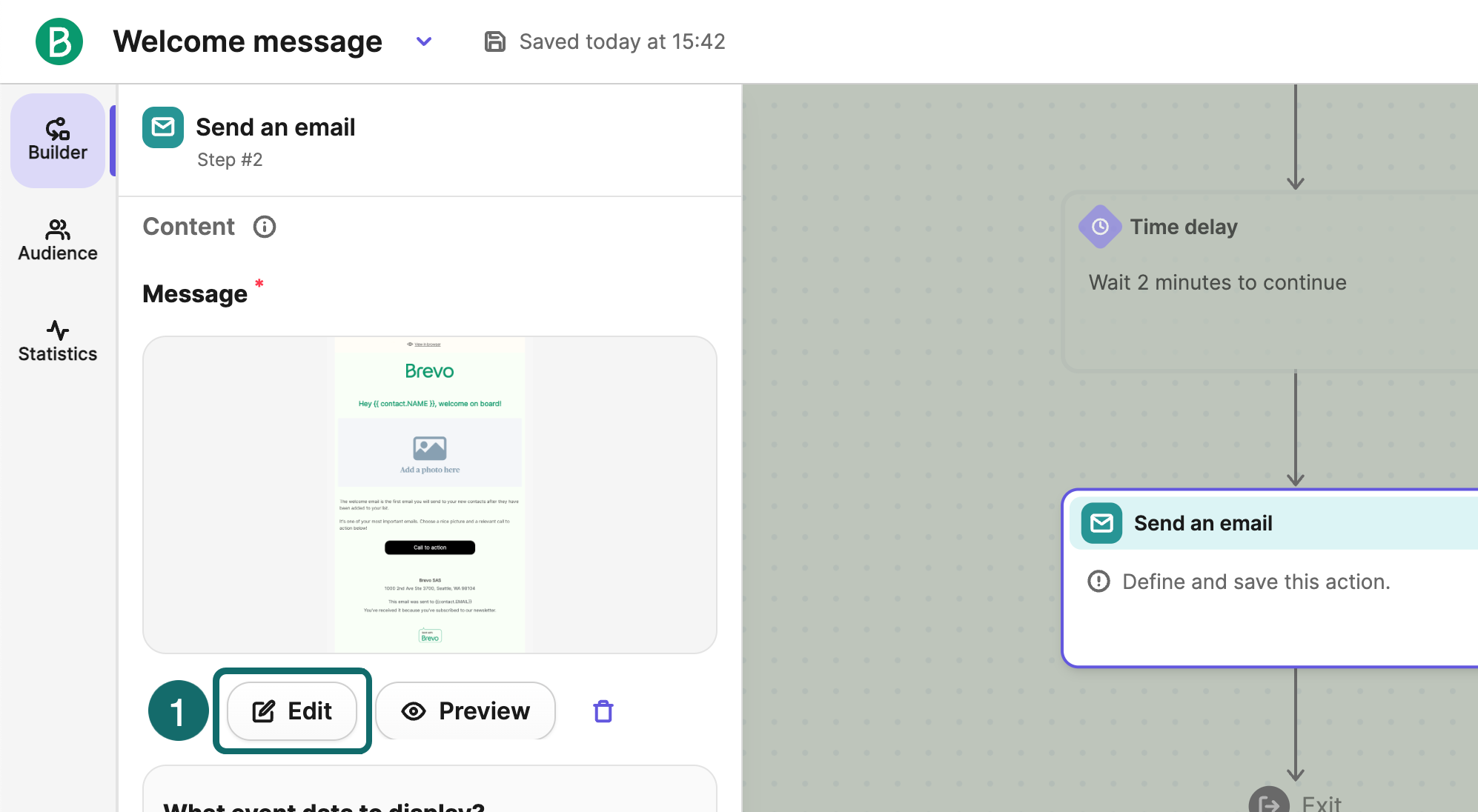
4. Check reentry under Settings. For a standard welcome series, leave Allow contact re-entry after exit off. Configure exits for goal completion and status changes, then activate. This preset admits new list members after activation and does not backfill the entire existing list.
After activation, use a controlled address to verify confirmation, list entry, workflow entry and receipt in sequence. Keep tests separate from production recipients. Check duplicate submissions, exits and missing data before treating the workflow as ready for ongoing operation.
Abandoned-cart workflows
Cart recovery needs an identifiable contact, appropriate marketing permission or another applicable basis, and reliable cart or checkout events. Without an available address, an anonymous visitor generally cannot receive an email. Cart creation, updates, checkout initiation and order completion are different events. Verify what your integration supplies.
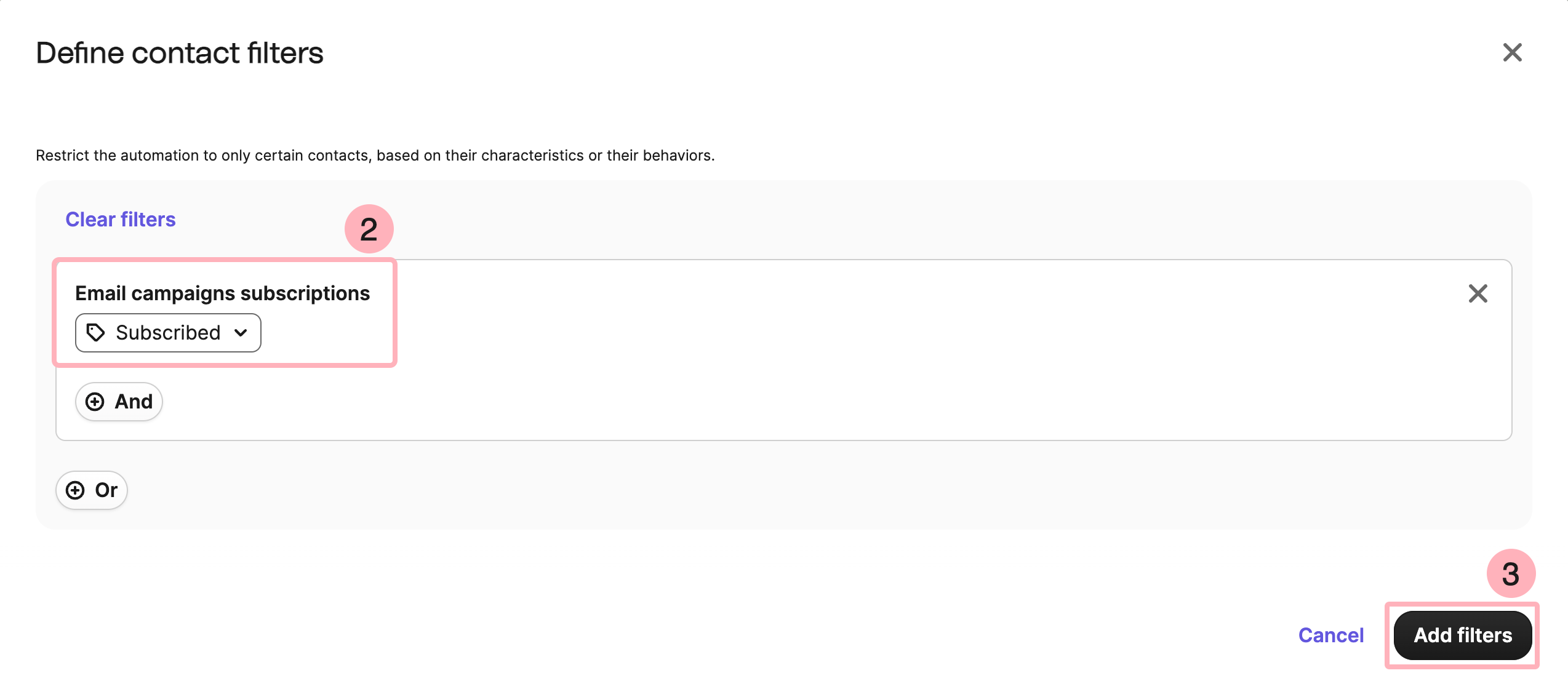
A testable sequence waits about an hour, verifies no purchase and sends a cart reminder. After roughly a day, explain shipping, delivery, compatibility or returns. If still eligible, send a last reminder one or two days later. Longer-consideration or expensive products may need more time. Adapt the schedule to your purchase cycle.
Before each send, check for a relevant completed purchase and verify recovery links, product images, price, stock and currency. Skip unavailable products. Assess margins before using discounts later in the sequence and state deadlines, usage limits and excluded items. A discount need not follow every abandoned cart.
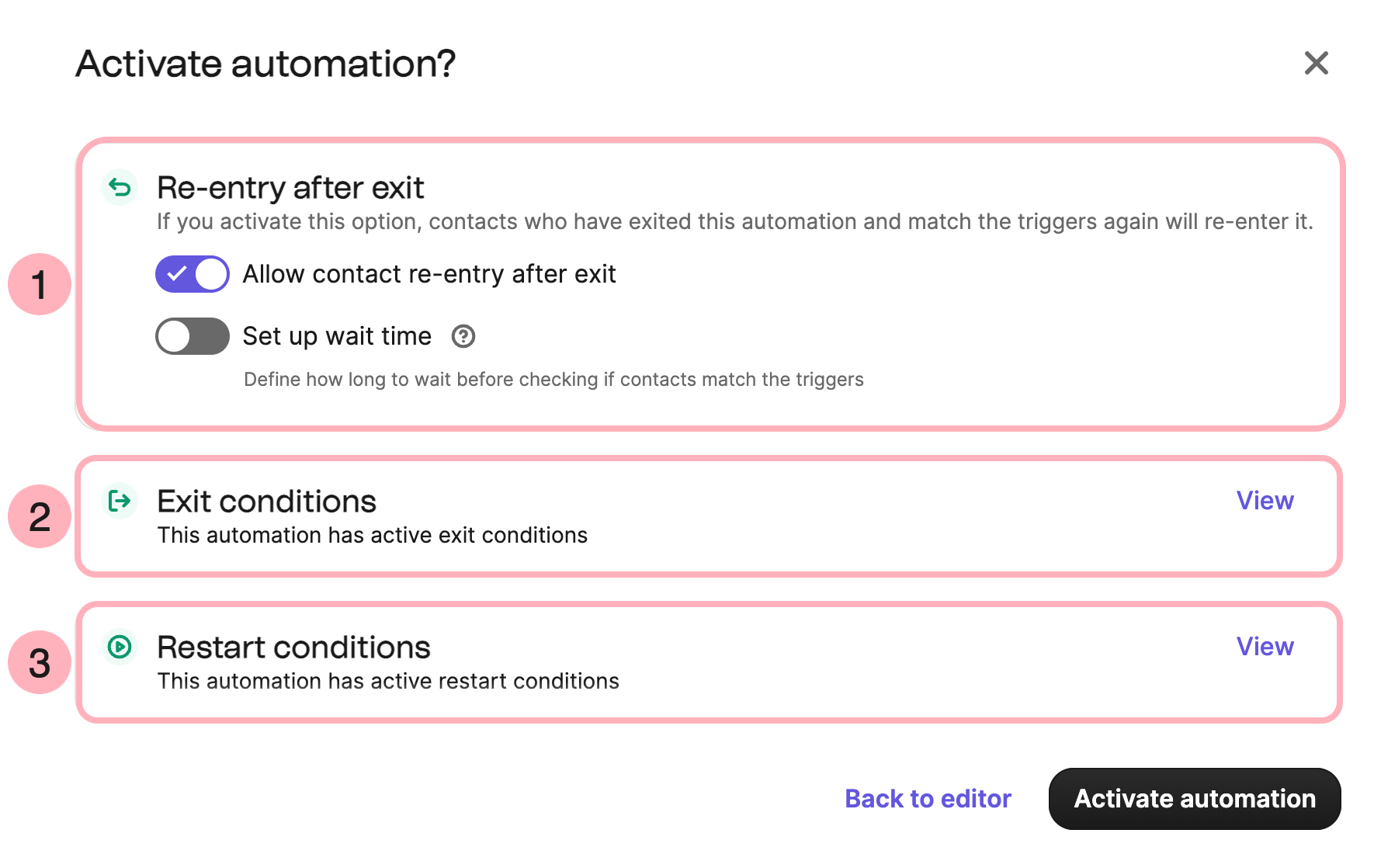
Exit rules should cover completed orders, emptied or deleted carts, unsubscribes and lost eligibility. Check reentry too, since repeated cart updates can retrigger the flow. Document parallel-flow limits and cooldowns for each person, then test them.
Product use and support after purchase
Order confirmations and shipping emails should provide timely service information. Subsequent educational or marketing messages can offer setup, usage or care instructions after delivery, followed by relevant accessories based on the product cycle. Prefer actual delivery events. If estimating from the order date, allow for international shipping delays before requesting a review.
Pause inappropriate promotions and review requests for orders with unresolved returns, refunds, complaints or support issues. Recommend compatible accessories based on what was purchased. Alongside associated sales, assess whether customers use the product successfully and need less support.
Replenishment and repeat purchases
For consumables, use quantities and typical usage periods to plan replenishment. Durable goods may suit accessories, maintenance or related uses. Begin with a business hypothesis and refine it using actual order intervals. A universal 30-day reorder rule misses differences between products.
Before sending, check whether the person has reordered and whether the product, price and delivery remain available for the market. Without reliable product-level purchase events, begin with category-level segments rather than claiming to know an item’s replenishment cycle.
Reengagement and inactive audiences
Reengagement determines whether people still want the content. Start with useful recent articles or updates, then invite topic and frequency choices. Stop or sharply reduce marketing for people with no reliable activity. Account for privacy-distorted opens before inferring inactivity.
Someone who never clicks can still buy on another device. Review orders, visits, replies and sending history before suppression. Longer business cycles need appropriate observation windows. Do not send win-back messages to already unsubscribed people seeking permission. Offer an appropriate voluntary resubscription route.
High-value customers and membership
High-value customers may value early previews, relevant combinations, priority service or special content. Test these benefits alongside discounts. Determine eligibility from valid orders and net revenue, removing inflation from cancellations and refunds. Offer only benefits you can actually deliver.
Start with welcome and one valuable workflow, then expand gradually. Every addition needs an overlap and frequency review against existing sends. Reliable entry, timely exit and ongoing maintenance matter more than the number of workflows.
B2B nurturing and sales collaboration
B2B emails often help the buyer judge whether a problem deserves attention, which solution fits, whether implementation is affordable and whether to speak to sales. Some businesses sell online. Others need demonstrations, quotes, technical validation and procurement approval. Design content for that process instead of assigning every contact the same immediate-sales sequence.
The teaching example is a fictional procurement-management software supplier. The method also fits industrial equipment, corporate education, consulting, wholesale and professional services when roles, evidence and events are adapted. Timings, scores and response targets below are starting hypotheses to validate.
Distinguish people, companies and opportunities
A contact holds role, interests, communication eligibility and interactions. A company holds industry, size, region and account relationships. An opportunity holds one purchase’s scope, value, stage, owner and timing. One company can have several contacts and simultaneous renewal and new-project opportunities. A person’s click does not establish company-wide readiness. Count one opportunity’s value once across its contacts.
Define the ideal customer profile using industry, company size, serviceable regions, system requirements and business problem. Distinguish users, business owners, procurement, finance and technical reviewers. Collect fields that change content or the next action, marking unknowns as unconfirmed. Avoid guessing budget, authority or need from email domains and titles alone.
Lifecycle stages let marketing and sales describe progress. HubSpot’s defaults use MQL for a contact or company marketing considers ready for sales, and SQL for a potential customer sales has qualified. Systems can support custom stages. Write explicit entry conditions instead of treating a score as a universal standard.
| Stage | Example entry criteria | Owner of the next step |
|---|---|---|
| Subscriber or early lead | Available contact details, clear interest and verified sending eligibility | Marketing provides relevant content |
| Marketing-qualified lead (MQL) | Basic fit plus sufficiently reliable demand signals | Marketing validates and submits to sales |
| Sales-accepted lead (SAL) | Sales agrees to follow up, with an owner and deadline | Sales contacts the lead and records the result |
| Sales-qualified lead (SQL) | Need and fit verified, with an agreed next step | Sales advances the evaluation |
| Opportunity | A specific purchasing opportunity and value definition exist | Opportunity owner manages progression |
| Customer | The organization’s agreed closed-sale conditions are met | Delivery and customer success take over |
SAL records sales acceptance separately from qualification. Booking a meeting alone does not make a lead an SQL, since the discussion may reveal poor fit. Preserve historical stages separately from the current follow-up status so a returned lead does not erase the original handoff.
Handle resource delivery and ongoing marketing separately
Deliver a requested guide as promised. If further case studies, product messages or meeting invitations are planned, explain that use on the form and obtain any required consent or other applicable basis. A scanned business card, public work address or one inquiry does not authorize every form of ongoing marketing. The nurture example assumes recipients are eligible for the follow-up.
B2B marketing has no worldwide exemption. UK rules distinguish corporate subscribers from individual subscribers such as sole traders. Processing identifiable employees’ data also brings UK GDPR into consideration, including objections to marketing. An address’s business domain alone does not determine eligibility. Apply the market’s rules and platform policies alongside the compliance chapter.
Respect unsubscribes and marketing objections across sales inboxes, imports and newly created lead records. Fulfillment of a requested demo, quote or necessary service communication needs a clear purpose and record separate from later marketing.
Separate customer fit from behavioral intent
Scores prioritize review and routing. Record Fit and Intent separately. Fit can use company size, industry, service area and required systems. Intent can use explicit forms, genuine replies, key product activity or filtered content engagement. HubSpot’s scoring tools also distinguish fit and engagement and support group limits, positive and negative scores and decay, depending on the product and subscription.
Use the following prototype for discussion. Add 20 points for a supported industry, 15 for a serviceable size and 15 for a verified relevant problem. Add 15 for an evaluation form and 25 for attending a full demonstration. Cap repeated refreshes, clicks and downloads of the same resource. Email opens are weak evidence for core high-intent scoring.
Include negative rules. Unsupported locations or technical requirements can create exclusion states. Keep bots, test records and obvious errors out of the sales queue. Reduce the weight of old engagement. As a hypothesis, start reducing old activity after 30 days without new meaningful behavior and stop treating it as current intent after 90 days. If the tool lacks decay, recalculate in the CRM or use the last meaningful engagement timestamp.
A starting workflow can require both the example Fit and Intent thresholds before human review. Prioritize explicit demo, quote and procurement requests without waiting for click scores. Clarify or refer poor-fit requests appropriately. Compare score bands with subsequent SQLs, opportunities and wins to validate the model.
Implement scoring and handoff in Brevo
Create numeric contact attributes such as FIT_SCORE and INTENT_SCORE, plus fields for eligibility, owner, handoff time and current follow-up status. These are proposed logical fields to create. Brevo’s official new automation example combines numeric attributes, Update contact attribute, Conditional split and user assignment actions.
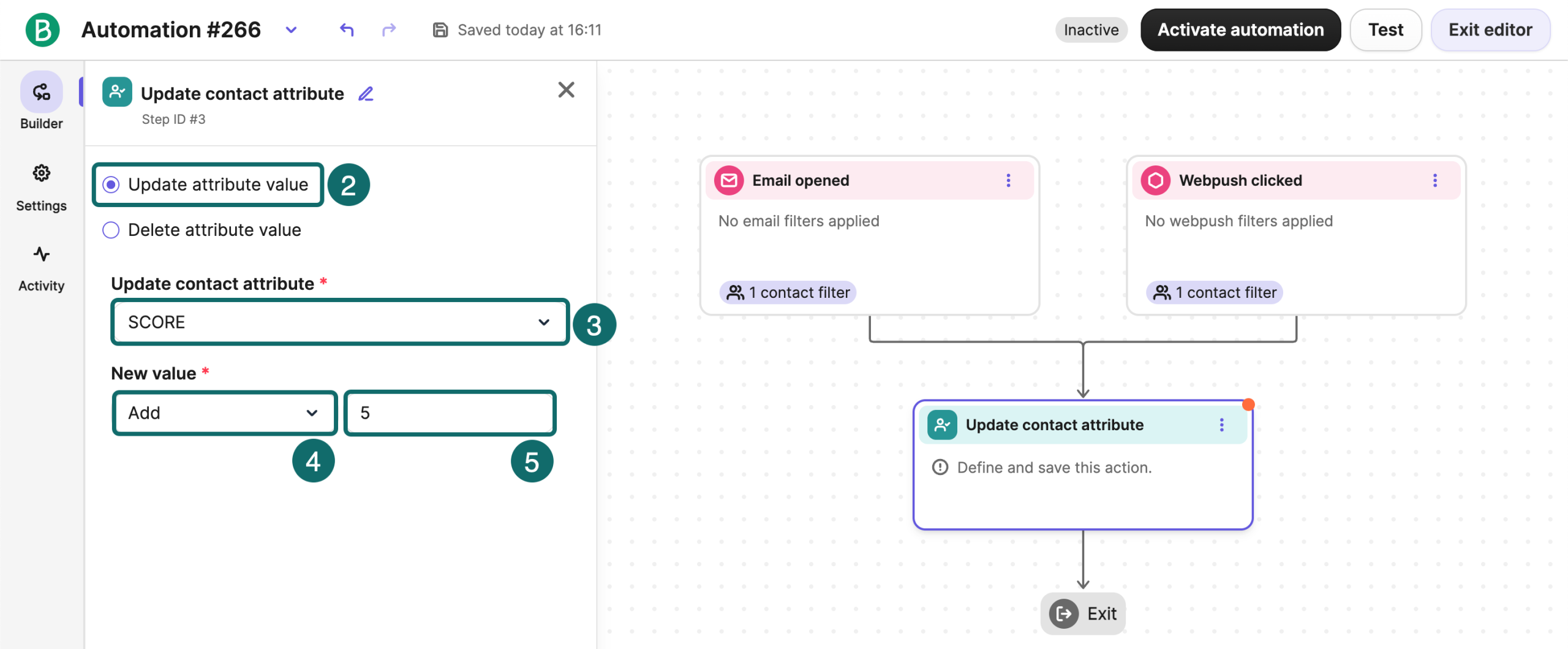
Start with a verified form or business event. Filter tests, invalid subscriptions and currently ineligible contacts, then update the score. At the conditional split, check fit, intent, eligibility and existing sales status together. Assign an owner and create a task only on the first qualifying handoff or a defined reevaluation. Eligibility for scoring and eligibility for email nurturing are separate settings.
The official example’s open events and fixed scores illustrate node usage. Replace them with verified business events. Define caps, cooldowns and deduplication for repeatable behavior. Triggering scoring again should not duplicate an existing sales task.
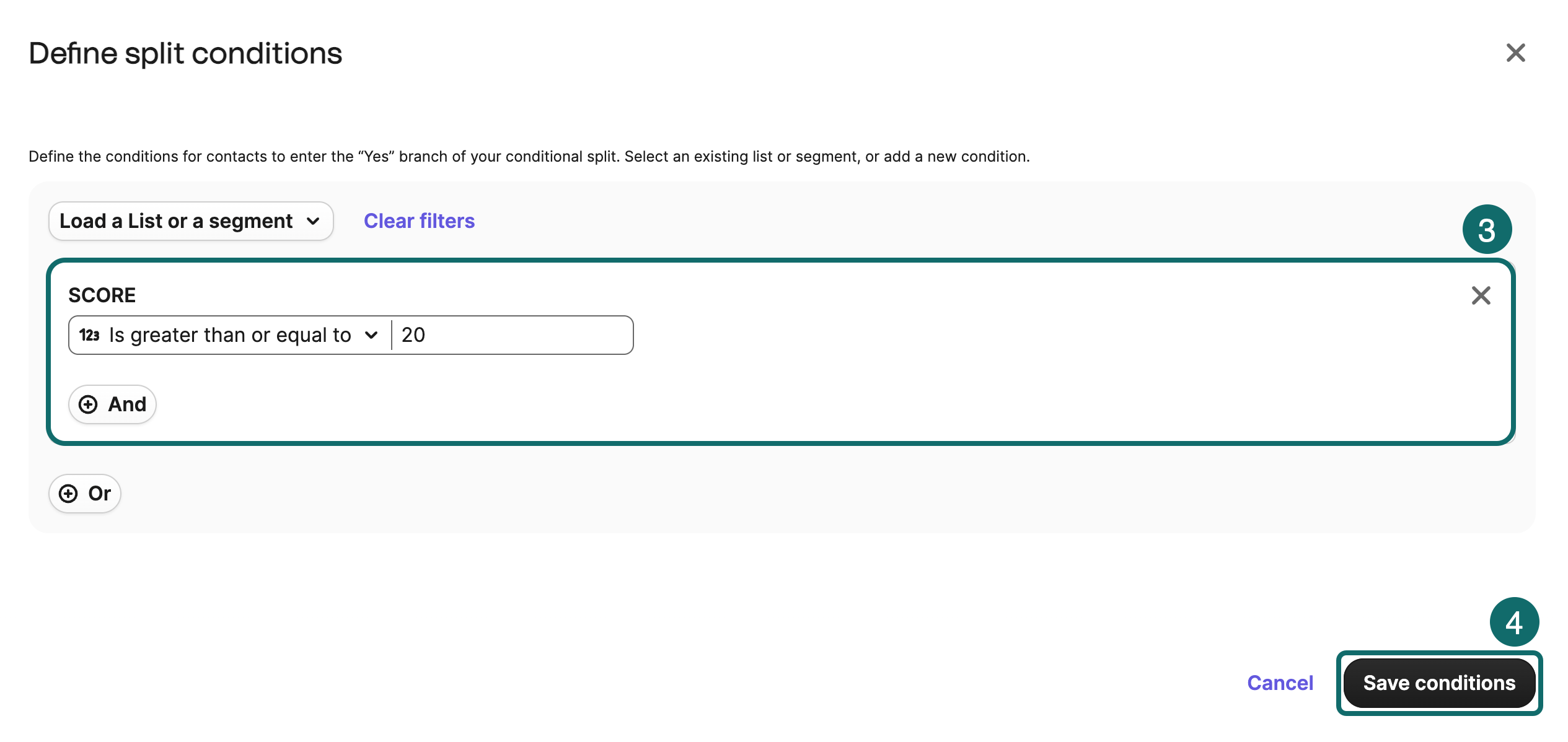
Brevo automation can create sales tasks and deals and react to deal-stage changes. Configure the pipeline, stages and record relationships first. Deal-stage triggers operate per contact. Several contacts associated with one deal may trigger multiple runs, requiring company- or deal-level deduplication.
In the new editor, add Deals – Create a deal and select Pipeline, Stage and an optional owner. If follow-up is needed, enable Create a follow-up task and configure it. Check existing deals and handoff records first. The screen configures the action, while your qualification rules determine whether a deal should be created.
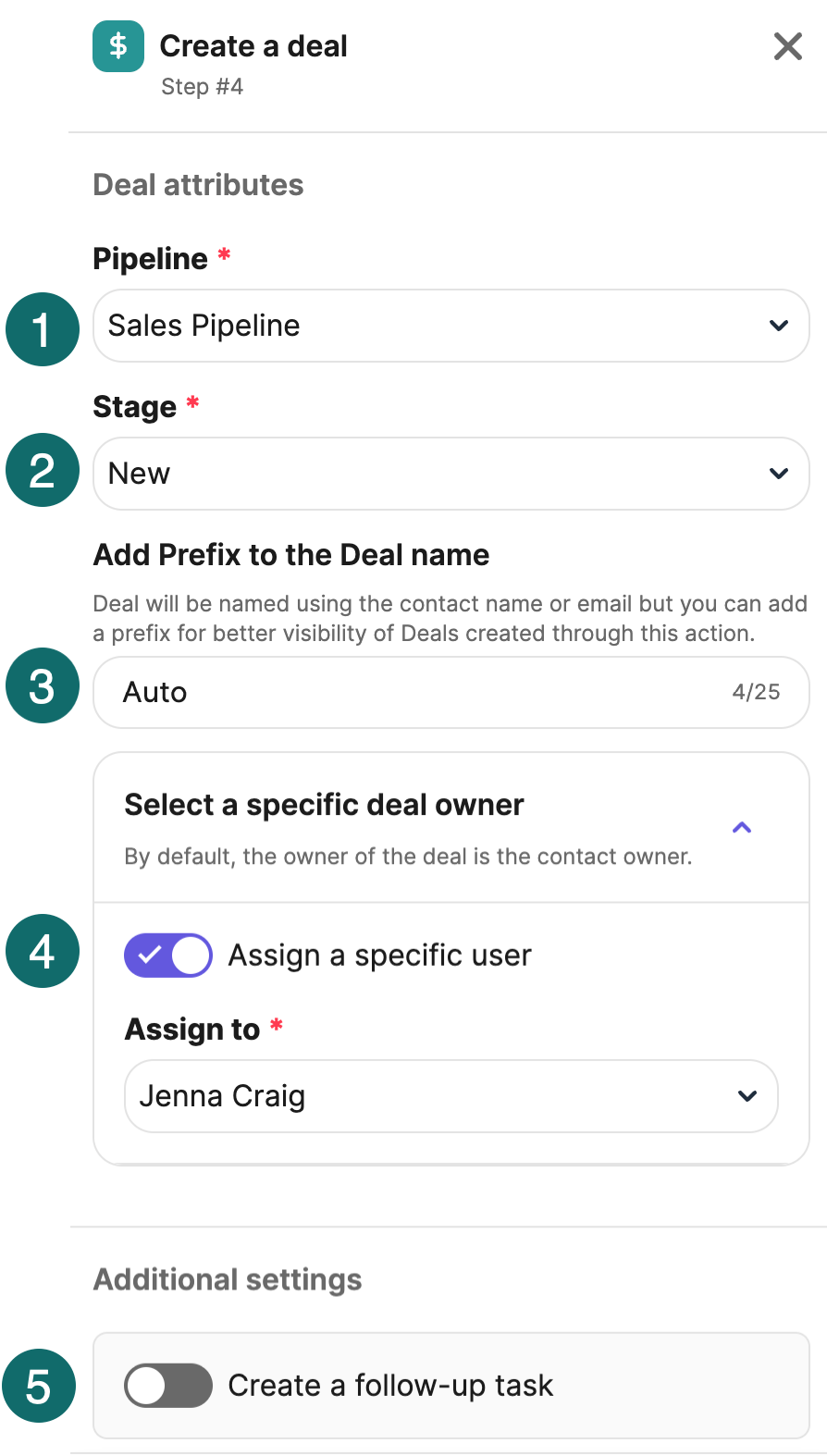
If the account lacks these sales or automation actions, send eligible contacts to a fixed queue for daily owner review and manual updates. A complete, traceable manual process can work at low volumes. Confirm the business rules before expanding automation.
Design five nurture emails with exit rules
The example targets early leads who requested a procurement process checklist and are eligible for further marketing. Exclude contacts already followed by sales, linked to an active opportunity, already customers or globally suppressed. Recheck before each send. Pause generic nurture and route explicit replies or demo requests to the owner.
| Email and example timing | Content and example subject | Main action |
|---|---|---|
| Email 1 · Same day | Your requested procurement process checklist | Access the promised resource |
| Email 2 · Around day 3 | Find the slowest step in your procurement process | Complete a short self-assessment |
| Email 3 · Around day 7 | Is a procurement system suitable for your team? | Review fit criteria or a comparison |
| Email 4 · Around day 12 | Five questions to resolve before implementation | Review rollout and cost information |
| Email 5 · Around day 18 | Would it help to review your procurement process together? | Reply with requirements or book a discussion |
Email 1 should provide the resource directly. For example, “Your checklist is ready. Start with requests, approvals and supplier management, then identify the area most in need of improvement. Reply if you have trouble downloading it.” Keep the download easy to find.
Email 2 can explain a diagnostic. “Record how long one purchase request takes from submission to confirmation. Separate approval delays, missing information and supplier response. Choose your most common problem so we can send relevant resources.” Collect answers you will actually use in subsequent content.
Email 3 supports evaluation. “Before choosing a system, confirm integrations, participating roles and approval rules that must stay. The comparison distinguishes ready-to-use features, configuration and items needing validation.” Use genuine, approved and relevant customer evidence if citing a case study. Avoid invented savings figures.
Email 4 reduces rollout uncertainty. “Confirm data preparation, permissions, training, migration scope and costs during evaluation. Assign the open items in the implementation checklist to the relevant colleagues.” Technical reviewers need compatibility and access information, finance needs total cost and business owners need adoption guidance. Provide routes based on known roles.
Email 5 proposes a stage-appropriate action. “If you know which process needs improvement, reply with team size, current tools and one problem. We will assess whether a further discussion fits. If you have no project yet, you can keep receiving useful guidance or adjust frequency.” No reply does not authorize higher frequency. Route later sends to lower-frequency content, pause or reevaluation.
Materials for different people at one company can complement one another. Coordinate overlapping workflows and give the account owner visibility into content and ongoing conversations. Pause company-wide promotions where appropriate. An individual unsubscribe stops that person’s marketing. A company-wide refusal requires an explicit organizational request or applicable rule.
Design acceptance, recycling and overdue handling
Handoff details should include contact and company, source, interests, permitted purposes, key timestamps, stated needs, resources seen, owner and next step. A score alone is insufficient context. As a proposed service target, assign explicit demos within two working hours and review regular MQLs within one business day. Promise these times externally only when the team can meet them.
Record acceptance time, contact result and next step. Distinguish poor fit, incomplete data, duplicates and wrong timing when returning leads. With appropriate permission, a temporarily unfunded project can reenter relevant nurture at an agreed time. A marketing refusal needs suppression. A lost opportunity should not automatically restart every acquisition email.
Monitor overdue unaccepted leads, missing owners and duplicate opportunities. Sample rejected MQLs to distinguish poor targeting, scoring noise and incomplete handoff. Feed sales observations back into forms, content and qualification rules alongside lead-volume goals.
After the sale, support usage, renewal and account development
Stop first-sale invitations after closing. Organize training, implementation and value reviews around the contract, usage and service progress. SaaS can focus on key task completion, adoption and renewal. Equipment suppliers can focus on installation, training, maintenance and spare parts. Professional services can use milestones and next-stage needs.
Synchronize renewal dates and usage problems from reliable systems. Have the customer owner handle severe support issues, unresolved complaints or disputes before deciding on expansion marketing. Assess service notices, education and promotions according to their purpose. Measure retention, renewals and actual adoption alongside immediate orders.
Apply the workflows to SaaS, publishing, education and services
Adapt triggers, goals and exits to the industry. Ecommerce’s not-yet-purchased condition may become not activated, not attended or evaluation incomplete. Change the events and denominators alongside the copy. The following are testable designs whose timing and thresholds need business validation.
SaaS focuses on activation and continued usage
Work with product teams to define the action that delivers value. A project-management tool could test creating a project and inviting a collaborator as activation, rather than login alone. Guide one key step after signup. Later, send targeted help only to accounts that have not completed it. Move completed accounts toward the next feature or collaboration stage.
Before trial expiry, provide a continuation option reflecting usage and eligibility. Paid, canceled, sales-managed and severely blocked accounts need separate paths. In company-paid products, one user’s click should not automatically trigger an upgrade promotion to the entire company. Design billing, permissions and essential service messages separately from unsubscribable marketing.
For activation rate, use equivalently eligible trial accounts and state the window. For trial-to-paid conversion, let each cohort have its full opportunity to convert. Analyze renewal among accounts actually due, accounting for cancellation, downgrades and refunds so future renewals are not counted as losses.
Publishers and membership businesses deliver their editorial promise
State topics and frequency at signup. Help readers select interests in the welcome flow and use a recognizable editorial structure afterward. Explain one central topic and offer a few related links. Paid-membership messages should explain the additional value, cadence and cancellation route.
Look beyond filtered clicks to genuine return visits, consumption and subscriber retention. An article with many clicks but many unsubscribes or only one-off traffic may lack long-term value. Assign an editor to process replies so preferences inform future topics and segments.
Education follows enrollment and learning stages
Before enrollment, explain who the course suits, prerequisites, syllabus, effort and actual schedule. After enrollment, help with preparation, attendance, assignments and learning obstacles. Remove enrolled learners from acquisition reminders for that course. Canceled or refunded participants should leave generic upcoming-course reminders too.
Separate registered attendees, actual attendees and no-shows for webinars and sample lessons. Give attendees supporting resources and no-shows an available recording or next session. Any subsequent marketing still needs eligibility. Measure registration, attendance and completion separately from course purchases.
Appointment and professional services focus on attendance and completion
Explain scope, process, cost boundaries and preparation during inquiry. After booking, send location, required materials and cancellation links based on the actual appointment time. Invalidate old reminders after rescheduling or cancellation. Move completed clients into feedback and aftercare instead of continuing booking prompts.
Human replies may matter more than clicks for expensive services. Classify replies as inquiry, support or refusal and update status instead of scoring reply count alone. Distinguish valid bookings, attendance, sales and retention, with capacity and delivery costs for each service type.
Nonprofits and associations maintain participation
Build relationships through project progress, use of funds or resources, opportunities and events. Keep one-time donations, registrations and ongoing subscriptions separate. Adjust after cancellation, withdrawal or goal completion. Marketing rules can also cover causes and fundraising. Since February 5, 2026, the UK has a limited charitable-purpose soft opt-in. It applies only to organizations meeting the statutory charity definition, for their own charitable purposes, with addresses obtained directly on or after that date through an expression of interest or support. Provide an opt-out when collecting the address and in every message, and respect previous refusals. This exception does not cover every association, nonprofit or market.
Across industries, collect needed fields, protect private status in subjects, UTMs and public links, assign workflow ownership and use actual events to continue, branch or stop. An industry label does not replace these conditions.
Connect website events and business systems
Attributes describe current status, events record changes at a moment in time, and business objects such as orders, companies, deals, subscriptions and appointments hold relationships. Synchronizing an email address alone cannot provide reliable cart recovery, lead handoff or activation workflows.
Define the event before integrating
| Logical event | Key data to retain | Uses |
|---|---|---|
| Subscription confirmed | Contact ID, timestamp, source and permission scope | Welcome entry and permission records |
| Cart updated or checkout started | Contact and cart IDs, products, amount and currency | Cart recovery entry and message content |
| Purchase completed | Unique order ID, products, net amount, currency and status | Exit cart recovery and enter post-purchase flows |
| Cancellation or refund | Order ID, refund amount and status-change time | Correct revenue and pause unsuitable marketing |
| Shipment or delivery completed | Order ID, actual time and status | Schedule product help and feedback requests |
| Inquiry or demo requested | Contact, company, request ID, needs and timestamp | Prioritize handoff and exit duplicate nurture |
| Sales stage changed | Opportunity ID, company, owner, stage and timestamp | Handoff, recycling and post-sale transitions |
| Activation or subscription changed | Account ID, event, plan, status and timestamp | Onboarding, upgrades and renewal |
| Enrollment or appointment changed | Registration or appointment ID, time, attendance and cancellation | Preparation, cancellation exits and follow-up |
The table specifies business data, not ready-to-paste Brevo API parameters. Follow integration or developer documentation for actual names and fields. Shopify merchants should verify current Brevo or Klaviyo event coverage. WooCommerce and custom stores need plugins, server events and identification that support their chosen workflow.
Define the authoritative system for preferences, orders, deals and appointments. Decide whether marketing may overwrite CRM lifecycle and owners and how SaaS company accounts relate to users. Establish which system owns subscription status. On the first Brevo PushOwl import, Shopify data can overwrite existing attributes and subscription states. For WooCommerce resynchronization, check Preserve contacts' existing subscription statuses in Brevo. Test subscribed, unsubscribed and unconfirmed samples first. A technical import-as-subscribed option does not establish permission.
Prevent duplicate and delayed events and mixed object types. A plugin and custom code may report the same order twice. Several contacts can duplicate one company’s opportunity. Preserve event or object IDs and occurrence and receipt times. Convert currencies consistently, deduplicate by order ID and define treatment of taxes, delivery and refunds. Browser behavior collection must follow applicable tracking-consent rules. Keep marketing subscription and analytics or advertising tracking decisions distinct.
Evaluate open-tracking pixels under applicable rules too. Marketing eligibility does not automatically authorize every email or website tracking method. Keep market requirements, tool settings and privacy explanations consistent.
Use consistent UTM naming
Set utm_source to the sender, such as brevo, utm_medium to email, utm_campaign to the campaign or workflow and utm_content to the button, position or variant. Keep spelling and capitalization consistent so one campaign is not split across rows.
https://example.com/product-guide?utm_source=brevo&utm_medium=email&utm_campaign=2026w48_en_productguide&utm_content=hero_cta_aThe example is broken into lines for readability. Combine it into one continuous URL in use. Keep email addresses, names, phone numbers and other personal identifiers out of UTMs. Align automatic and manual parameter settings and test the final destination for duplicates or parameters lost through short links and redirects.
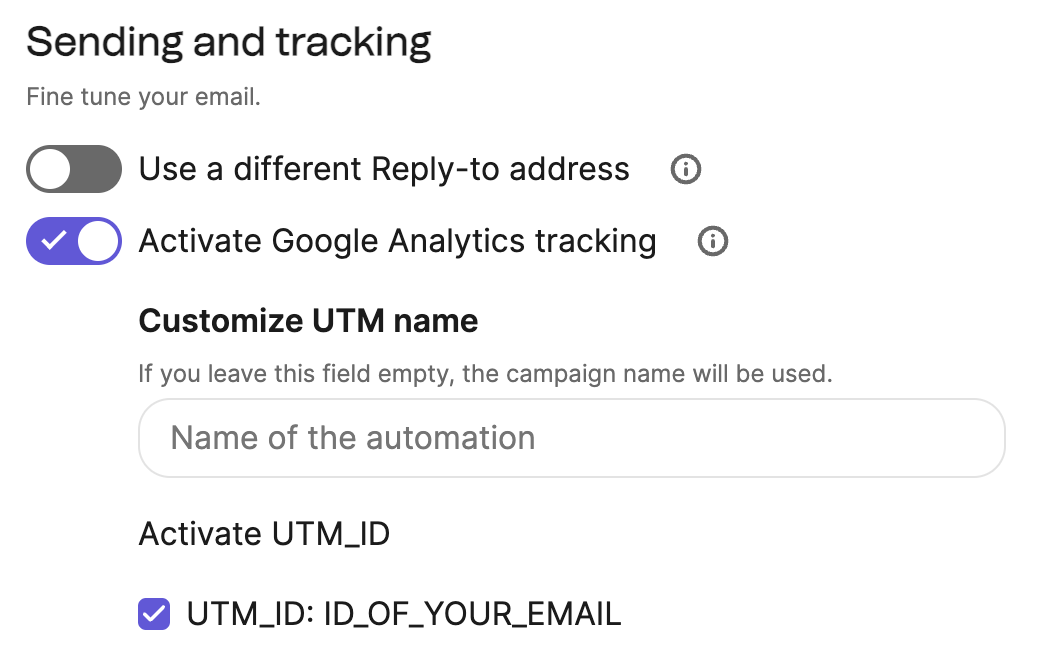
In GA4 Traffic acquisition, inspect Session source / medium or Session campaign for email traffic. For final outcomes, use the relevant attribution report and definitions. UTM labels identify a source, while incremental effects require additional evidence. Record offline B2B replies, sales activity, wins and stage timestamps in the CRM to follow the full buying cycle.
Validate the complete measurement chain
Have a controlled contact click a test email and complete the goal on the website. Inspect the email platform, analytics and business system. For ecommerce, reconcile order ID, net amount and currency. For B2B, check form, company, owner and deal. For appointments, check the booking ID and status. Mark or exclude tests and verify cancellation, refund and backward-stage synchronization.
Email platforms count link clicks. GA4 usually needs a page load and its measurement code to execute. Bots, browser limits, consent choices, incomplete loads and identification differences create discrepancies. Compare trends and compatible definitions without altering real data just to match totals.
A/B tests and incremental experiments
Start with a testable question, such as whether replacing Buy now with View compatible models increases unique click rate without reducing net revenue per recipient. Predefine the mechanism, primary measure, guardrails, sample and stopping rule before producing variants. B2B may prioritize qualified demos or sales acceptance, while SaaS may test activation. Evaluate downstream quality alongside clicks so the conclusion follows from the experiment.
Change one main variable at a time
For subject tests, keep the body constant. For button tests, keep audience, timing and destination consistent. Record profit for offer tests. You can compare two complete packages that change subject, discount, imagery and timing together, but cannot attribute the difference to one element.
Use mutually exclusive random groups and similar sending times. Avoid allocating all active people to A and inactive people to B. In workflows, keep each entrant assigned to one version across reentry. B2B and company-paid SaaS can randomize by company or account to reduce influence among colleagues. Analyze using that unit and its effective sample size.
Create a campaign test in Brevo
Choose A/B Test when creating a Campaign and select a supported test type. Current official guidance requires test recipients to have received an earlier campaign from the account, so new accounts need a regular campaign first. Brevo recommends at least 5,000 recipients, which is a platform practice recommendation rather than a statistical sample-size calculation.
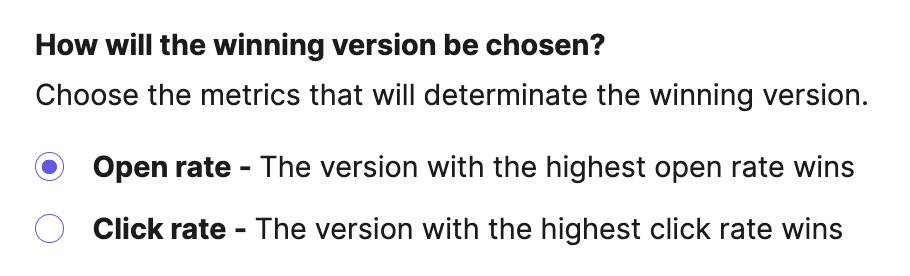
Configure the test portion, variants, waiting time and automated winner criterion. Brevo currently selects campaign winners using opens or clicks. Export and analyze results separately if net revenue determines your decision. A/B campaigns currently cannot use Send at best time or Send in batches together, so check these limits before scheduling.
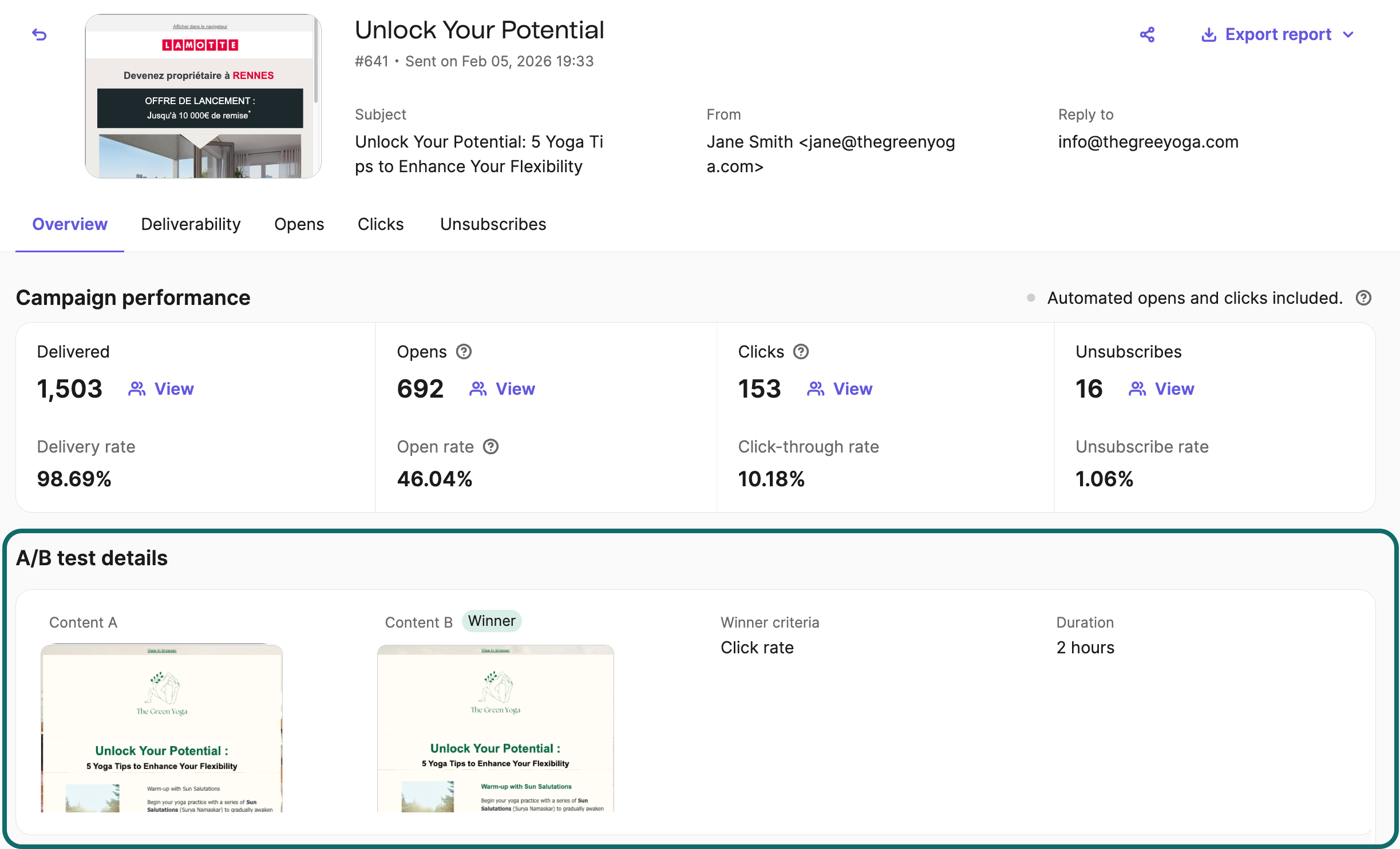
Where MPP affects opens, a higher recorded open rate does not prove more real readers. Filter bots in clicks too, then check goal completion and business value. Cover the main response window and avoid ending a test because of an early temporary lead.
Estimate the sample required
Suppose the unique click rate is 3% and you want to detect 3.6%, a 20% relative increase or 0.6-percentage-point absolute increase. Under approximate independent equal-sized random groups, a two-sided 5% significance level and about 80% power, a conventional two-proportion calculation requires roughly 13,900 people per group. This explains why 5,000 total recipients cannot guarantee reliable detection of a small effect.
Sample size also depends on baseline, minimum detectable effect, allocation and method. With a small list, prioritize larger strategic differences and accumulate consistent evidence across repeated tests. Report uncertainty when the sample cannot distinguish variants. Avoid pooling different campaigns and audiences without appropriate controls.
Use a holdout to measure incrementality
A/B tests compare two treatment approaches. To decide whether to send at all, compare eligible people randomly assigned to receive the marketing with a comparable holdout over the same goal and window. The example uses ecommerce purchases. B2B should use suitable company- or opportunity-level outcomes and its decision cycle. Keep necessary transactional and service messages available to the holdout.
| Teaching assumptions | Send group | Holdout |
|---|---|---|
| Randomly assigned people | 10000 | 10000 |
| Purchasers within seven days | 300 | 240 |
| Purchase rate | 3.0% | 2.4% |
| Absolute difference | +0.6 percentage points | Comparison baseline |
| Relative difference | +25% | Comparison baseline |
These assumptions give about 60 additional purchasers in the send group. With a conventional independent-sample normal approximation, the 95% confidence interval for the rate difference is about +0.15 to +1.05 percentage points. The interval is still wide and depends on valid randomization and measurement. Actual experiments may yield different conclusions.
At an average contribution of USD 36 per incremental order, 60 orders contribute about USD 2,160. Subtract USD 500 of experiment-related marketing costs to estimate USD 1,660 incremental contribution. This assumes one order per incremental purchaser and a contribution already accounting for discounts, product cost and relevant variable expenses. Prefer comparing net contribution per assigned person to accommodate order-value differences.
Brevo’s Percentage split randomly routes contacts when they reach the node. For persistent versions, save the assignment separately and test reentry. Control other marketing during observation. The untested remainder of a regular A/B campaign ceases to be an ongoing holdout if it later receives the winner.
Metrics and business value
Review successful sending first, then genuine engagement and business outcomes. Define denominators and attribution settings because platforms vary. The following are suggested measurement definitions. Check the platform’s official definitions before comparing its figures.
Core metrics and denominators
| Metric | Suggested calculation | Use |
|---|---|---|
| Server acceptance rate | Accepted messages ÷ sent messages | Diagnose bounces. Server acceptance does not measure inbox placement |
| Unique click rate | Unique clickers after filtering abnormal activity ÷ delivered recipients | Assess content and the next-action prompt |
| Recipient goal-completion rate | Unique people completing the defined goal in the window ÷ unique delivered recipients | Keep purchases, registrations and demo requests separate |
| Value per recipient | Defined business value ÷ recipients on a consistent basis | Use net revenue where reliable, with pipeline value reported separately |
| Unsubscribe rate | Unsubscribers ÷ delivered recipients | Assess relevance, frequency and expectations |
| Complaint rate | Complaints and denominator under the platform’s definition | Diagnose sources and sends without conflating mailbox-provider metrics |
| Incremental contribution | Experiment-estimated incremental net contribution − related marketing costs | Assess additional economic value from the sending strategy |
Open rate and Click-to-open rate depend on open measurement. Apple Mail Privacy Protection can separate remote-content loading from actual reading, and security systems may visit links automatically. Check filtering before interpreting high opens or clicks, then compare real visits, replies and goal events in business systems.
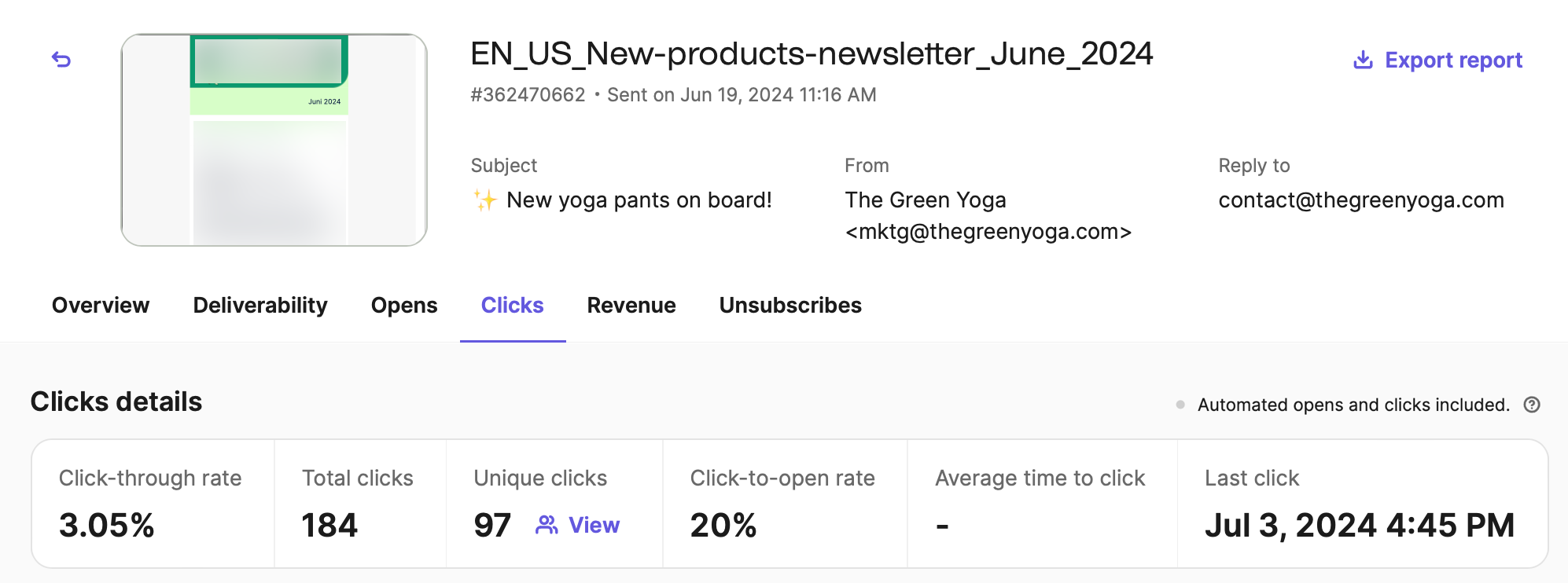
Ecommerce revenue and contribution example
Suppose 10,000 emails are sent and 9,800 accepted. After filtering abnormal activity, 294 unique people click. Within the chosen attribution window, 49 of those clickers each place an order, producing USD 3,675 attributed revenue after refunds. Server acceptance is 98%, unique click rate is 3%, purchase rate per delivered recipient is 0.5%, and revenue per delivered recipient is USD 0.375.
At 60% gross margin after product cost, attributed gross profit is USD 2,205. Subtract USD 8 per order, or USD 392, for payment and fulfillment variable costs not already in gross margin, and USD 300 marketing cost, leaving USD 1,513 attributed contribution. A control experiment is still needed to estimate the incremental portion.
The calculation 49 ÷ 294 is about 16.7%. It describes clicker purchase rate only if the 49 purchasers genuinely belong to those 294 clickers and the windows match. Real reports can include post-open purchases or orders from other windows, so confirm those conditions before dividing.
Evaluate B2B with mature lead cohorts
Separate email response, lead quality and actual procurement. Fix a cohort, such as contacts first entering nurture in one month, record stage dates and compare within the same window. New leads this month do not have the same closing opportunity as leads followed for six months.
The fictional campaign reaches 2,000 eligible contacts, of whom 1,960 receive at least one message. To simplify the example, each comes from a different company with at most one opportunity. Deduplicate real business records by company and opportunity. All later stages belong to this cohort and are verified within the same 180-day window.
| Outcome | Count | Rate relative to the relevant previous stage |
|---|---|---|
| Delivered contacts | 1960 | 98% of the selected audience |
| Leads submitting valid requirements | 240 | About 12.2% of delivered contacts |
| Team-defined MQLs | 180 | 75% of leads with valid requirements |
| Sales-accepted leads (SAL) | 90 | 50% of MQLs |
| Sales-qualified leads (SQL) | 72 | 80% of SALs |
| Qualified opportunities | 24 | About 33.3% of SQLs |
| Closed-won deals | 6 | 25% of opportunities |
The useful question may be why sales accepted only half the MQLs. Test broad fit criteria, incomplete handoff information, duplicates and sales capacity using rejection reasons. Track booked meetings and actual attendance separately as supporting metrics. A booking alone does not replace SQL criteria.
Suppose the 24 opportunities initially total USD 240,000. That is pipeline, while multiplying by closing probabilities gives estimated weighted pipeline. If the six wins total USD 60,000 in contracts, that describes signed contract value for the cohort, not automatically recognized revenue, cash received or incremental email revenue. State the reporting date, open opportunity count and the definitions of contract value, revenue and collections.
With USD 6,000 in included marketing and follow-up costs, cost per MQL is about USD 33.33, per opportunity USD 250 and per win USD 1,000. These measures include only the specified costs. They are not the company’s complete customer acquisition cost. Continue following immature cohorts without classifying all open deals as losses or guaranteed wins.
To estimate incrementality, randomize nurture by company and assign its contacts together to reduce forwarding and sales-coordination contamination. Keep eligibility, sales service and observation windows consistent. Predefine opportunities, wins or net contribution as the main result. Small B2B samples may be imprecise. Report intervals and uncertainty before attributing differences in a few large deals to email.
Compare automation by eligible entrants
Record goal completions, later value, unsubscribes and complaints per 1,000 eligible entrants. Ecommerce can track purchases and net revenue, B2B qualified replies, acceptance and deals, and SaaS activation and paid conversion. Separate trigger counts, entrants and actual recipients to determine whether deteriorating performance comes from audience changes, more skips or the emails themselves.
Welcome and cart entrants have different intent. Cart audiences are already more likely to buy, and attribution can include purchases that would have happened anyway. Prioritize workflows by eligible reach, improvement potential, contribution and maintenance cost alongside attributed revenue.
Run a weekly review that leads to action
Check net list growth and source quality, delivery anomalies, campaign results, workflow skips and exits, and discrepancies against orders, CRM, product or booking systems. Record a verifiable explanation and next action for each anomaly. For example, falling mobile button clicks could trigger a layout and landing-page speed review.
Record costs, refunds and windows too. Promotions can bring later demand forward, requiring observation beyond the sending day. More complex tests should inspect later unsubscribes, repurchases and order margins. B2B reviews need sales acceptance, rejection reasons, follow-up speed and opportunity maturity. SaaS cohorts need equal trial observation periods. Compare consistent measures over several cycles.
Ongoing optimization and international operations
Locate the stage that changed before acting. For server rejection, prioritize authentication, unusual sends and list sources. For healthy clicks and weaker business conversion, investigate pages, offer fit and downstream processes. For rising revenue with falling margin, reassess offers before simply sending more.
Troubleshoot common problems in order
| Symptom | Check first | Next action |
|---|---|---|
| Bounces suddenly rise | DNS, actual authentication, address sources and receiving-server errors | Pause the affected batch and resolve each error category |
| High recorded opens but little site traffic | MPP, bot filtering, tracking and consent | Compare unique clicks with real page loads |
| Normal clicks but few purchases | Mobile pages, price, stock, delivery and checkout | Verify the landing experience and audience-to-product fit |
| Unsubscribes or complaints increase | New sources, overlapping frequency and mismatched promises | Break down by source and reduce problematic sends |
| Cart reminders reach purchasers | Delayed purchase events, exits and duplicate order events | Fix events and send-time conditions before restarting |
| Revenue greatly exceeds store records | Attribution windows, cross-channel overlap, refunds and currencies | Reconcile order IDs and net revenue definitions |
| Many B2B leads but high sales rejection | Source promises, fit, duplicate companies and scoring | Align qualification and return rejection reasons |
| Many appointments or trials but little completion | Reminder timing, usage friction, cancellation and activation events | Fix the relevant stage and status-based exits |
Build sending performance gradually
For a new domain, dormant list or large migration, start with clearly authorized, recently engaged people. Expand gradually and review each batch. Choose the pace using history, scale, quality and platform advice instead of a universal daily-doubling schedule. Resolve significant anomalies before scaling.
A dedicated IP needs sustained volume and monitoring, so it is not necessary for every team. In shared infrastructure, understand both the provider’s responsibilities and your own work on domain, content and list quality.
Manage multiple languages and markets
Language, country and currency are separate dimensions. Prefer stated language choices over IP or email-domain guesses. Adapt price, delivery, dates and support promises to the actual market. After translation, inspect button length, wrapping, subject truncation and destinations, including unsubscribe and landing pages.
Stabilize the main languages first, then expand. Preserve product facts while adapting examples, units, support hours and action links. Assign B2B leads by sales territory and working hours. Use the event’s real local time for course and appointment reminders. Adapt frequency, holidays and schedules by market.
Bring compliance rules into daily operations
| Market or rule | Scope to understand | Where to implement it |
|---|---|---|
| US CAN-SPAM | Covers B2B commercial messages, identity, subjects, address and opt-out. It is not a universal prior-opt-in rule | Sender and footer templates, opt-out process and vendors |
| UK PECR and UK GDPR | Distinguishes corporate and individual subscribers, alongside personal-data duties | Forms, permission records, applicable exceptions and suppression |
| EU GDPR and electronic marketing rules | Consider GDPR processing grounds together with national electronic-marketing permission rules | Permission design, notices, retention and international processing |
US CAN-SPAM requires applicable opt-outs to be honored within 10 business days. Gmail’s FAQ requires relevant unsubscribes within 48 hours and Yahoo within two days. Stop affected marketing promptly and synchronize systems so old schedules, workflows and third-party tools do not keep sending.
The UK products-and-services soft opt-in requires addresses obtained directly during a sale or sales negotiation, marketing of your own similar products or services, and clear easy opt-outs both at collection and in every subsequent email. Respect earlier refusals and withdrawals. Apply destination-market rules even where a platform technically accepts an import.
B2B has no worldwide permission exemption. UK PECR distinguishes corporate subscribers, such as separate legal companies, from individual subscribers, such as sole traders and some partnerships. The former do not face the same prior-consent email rule. The latter generally require consent or an applicable exception. Identifiable work email data can still require UK GDPR grounds, notices and objection handling. The address suffix alone cannot establish the category.
US CAN-SPAM also covers B2B commercial emails, including one-to-one sends. Downloads, business cards and public addresses alone do not establish ongoing subscription consent. Evaluate legal scope, platform acceptable-use rules and recipient expectations together.
Assign owners for opt-outs, replies and complaints. AI can suggest subjects and draft variants, while human review verifies products, offers, dynamic fields and brand voice. Keep full customer lists out of external writing tools without appropriate data-processing arrangements and validate generated content before bulk sending.
A 30-day implementation plan and launch checks
Aim for one dependable, measurable foundation. Small audiences, long decision cycles and incomplete data may justify fewer workflows during the first month. Advance when each stage is verified.
A four-week plan
| Stage | Main work | Completion criteria |
|---|---|---|
| Week 1 | Define goals, check permission, create fields and authenticate the domain | Test identity passes, with traceable sources and opt-outs |
| Week 2 | Launch forms, confirmation and welcome email | Normal signup, duplicates and unsubscribe paths all tested |
| Week 3 | Send a regular campaign, connect key events and standardize UTMs | Reconcile goal events across email, website and business systems |
| Week 4 | Launch one valuable automation and design the first experiment | Goal completion, sales takeover and unsubscribes cause exits, with clear test rules |
At month-end, maintain briefs, templates, field definitions, workflow rules, screenshot explanations and incident records together. These preserve business logic through staff or platform changes.
Review before every send
Audience and eligibility. Verify source, marketing eligibility, language, market, unsubscribes and suppressions. Check segment logic, final counts, recent sends, automation overlap and company-level sales conflicts.
Content and experience. Verify products or services, prices, offers, stock and course or appointment dates. Test missing-name fallbacks on mobile and real clients. Check primary and supporting links, unsubscribe and Reply-To.
Tracking and timing. Verify final URLs, UTMs, event and object deduplication, account time zone and scheduled time. Exclude internal tests and name the person who checks anomalies after sending.
Automation and experiments. Verify triggers, delays, exits, reentry and frequency. Make test assignments exclusive and predefine measures, windows and stopping rules. Preserve necessary transactional notices.
Reusable campaign brief
Campaign name:
Target audience and exclusions:
Audience’s current problem:
Value promised by this email:
One main action and landing page:
Language and market:
Send time and time zone:
Main metric and observation window:
Guardrails for unsubscribes, complaints, cost and business quality:
Test variable and assignment method:
Reviewer and incident owner:
Reusable automation specification
Workflow name and business purpose:
Entry event and actual source:
Permission and other entry conditions:
Delay and content at each step:
Conditions rechecked before every send:
Exits for goal completion, status changes, refusal and unsubscribe:
Reentry and parallel-flow handling:
Personalization fields and missing-value fallbacks:
Tracking parameters, main goal and value definition:
Test cases and validation results:
Review date and owner:
Frequently asked questions
How often should we send? Honor the signup promise, then adjust to value, engagement and the buying cycle. Publishers can use an editorial cadence, retailers product and promotion schedules, B2B procurement and sales progress, and services actual bookings. Assess frequency with unsubscribes, complaints and goal quality alongside volume.
Is a small list worthwhile? Begin with a form, welcome email and relevant usage help. Small lists can support better information and experience. Acknowledge sample limits in tests of small differences without expanding to ineligible people for volume.
Should we resend to non-openers? Check open reliability alongside clicks, purchases, recent sends and opt-outs. A resend needs a clear content reason and frequency limit. A blanket resend can disturb people who already read or bought.
Can we buy lists or scrape public addresses? Build subscriptions through your own content, product experience and clear signup routes. An accessible or deliverable address does not imply willingness to receive marketing. Unclear sources and permission also weaken complaint handling and long-term delivery.
Why does attributed email revenue differ from GA4? Compare windows, open and click rules, identity, consent, refunds and currency, then order IDs. Use each platform for comparisons within its definitions. Estimate additional value through randomized tests or another suitable causal method.
Does B2B need sophisticated scoring first? Begin with clear customer-fit rules, explicit inquiries or demo requests and human qualification. Add validated scores once data supports them. Scores help prioritize without replacing sales judgment or changing contact eligibility.
Does every business need cart recovery? Businesses without carts or direct checkout should use real scenarios such as resource nurture, activation, appointment preparation or learning participation. Define trigger, eligibility, goal, exit and measurement for each workflow.
What should we do first? Choose one concrete goal and audience, authenticate the domain, complete the signup journey and write a welcome email that delivers the promise. Verify the real journey, then add complexity where the business needs it.