

A discount reduces revenue immediately, while many order costs stay the same. Before launching a sale, calculate how much each order can contribute toward advertising, then decide how much contribution you want left afterward. This tutorial walks through the arithmetic, the calculator inputs and a Google Sheets review.
The worked example uses a hypothetical USD order and illustrative fees. The four screenshots show calculator states, not a merchant’s advertising results. Keep one currency and a consistent order population throughout your own calculation. This is an order contribution model; fixed overhead and other period costs still need funding.
1 Define the revenue and cost basis
In this example, R is merchandise revenue after the discount, excluding sales tax and before the separate returns allowance. The customer receives free shipping, so merchant shipping is a cost. Recoverable taxes and fixed overhead are outside this order model. Do not replace this definition with a report label without checking what that label includes.
Let V be the expected variable cost before advertising, C the contribution before ads, T the contribution you want to retain and A the maximum advertising cost per order.
C = R - V
Break-even ROAS = R / C        when C > 0
A = C - T
Required ROAS = R / A          when A > 0
With no retained-contribution target, T = 0 and the ad allowance is C. The inverse-margin shortcut uses the contribution margin after all modeled variable costs, not the product gross margin alone. If C <= 0, or your retained target makes A <= 0, there is no positive advertising allowance under those assumptions.
| Input | What to collect | Check before calculating |
|---|---|---|
| Discounted order revenue | The actual offer, basket quantities and discount rules. | Use the price after discounts, with a stated treatment of tax, shipping and refunds. |
| Product cost | Cost for the quantities in the order. | Include applicable landed costs once; do not substitute selling price or a catalog margin percentage. |
| Shipping and fulfillment | Merchant shipping, pick-and-pack and packaging. | Model the relevant destination mix and any customer shipping charge consistently. |
| Payment and other variable fees | Actual percentage fees, fixed transaction fees and applicable commissions. | Use the correct fee base, payment method and currency costs. The example’s 3% plus $0.30 is not a provider quote. |
| Returns allowance | Expected incremental contribution loss from the relevant return cohort. | Reconcile refunds, recovered inventory and extra return costs without counting a loss twice. |
| Retained contribution | An amount to leave after media spend. | This amount still has to support any costs excluded from the order model. |
2 Avoid double counting returns, tax and shipping
The example keeps revenue before the future-return reserve and deducts a $4 expected incremental returns loss in costs. That reserve is a modeling assumption, not a $4 charge on every returned order. Build your own estimate from return frequency, refunded amounts, extra handling, return freight, nonrefundable fees and inventory recovery.
Product cost is already charged for the shipped order. Do not charge the same product cost again inside the returns allowance. Credit recoveries or cost reversals where appropriate. If you instead start with revenue already reduced for refunds, remove that same refund component from the allowance and retain only the remaining incremental effects. Use one reconciled method.
If customers pay shipping, either include their shipping charge in revenue and merchant shipping in costs, or net the charge against shipping cost. Do not do both. These presentations can preserve contribution but change the revenue numerator, so recalculate the displayed ratio on your chosen basis. Keep tax collected on behalf of an authority outside the example’s revenue and separate recoverable from nonrecoverable amounts when preparing your own costs.
3 Open the calculator and inspect the defaults
- Open the Beecommercer Break-Even ROAS Calculator and find Inputs and Result.
- Locate Average order value, Product cost, Shipping and fulfillment, Payment/refund cost %, and Current ad spend per order.
- Check the defaults before replacing them. The preset 2.05× result belongs to the preset inputs; it is not a recommended business target.
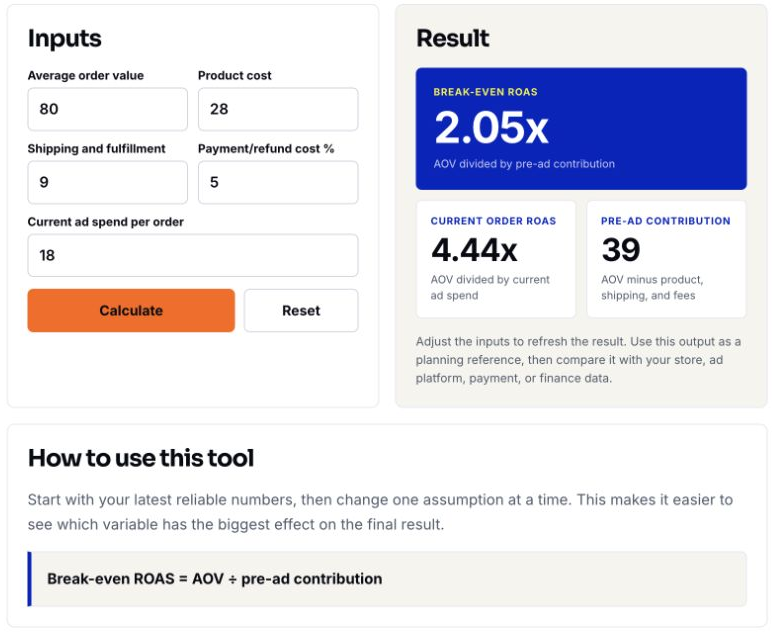
The calculator combines payment and refund effects into one percentage. We will calculate that percentage from separate dollar costs in the worksheet. Its Current ad spend per order field changes Current order ROAS; it does not change the pre-ad contribution or break-even threshold.
4 Calculate the regular-price order
The hypothetical order sells for $80. Product cost is $28, merchant shipping is $8, pick-and-pack is $3, payment fees are 3% of revenue plus $0.30, and the expected incremental returns allowance is $4.
Payment cost = 80 * 0.03 + 0.30 = 2.70
V = 28 + 8 + 3 + 2.70 + 4 = 45.70
C = 80 - 45.70 = 34.30
Break-even ROAS = 80 / 34.30 = 2.33x
The unrounded contribution margin is 42.875%. At this order-level break-even point, $34.30 of media spend uses the full contribution. It leaves nothing for fixed overhead or other excluded costs. This is a per-order advertising allowance, not automatically a new-customer acquisition cost.
- Enter 80 for Average order value and 28 for Product cost.
- Enter 11 for Shipping and fulfillment: $8 shipping plus $3 pick-and-pack.
- Enter 8.375 for Payment/refund cost %:
(2.70 + 4) / 80 * 100. - Click Calculate. Confirm 34.3 pre-ad contribution and 2.33× break-even ROAS.
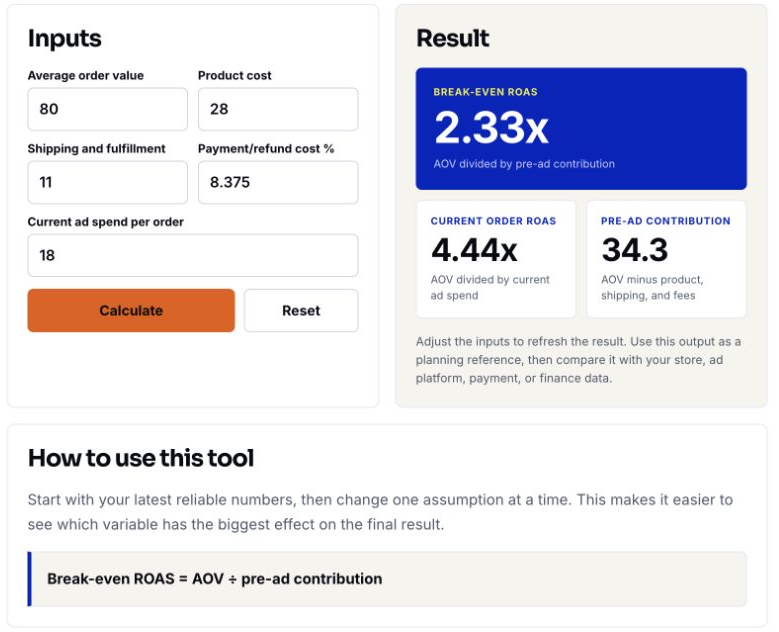
The pictured Current ad spend per order remains 18, so Current order ROAS is 4.44×. That separate value does not change the $34.30 break-even allowance.
5 Recalculate the sale and the contribution to retain
A 20% discount reduces the selling price to $64. Product, shipping and pick-and-pack costs stay unchanged. Payment fees become 64 * 0.03 + 0.30 = 2.22. With the same $4 returns allowance, variable cost is $45.22 and pre-ad contribution is $18.78.
| Scenario | Revenue (USD) | Variable cost | Contribution before ads | Retained target | Max ad cost per order | Required ROAS |
|---|---|---|---|---|---|---|
| Regular price | 80.00 | 45.70 | 34.30 | 0.00 | 34.30 | 2.33× |
| 20% sale | 64.00 | 45.22 | 18.78 | 0.00 | 18.78 | 3.41× |
| Sale downside | 64.00 | 50.22 | 13.78 | 0.00 | 13.78 | 4.64× |
| Sale, retain $6 | 64.00 | 45.22 | 18.78 | 6.00 | 12.78 | 5.01× |
Although revenue falls 20%, the available pre-ad contribution falls by $15.52, about 45.2% relative to $34.30. The sale’s order-level break-even ROAS rises to 3.41×. Calculate from unrounded inputs, then round the displayed result.
To leave $6 per order after ads, the allowable media spend becomes 18.78 - 6 = 12.78. The corresponding required revenue ROAS is 64 / 12.78 = 5.01x. This $6 is retained contribution before fixed costs, not net profit.
- Change Average order value to 64.
- Keep Product cost at 28 and Shipping and fulfillment at 11.
- Set Payment/refund cost % to 9.71875:
(2.22 + 4) / 64 * 100. - Enter 12.78 for Current ad spend per order and click Calculate.
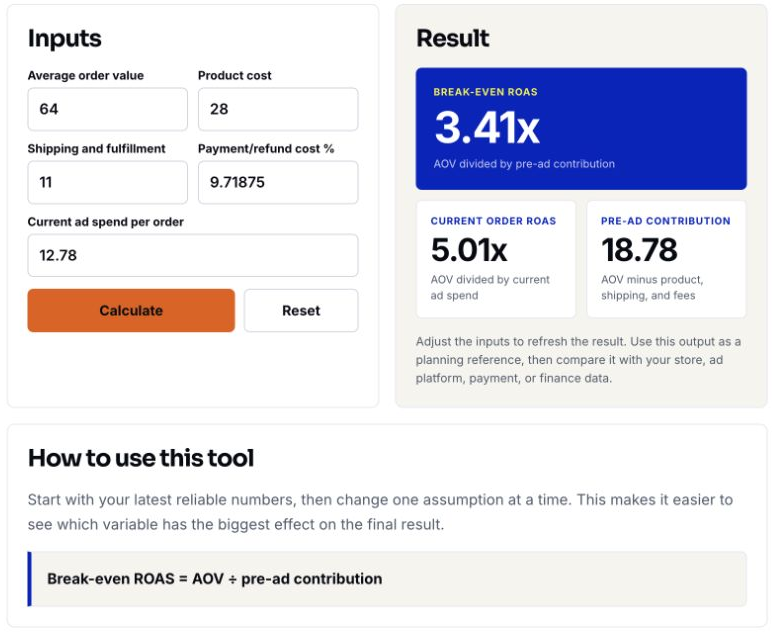
The tool still shows $18.78 pre-ad contribution. Subtract $12.78 yourself to confirm the $6 remaining amount; the calculator does not display that subtraction as a separate field.
6 Stress-test shipping and returns
For the downside case, raise merchant shipping from $8 to $11 and the expected returns allowance from $4 to $6. Keep the $64 selling price, $28 product cost, $3 pick-and-pack and $2.22 payment fee. Variable cost becomes $50.22, pre-ad contribution is $13.78 and break-even ROAS is 4.64×.
- Keep Average order value at 64 and Product cost at 28.
- Increase Shipping and fulfillment to 14: $11 shipping plus $3 pick-and-pack.
- Change Payment/refund cost % to 12.84375:
(2.22 + 6) / 64 * 100, then click Calculate.
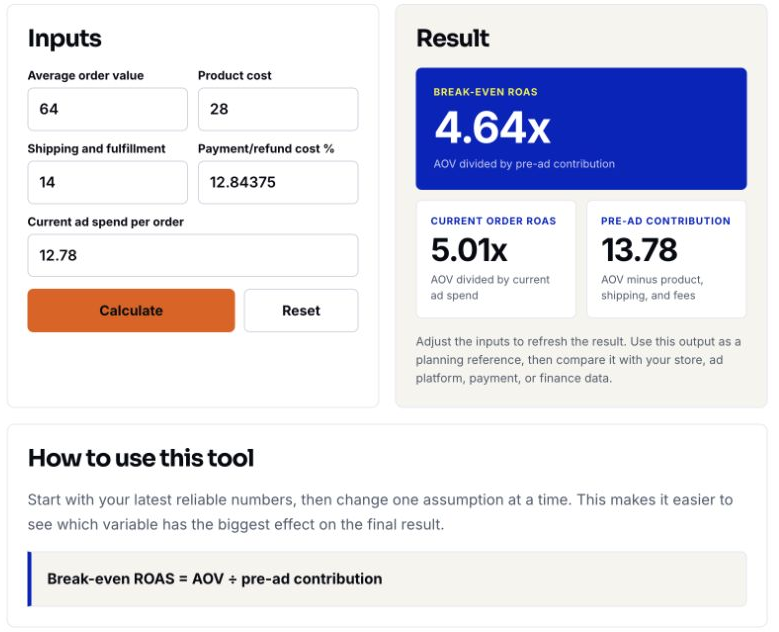
The captured ad-spend input is still $12.78, leaving only 13.78 - 12.78 = 1.00 before fixed costs. A separate stress assumption of $15 media spend would lose $1.22 per order. The 5.01× current ROAS visible in the screenshot does not preserve the previous $6 contribution when costs increase.
7 Reproduce the scenarios in Google Sheets
Download the sale ROAS scenarios CSV and import it into a new Google Sheet. Keep an unchanged reference copy. The four example rows contain static inputs and results, not live formulas. Restore the calculation columns below before changing inputs.
| Columns | Fields | How to use them |
|---|---|---|
| A | scenario | Name the scenario and keep a dated record of its owner, market and assumptions. |
| B:H | revenue_usd, product_cost, shipping_cost, fulfillment_cost, payment_rate, payment_fixed, returns_allowance | Editable order inputs. Enter 0.03 in F for 3%, not 3. The example uses USD; change the currency consistently throughout your own working sheet. |
| I:J | variable_cost, contribution_before_ads | Calculated variable cost and pre-ad contribution. |
| K | retained_target | Editable contribution to leave after ads; zero means order-level advertising break-even. |
| L:M | max_ad_cost, required_roas | Calculated media allowance and revenue ROAS ratio. |
With headers in row 1, replace I2, J2, L2 and M2 with the following formulas, respectively. Fill them down through the four sample rows. English function names and commas are shown; regional settings may require different separators.
=IF(COUNT(B2:H2)<7,"check_inputs",IF(OR(B2<=0,MIN(C2:H2)<0,F2>1),"check_inputs",SUM(C2:E2)+B2*F2+SUM(G2:H2)))=IF(ISNUMBER(I2),B2-I2,"check_inputs")=IF(COUNT(J2:K2)<2,"check_inputs",IF(K2<0,"check_inputs",J2-K2))=IF(COUNT(B2,L2)<2,"check_inputs",IF(B2<=0,"check_inputs",IF(L2<=0,"no_positive_allowance",B2/L2)))- Confirm the four reference ratios: 2.33, 3.41, 4.64 and 5.01. Display money to two decimals without rounding the underlying calculations.
- Check numeric inputs, positive revenue, nonnegative costs and retained target, and a payment-rate fraction between 0 and 1. Replace missing data before using the result.
- Keep M as a numeric ratio, for example 3.41. If you format that same value as a percentage, it displays approximately 341%; do not type 3.41% to represent 3.41×.
- Replace the examples with your own verified costs, then add sale and downside rows. Extend the formulas if you introduce cost fields beyond this simple model.
The calculator and sheet use different percentage-entry conventions: the calculator expects 8.375 for an 8.375% combined payment/returns allowance; the sheet expects 0.03 for a 3% payment rate and keeps the returns allowance as a separate dollar amount.
8 Match the threshold to the advertising report
Google Ads reports conversion value divided by advertising cost, using the configured conversion values and actions. Its Target ROAS guidance concerns value-based bidding; it does not convert reported revenue into profit. A 3.41× ratio is about 341%, while 5.01× is about 501%.
Check which purchase actions enter the report, their attribution scope, currency, tax and shipping treatment, refunds and any value rules. A model using ad-attributed order economics is not comparable with an ad cost divided by all paid and organic store orders. Use the advertising tracking diagnostics tutorial to inspect purchase value, currency and duplicate collection.
If the aligned reported value per order is P, the comparable platform ratio is P / A, not automatically R / A. For example, the same $12.78 media spend gives 5.01× on $64 modeled revenue, but 5.51× if the report counts $70.40. That difference changes the reported ratio, not the economic advertising allowance. Reconcile why the values differ before copying a threshold into a bidding setting.
Use supported conversion adjustments to retract or restate eligible conversions when appropriate for your tracking setup. Do not assume every refund automatically corrects every advertising report. Allow for conversion delay and maturing returns before interpreting recent results.
9 Turn the result into a sale plan
A per-order allowance is not a daily campaign budget. A budget scenario needs a credible order-volume assumption, fulfillment capacity, cash limits and a separate allowance for campaign-specific or fixed costs. Keep media spend, acquisition-service fees and other costs on a consistent basis; a fee charged as a percentage of ad spend cannot simply be entered as a percentage of revenue.
For mixed products or baskets, sum their revenue and contribution using the expected order mix, then calculate the ratio from those totals. Do not take a simple average of product-level ROAS thresholds. Separate new and returning customers before using repeat-purchase value to justify an acquisition allowance.
- Save the scenario version, owner, offer dates, market, cost evidence, retained-contribution target and reporting basis before launch.
- If the required efficiency is unrealistic, reconsider discount depth, product eligibility, bundles, shipping subsidy or costs before committing the budget.
- During the sale, compare actual order revenue, cost mix and media spend against the same assumptions. Set review and adjustment rules using your own economics and available data.
- Revisit the result as conversions and returns mature. Future purchases remain a scenario until retention and margin evidence supports them; current ROAS alone does not establish incremental profit.
10 Common questions before launch
What if the contribution or advertising allowance is zero or negative?
There is no positive media allowance under those assumptions. This also applies when contribution is positive but the retained target uses all of it. Do not report zero as a workable ROAS target; change the offer or cost assumptions and recalculate.
Is this the same as new-customer CAC?
No. The example is per order. New-customer CAC needs an explicit new-customer count and acquisition-cost definition. Repeat orders, organic orders and different attribution rules can make the denominators differ.
Does retaining $6 mean making $6 net profit?
No. It is contribution left after modeled variable costs and media spend. Fixed overhead and other excluded costs must still be covered in a campaign or period profitability view.
Will setting the calculated target guarantee the sale works?
No. The threshold is an economic planning result under stated assumptions. Bidding settings do not guarantee the same achieved ROAS, conversion volume, incremental sales or profit. Verify the inputs and reporting basis, then monitor actual outcomes.