

A UTM naming convention is a shared set of rules for labeling campaign links. It helps your team keep one launch together in reports, compare useful placements, and trace each issued link back to an owner. Start with a small dictionary, then build, test and record the final URL.
This walkthrough uses four real interface captures from the Beecommercer UTM Builder. The campaign 2026_summer_launch_us is a fictional practice example. Its example.com destination is reserved for documentation, not a working merchant collection. The captures demonstrate link generation and a copy confirmation; they do not demonstrate a customer visit, GA4 attribution or campaign revenue.
1. Give each parameter a clear job
Before making links, decide what you want to compare: an initiative, a traffic source, an email position or a creative version. Keep that question attached to the naming rules. A new campaign name for every button fragments the initiative; identical content values for two positions remove the distinction you planned to measure. Before production, prepare a real destination, a campaign owner, a shared register, and access to the destination’s implemented GA4 property for validation.
Google’s campaign URL guidance recommends using source, medium and campaign together and supplying other relevant fields. Our release policy requires those three values. This is a team convention, not a claim that every UTM field is technically mandatory.
| Parameter | Give it this job | Practice value or decision |
|---|---|---|
| utm_source | Identify the origin of the incoming traffic. | newsletter |
| utm_medium | Identify the distribution method. | email |
| utm_campaign | Group links for the same initiative. | 2026_summer_launch_us |
| utm_content | Distinguish a placement or creative you will review. | hero_button_a |
| utm_term | Record relevant manual keyword detail when needed. | Leave empty for this email example. |
| utm_id | Provide a stable campaign identifier when your reporting workflow needs one. | Optional in this basic example; govern it separately from the display name. |
| utm_source_platform | Record a manual source-platform label when relevant. | Use the corresponding manual dimension; it does not guarantee the same value in the processed cross-channel Source platform field. |
Parameter names are the fixed keys, such as utm_source. Parameter values are your approved labels. Do not translate the keys or the demonstrated values when sharing this campaign across language versions. If a local-market comparison is needed, define a market code consistently instead of letting each teammate invent a spelling.
2. Approve a small naming dictionary
Assign one person to approve the dictionary and another to review the final links when possible. For this tutorial, use lowercase Latin letters, numbers and underscores. These choices make names easier to reuse; Google does not require this exact separator.
| Rule | Approved example | Avoid |
|---|---|---|
| Use one spelling and case. | newsletter | Newsletter, news_letter and ad hoc abbreviations. |
| Use a medium with a defined reporting meaning. | email | Mixing email, newsletter and e-mail as the medium. |
| Keep the campaign value stable across related links. | 2026_summer_launch_us | A different campaign name for each button or email. |
| Give content an ordered structure. | hero_button_a or footer_button_a | Unexplained labels such as new or test2. |
| Keep identifiers free of personal information. | A public partner code or a non-personal creative label. | Email addresses, customer names, order details or other personal identifiers. Follow Google’s PII prevention guidance. |
| Record exceptions and historical mappings. | A dated note linking an old spelling to the approved label. | Renaming old register rows and assuming historical GA4 data changes. |
Values are case-sensitive: Newsletter and newsletter can appear as different values. A naming dictionary prevents that split before distribution. Keep an approved-value list in a shared Google Sheet or another team register, and use a drop-down or review step so operators select approved labels.
Use UTMs for incoming campaign links. Avoid adding them to navigation, product links or checkout links inside your own website: that can contaminate campaign information. Track internal promotions with appropriate on-site events and a separate measurement plan.
3. Build the email link in four steps
Open the Beecommercer UTM Builder. The interface captures below show the English form; field labels may be localized on your selected language page. The fixed parameter keys and practice values stay the same.
Step 1: identify entered values and placeholders
Scroll to Build a tracking link. Locate Landing page URL, Campaign source, Campaign medium, Campaign name, Keyword or audience, and Ad/content version. Gray suggestions are placeholders: they are not entered values. The visible keyword suggestion will not become a parameter unless you supply a value.
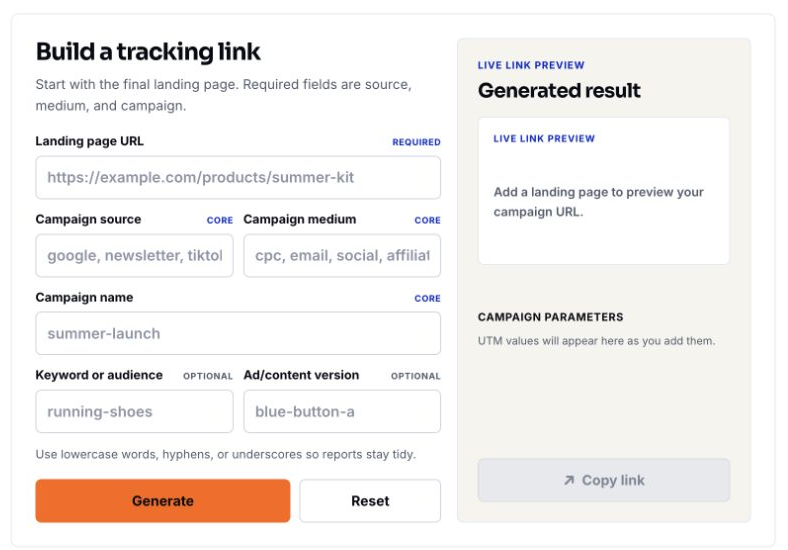
Step 2: enter the destination and the three core values
Enter https://example.com/collections/summer?sort_by=best-selling as the landing page. Set source to newsletter, medium to email, and campaign to 2026_summer_launch_us. Compare the live preview with your approved dictionary.
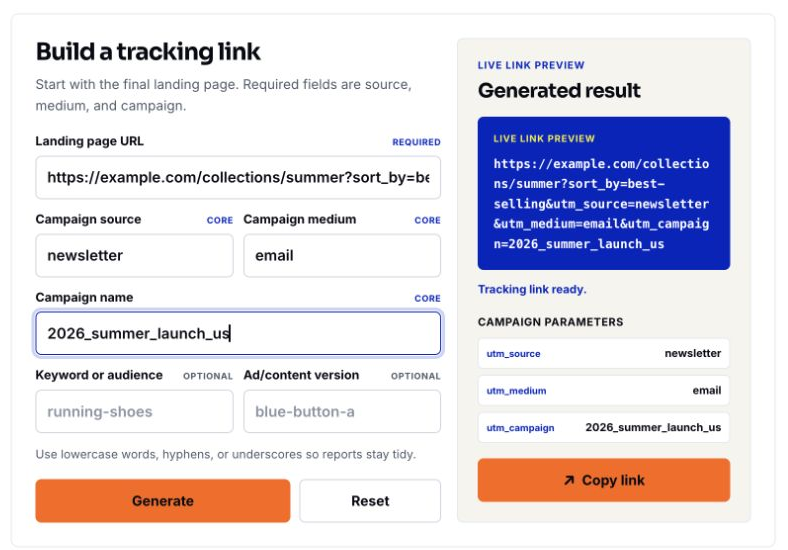
The destination already has sort_by=best-selling. That option should remain intentional after tagging. IANA reserves example.com for documentation; replace the entire host and path with a verified page you control before using this link in a real campaign. Do not use the illustrated collection path as a live shop.
Step 3: add placement detail and generate
Leave Keyword or audience empty. Enter hero_button_a in Ad/content version and click Generate. Inspect both the result and the Campaign parameters list. The result should include utm_content=hero_button_a and no utm_term. The keyword placeholder is still not an entered value.
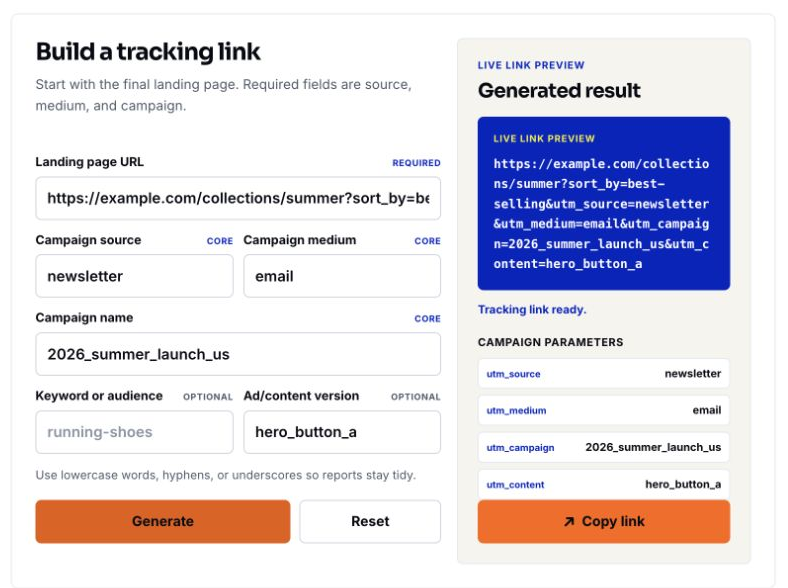
The demonstrated URL
https://example.com/collections/summer?sort_by=best-selling&utm_source=newsletter&utm_medium=email&utm_campaign=2026_summer_launch_us&utm_content=hero_button_aRead parameter names and decoded values rather than relying on their display order. A builder creates a URL string; it does not install analytics, make a destination page work or prove that a channel caused a sale.
Step 4: copy and record the link
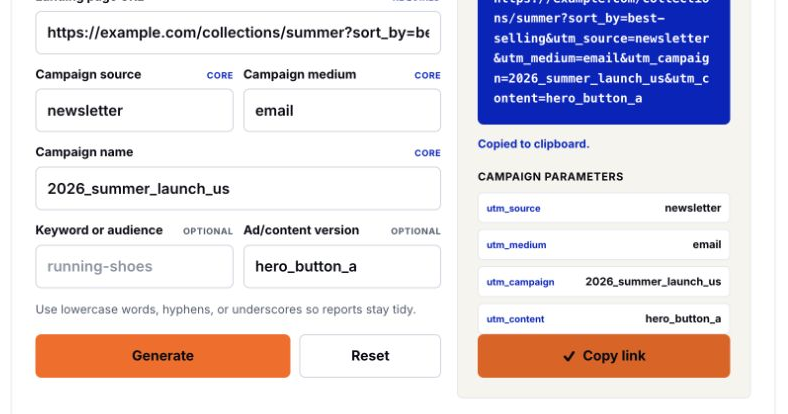
Click Copy link. In the captured operation, the button changes to a check mark and the form displays Copied to clipboard. Paste the result into the register and compare it with the preview before inserting it into a campaign draft.
If you need utm_id, utm_source_platform or other supported fields that are not exposed by this basic form, use an approved extended workflow and review the final URL. Do not invent a replacement field or put a campaign ID into utm_term just because the form has an empty input. Google distinguishes manual fields from some processed traffic-source dimensions; check the matching dimension when validating a value.
4. Reuse the campaign across useful comparisons
The following rows are planning examples, not additional captured operations or campaign results. Keep the exact campaign value for links belonging to this initiative. Change source, medium and content to describe the real distribution path.
| Planned link | Source / medium | Content |
|---|---|---|
| Email hero button | newsletter / email | hero_button_a — the captured example. |
| Email footer button | newsletter / email | footer_button_a — proposed, not captured. |
| Facebook paid social ad | facebook / paid_social | video_demo_hook_a |
| Instagram organic profile link | instagram / social | profile_bio |
| Affiliate partner link | partner_01 / affiliate | review_article |
GA4’s default channel definitions use specific source and medium rules. Your business labels do not automatically create the channel you intended. In particular, distinguish paid from organic social, use the actual source, and check the resulting channel in your property rather than assuming every custom source name is recognized.
For Google Ads, keep the account’s intended auto-tagging and click-ID workflow. Do not remove or overwrite gclid, disable auto-tagging to follow an email example, or replace platform tracking with a partial UTM string. When auto-tagging and manual tags coexist, GA4’s tagging precedence matters. Partial manual tags can leave acquisition fields unset when automatic identifiers cannot be used. Agree on the configuration with the person responsible for the linked property.
5. Check the URL structure and final click path
Start with the final landing page, not a home page that later needs to be replaced. Keep the intended market, product range and destination options. Add campaign parameters as query parameters before any #fragment. A fragment identifies a page position; text placed after it is not an ordinary query parameter.
| Situation | Check before distribution |
|---|---|
| The destination has no query string. | The first parameter begins with ?; later ones use &. |
| The destination already has query parameters. | Preserve intentional values such as sort_by and append UTMs with &. |
| The destination is already tagged. | Review and replace conflicting values deliberately. Avoid duplicate instances of the same UTM key or a second question mark. |
| The destination has a fragment. | Place UTMs before the # and preserve the intended fragment. |
| Values need URL encoding. | Use a URL-aware builder; inspect decoded values. Avoid manually double-encoding an already generated URL. |
| An email platform, short link or redirect rewrites the URL. | Test the actual issued link and confirm that required parameters reach the intended page. |
| A platform adds its own identifiers. | Preserve required click IDs and destination parameters; resolve collisions with the integration owner. |
| A platform asks for a URL-parameter or suffix field. | Follow that field’s current instructions. It may expect parameter pairs rather than a complete destination URL or a leading question mark. |
Keep the generated URL and the final issued link as separate fields when a platform rewrites links. A copy confirmation in the builder cannot verify an email redirect, a shortener, a consent flow or a landing-page change that occurs later.
6. Verify the real visit in GA4
Replace the reserved destination with a real page, open the final link through the actual email or ad preview, and confirm the intended page and market. Inspect the final URL after redirects. Follow your normal consent and test-traffic procedures; do not send personal identifiers in the URL.
Then check the correct GA4 property and dates. Where the report is available, open Reports → Acquisition → Traffic acquisition and inspect Session source / medium and Session campaign. Navigation can vary in customized properties. Google’s Traffic acquisition instructions explain the session-based report.
| Question | Suitable evidence | Do not substitute |
|---|---|---|
| Did the builder produce the intended string? | The generated URL, parameter list and pasted copy. | A claim that a real visitor or purchase has been measured. |
| Did a controlled visit reach the page and send the expected events? | The actual final click path and received test events. | A claim that processed campaign attribution is complete. |
| Which session campaign brought measured visits? | Session-scoped acquisition dimensions over the relevant dates. | First user source / medium, which describes initial acquisition. |
| Which manual content or term was recorded? | An appropriate report or exploration with the supported manual content/term dimensions. | An assumption that these fields are visible in every default report. |
Use Realtime or DebugView where appropriate to inspect a controlled test. These views provide limited attribution and are not the final campaign-report check. Allow for report processing and inspect data-quality limits before comparing totals; there is no universal exact waiting time. Consent choices, blocked collection, the wrong property or date range, and redirects can affect what is measured. Keep analytics verification pending until you have evidence for the specific fields and scope you intend to use.
Campaign information changing during an existing GA4 session does not by itself start a new session or replace that session’s original acquisition values. Google’s session guidance explains this behavior. Use a controlled test with a clear session boundary; do not keep clicking the same link in one active session and conclude that tagging is broken.
UTMs label measured incoming traffic. Revenue definitions, refunds and attribution rules still need separate checks. The GA4 and Shopify reconciliation tutorial explains how to compare store records and analytics values before interpreting a difference as lost revenue.
7. Keep a register with separate validation statuses
Download the UTM link register (CSV) and open it in Excel or import it into Google Sheets. Its English column names can be shared across teams. The first row documents the captured hero example, the second is a proposed footer link, and a blank row is ready for your own campaign. Both example destinations must be replaced before production.
| Status | What counts as evidence |
|---|---|
| Naming approved | An owner reviewed source, medium, campaign and optional identifiers against the dictionary. |
| URL generated | The intended URL and parameter list have been recorded. |
| Copy checked | The pasted link matches the generated value; a copy confirmation alone is not the whole check. |
| Destination tested | The actual issued link reached the intended real page with the required parameters. |
| Analytics verified | The intended values were confirmed in the correct property, dates and reporting scope. |
Record an owner, issued date, destination, exact final URL, placement, validation evidence and any later change. Preserve issued links as historical records. If a spelling was wrong, correct future links and document a reporting mapping separately; editing today’s register does not rewrite data already collected in GA4.
For a two-link email, two of two links passing the required launch checks means 100% validation coverage. One of two means 50%. This measures the team’s checking process, not expected sales loss or forecast campaign performance.
8. Run the release check and diagnose mismatches
- Confirm the owner and approved naming dictionary.
- Reuse the exact campaign value across related placements and make content values meaningful.
- Check the real destination, existing query values, fragments and platform identifiers.
- Compare the generated URL with the final issued link and test the actual click path.
- Check the correct GA4 property, dates and session/manual dimensions before approving analytics verification.
- Store the evidence, exception notes and final issued URL in the shared register.
| Observed problem | Check first | Next action |
|---|---|---|
| One launch appears under several campaign spellings. | The exact issued values, case, separators and legacy links. | Standardize new links and document historical reporting mappings. |
| A parameter is missing after the click. | The final issued URL and each redirect or platform rewrite. | Fix the point that removes or replaces it, then test again. |
| The expected session source does not appear. | Property, date, session boundary, consent, received events and auto/manual tagging rules. | Investigate the relevant layer rather than changing random labels. |
| Content or term is not visible. | Whether the parameter was actually supplied and whether the chosen report supports the corresponding dimension. | Inspect the appropriate manual dimension; do not assume the builder failed. |
Frequently asked questions
Must every UTM field be filled in?
No. Our convention requires source, medium and campaign, then adds relevant optional detail. The email example deliberately leaves term empty. Google also documents other supported fields; use only those your workflow can govern and verify.
Can one campaign cover several emails or channels?
Yes, when they belong to the same initiative. Keep source and medium truthful to each distribution path, and use content to distinguish meaningful placements or creatives.
Should I rename source values in each language?
Keep machine values consistent for the same campaign. Localize the instructions and register notes; introduce a documented market or language code only when it supports a planned comparison.
Will correcting an old register fix historical GA4 values?
No. Preserve the issued link, correct future distribution and document any analysis mapping. A register edit does not rewrite previously collected data.
Do UTMs prove that a campaign caused a sale?
No. They label observed traffic. Consent, attribution settings, device changes and unobserved journeys affect reporting; a causal claim needs an appropriate evaluation method.
Can I add customer emails or order details for easier matching?
Do not put personal identifiers in campaign parameters. Use approved non-personal campaign, placement or partner codes, and keep any permitted operational matching in the appropriate controlled system.