

Last updated on October 17, 2025 at 10:55 AM
Google Display Ads are an essential component of Google ads. Users can be actively pushed to view display ads. Display ads are more active than search ads. Display ads can be shown on more than 35 million websites and apps, as well as on Google’s own services (like YouTube and Gmail), which are used by more than 90% of the world’s online users. The Google Display Network helps you find the right audience, and its targeting options let you show potential customers where and when your message makes sense. It is a low-cost option for brand exposure and remarketing users.
This article focuses on four areas: the introduction of display ads, creative production, ads targeting, and ads creation.
Introduction of display ads
Display ads are divided into two ad sub-types: image ads and responsive display ads. Image ads will be put in different places based on the size of the image, and the number of places will be limited. The display format is only images. Advertisers need only provide images. Responsive display ads can be in native formats and fit into any ad space on the Google Display Network. Advertisers must provide the following information: headline, description, image, logo, video, and product feed)

The position on the right side of the image above is a display ad from a bbc.com advertisement. The image ad will show the image we gave, and when a user clicks on it, they will be taken to the landing page we chose.

The responsive display ads on CNN.com are shown in the picture above. They are at the top of the homepage of the website. Product information, the brand logo, and the advertisement headline are displayed. When the user clicks on the product, they are taken to the product details page.
| Display ad types | Image Ads | Responsive Display ads |
| Display format | images | images, texts, videos,products |
| Assets | images | images, headlines, logos, videos, and descriptions, product feed |
| Ad coverage | limited by image size | unlimited |
| Advertising Controllability | High | Low |
Image ads have fewer display forms than responsive display ads. Responsive display ads can show images, text, video, and product feeds, covering nearly all of the assets we offer. Image ads, on the other hand, can only upload images that we have created ourselves. The display format is relatively fixed. In terms of where ads can show up, responsive display ads can show up on almost all ad placements, while image ads can only show up on placements where we set image size limits. Image advertisements have a limited reach. The most significant advantage of image ads is that they are highly controllable. At the very least, advertising content can be completely controlled. We made everything in the ad, but the responsive display ad can be put together in any way the creatives want, and there are many options.
Creative production
The creative used to display your ad is critical to its effectiveness. Higher click-through rates are more likely with good creative. The creative for the two ad types in which the ad is displayed will also differ.

The most widely covered and commonly used image sizes for image ads are mobile: 300*250, PC: 336*280, and other commonly used sizes: 300*600, 970*250, and so on. Depending on your business situation and testing situation, you can use different image sizes to cover different ad placements.
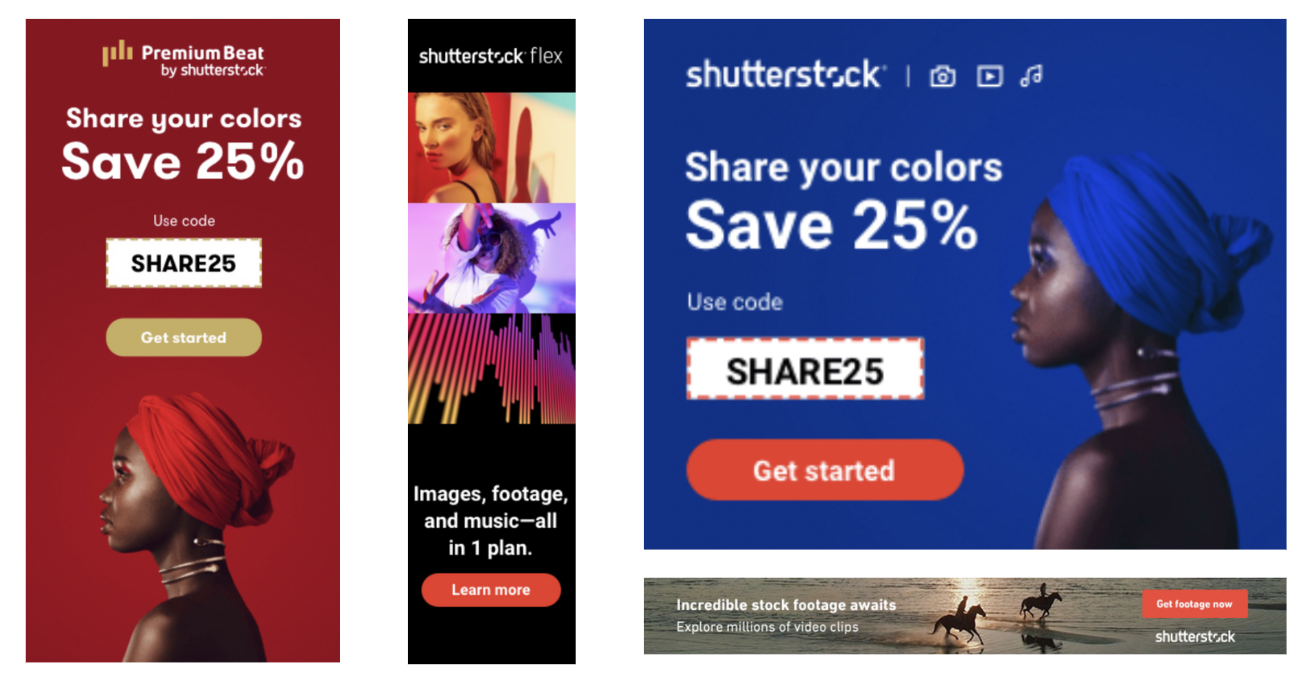
The images shown above are some examples of shutterstock image ads. As you can see, image elements typically include the brand name, ad copy, discount information, product or service content, and a call-to-action button.
Landscape image (1.91:1)
Recommended size: 1200 x 628
Minimum size: 600 x 314
Square (1:1)
Recommended size: 1200 x 1200
Minimum size: 300 x 300
Portrait (9:16)
Recommended size: 900 x 1600
Minimum size: 600 x 1067
The image size of responsive display ads must only provide three sizes: a landscape image of 1.91:1 (recommended 1200*628), a square image of 1:1 (recommended 1200*1200), and a portrait image of 9:16 (recommended 900*1600). The ad system will match different image sizes to various ad placements.
The requirements and suggestions for discovery ads can be used to make images for responsive display ads.
Cannot violate any of Google’s policies
If your image violates any of these guidelines, it will not be displayed. The image will be rejected, and a ‘low quality’ message will appear.

For more advertising policies, click here.
Use authentic background
According to research, images are very interesting when they show a product or person in a real-world setting that users can quickly recognize and/or connect to their own environment. Natural lighting and colors are commonly used in realistic background environments. Overlay the main elements of the image over digitally composited or unrealistic backgrounds; avoid excessive photo retouching.

Avoid overlapping text and elements
According to research, displaying images with no visual distractions and a strong theme is the most effective way to get “casual look” users to immediately connect with your message. Text, shapes, logos, and calls to action shouldn’t be added to images unless it’s an absolute must to keep people interested in your brand.

To emphasize key points, use strong visual contrast
According to research, great graphics capture users’ attention as they browse casually. Choose images that stand out from the crowd and catch the viewer’s attention. Also, make sure your pictures have the right lighting to make the product or experience better. Because some users may turn on the energy-saving mode, the image may look darker than expected on the screen.

Avoid Stitching Images
It has been discovered that arranging images in a geometric or harmonious pattern increases their visual appeal and effectively piques user interest.

Showcase products alongside usage scenarios
According to research, when given contextual cues, users tend to put themselves in the context of using a product. Don’t just show the product; pair it with related items or place it in a relevant context. Showing a person with a watch on their wrist, for example, works better than simply showing the watch.

Ads targeting
By targeting the right audience, you can make ads work better, make them more relevant, and make them more personal. Display ad targeting methods are divided into two categories: audience targeting and content targeting.
The goal of audience targeting is to target advertisements to relevant groups of people. Remarketing audiences, custom audiences, and audiences with specific purchase intentions are the most common.

Six targeting methods are visible on the audience targeting setting interface (as shown in the figure above).
Who they are (Detailed demographics): Specific demographics, who are they? Such as age, gender, reproductive status, etc. all fall into this category.
What their interests and habits are (Affinity): audiences with similar interests, what are their interests and habits? For example, those who are interested in outdoor sports and financial management all fall into this category.
What they are actively researching or planning (In-market and life events): Audiences with specific purchase intentions and life events, what are they actively researching or planning? For example, planning to buy electronic products, planning to buy clothing, etc. all fall into this category.
How they have interacted with your business(Your data and similar segments): Remarketing audiences and similar audiences, which audiences have interacted with your website before? Among them, the similar audience function will be discontinued in May 2023. Users who have visited your website or made a purchase on your website fall into this category.
Your combined audience segments (Combined segments): combined audience, you can combine different audience types into one audience.
Your custom audience segments (Custom segments): Custom audiences: you can use keywords related to the audience or website URLs that the audience frequently visits to define an audience by yourself. not limited to Google’s classification of audiences.

The goal of content targeting is to get ads to the right people by finding the content of the ads. Keywords, topics, and placements are the three main content targeting methods.
What I was referring to earlier was audience targeting, or people targeting. What we’re discussing here is content targeting, also known as inventory targeting. Keywords, topics, and placements are the three types of content targeting methods. Keyword targeting means finding the websites where these keywords appear. This is different from the keywords mentioned above in the custom audience. In audience targeting, the keywords of the custom audience are keywords that users have searched for. Topic targeting means that the website’s content is tailored to the topics we select. Placement targeting entails specifying a specific website on which our ad will appear.
Audience targeting and content targeting are rarely used concurrently. If they are used concurrently, the ad’s coverage and performance may be compromised.
Ads creation
1.Select locations to target.

2.More settings.

3.Set your budget and bidding strategy.

4.Audience segments setting

5.Ad targeting setting

6.Create responsive display ads or upload the image ads.


Image ads and responsive display ads can only be chosen once. The ad is finished at this point.