
Last updated on November 1, 2026 at 12:37 PM
Meta Ads operating guide · Advantage+ Sales
Advantage+ Sales can automate parts of campaign delivery; it does not choose a sound business objective, repair unreliable purchase events or guarantee new-customer profit. A useful setup makes clear what Meta may optimize, what the business must control, and which evidence will determine the next decision.
What you will prepare: a campaign plan, a list of automation settings and controls, rules for identifying customers and a review sheet comparing Ads Manager with real orders. This guide assumes the account, permissions, dataset and store connection are ready.
Reviewed November 1, 2026. Advantage+ Sales was formerly called Advantage+ Shopping. Meta Blueprint describes the streamlined setup and the continued use of controls and manual settings; exact screens and eligibility differ across accounts and existing campaigns.
1. Identify which automation you are using
Do not use “Advantage+” as if it were one switch. A Sales campaign can involve campaign-budget allocation, audience expansion, placements, creative transformations and catalog delivery. Their settings answer different questions. Record the actual configuration, rather than relying only on an Advantage+ status label.
| Area | What to inspect | What remains your decision |
|---|---|---|
| Budget | Where allocation is controlled and which budgets, schedules or limits apply. | How much you can afford to risk, business priorities and who can approve changes. |
| Audience | Required controls, expandable suggestions and customer-related settings. | Markets you can serve, restrictions on who may receive the ads and a documented acquisition strategy. |
| Placements | Where ads may appear and any restrictions. | Suitable materials and requirements you remain responsible for meeting. |
| Creative and catalog | Enabled enhancements, asset selection and product availability. | Truthful claims, rights, correct products and a working destination. |
Meta’s automation training distinguishes end-to-end campaign solutions from tools that automate individual steps. A manually controlled setting is not automatically a mistake; an automated setting is not automatically the right fit for every constraint.

2. Write the plan before creating the campaign
State whether the priority is total sales, first-time customers, repeat purchases or another supported business outcome. Those are not interchangeable. A strong blended ROAS can coexist with weak acquisition if many attributed orders come from customers who already know the brand.
Offer and market: product, country, language, currency, delivered price, inventory and buying conditions.
Outcome: the action the campaign will optimize and the business result you will separately evaluate.
Profitability: variable costs, returns risk, acceptable contribution margin and acquisition assumptions.
Customer definition: how you will distinguish new customers, existing customers and people whose purchase history you cannot confirm.
Budget and responsibility: approved spend, review period, required controls and who may change them.
Use the contribution-margin model in the product research guide to check profitability. A campaign cannot rescue an offer already made unworkable by delivery costs, refunds or stock commitments. Before setting a revenue target, check how much will remain to pay for advertising and fixed costs.
3. Follow the campaign, ad set and ad in order
In Ads Manager, start campaign creation with the Sales objective when that matches the task. Inspect the setup your account presents. Meta’s streamlined-setup training covers Advantage+ Sales, the former Shopping naming and controls; older tutorials may show a separate choice or fields that do not match your account.
- Campaign: confirm the objective, name, budget allocation, schedule and available spending limits. Save the approved settings before proceeding.
- Ad set: choose the appropriate conversion location, dataset and optimization event. Confirm the performance goal and any value-related option actually offered and suitable for the business.
- Audience: distinguish controls from suggestions, review customer settings and verify the intended market.
- Placements: inspect eligibility and requirements; make sure the creative can work where delivery is allowed.
- Ad: check the Facebook and Instagram identity, destination, assets, tracking parameters and enabled transformations.
For website sales, check that the selected purchase event represents real completed orders with the correct values and currency. Verify browser/server deduplication and the connected dataset before blaming poor results on the product. The asset guide explains setup; a working integration does not need reinstalling.
Keep a dated setup record. When a control changes Advantage+ status, evaluate whether the control is necessary rather than optimizing for a label. If your account cannot express a required restriction, do not launch until you have an appropriate supported setup.
4. Separate required controls from audience suggestions
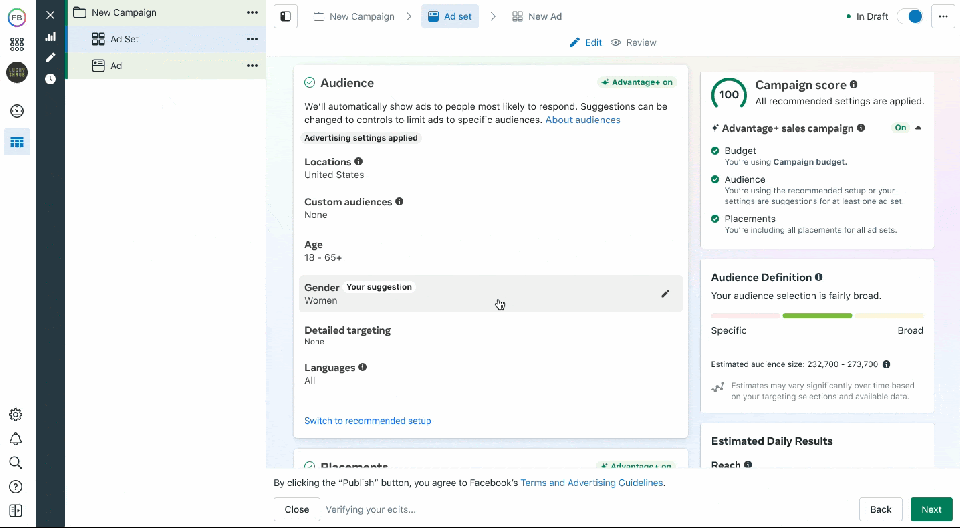
Read the descriptions beside the inputs in your current account. If an age range, interest, lookalike or other audience input is labeled as a suggestion, do not treat it as a guaranteed boundary. Likewise, do not assume every account, objective or regulated category offers identical controls.
| Question | Evidence to save | What to do if the check fails |
|---|---|---|
| Can we serve the selected locations? | Included and excluded locations plus delivery conditions. | Correct the selected areas or delivery terms before launch. |
| Are mandatory restrictions on who may receive ads being enforced? | The actual control, its description and any category requirements. | Do not substitute a suggestion for a required restriction. |
| What happens beyond audience suggestions? | Expansion wording and saved settings. | Correct the strategy if it depends on a closed audience. |
| How are existing customers handled? | Definitions, permitted data sources, exclusions or lifecycle settings. | Complete or update the data and record what you still cannot verify. |
| Do allowed placements fit the assets? | Previews and any documented restriction. | Adapt the asset or use an appropriate supported control. |
Do not turn fields in an old screenshot into universal rules for age, audience or existing customers. Record the settings your campaign actually applies. A mandatory delivery restriction is different from a suggestion that guides the starting audience.
5. Define how you will identify new and existing customers
Meta’s October 6, 2026 announcement says Customer Lifecycle Strategy is available to all advertisers and can recommend existing-customer exclusions for acquisition campaigns. The same announcement describes a simplified Audience Label exclusion approach as testing. Do not turn that latter example into a guaranteed button in every account.
Where the lifecycle workflow is present, inspect its recommendations and the actual saved exclusions or settings. Do not assume that selecting “acquisition” makes every resulting order a first purchase. The system depends on the information it can recognize; your order history remains a separate source for customer status.
Write your own definition. For example: a uniquely identified customer with no previous completed, paid order before their first purchase, using documented rules for matching customers and handling refunds. This is an example, not a mandated Meta standard. Check cancellations, guest purchases and changed email addresses. If you cannot confirm someone’s purchase history, do not automatically count them as new.
Assign an owner and refresh schedule to permitted customer data sources. Record which period and customers each list or segment covers. A list of recent purchasers does not include everyone who has ever bought. Follow the relevant terms and permissions; do not put personal information in ad URLs.
Legacy Advantage+ Shopping instructions may discuss an existing-customer budget field. Verify the options and meaning in the current setup instead of promising that old field or a universal percentage cap. Reporting segments, exclusions and budget allocation serve different purposes.
6. Give automation accurate material to work with
Use meaningful creative concepts that explain a real customer problem and truthful product benefit. Automation cannot make an unclear promise accurate. Preview the assets and enabled enhancements; check language, dimensions, audio, claims and the relationship between the ad and the landing page.
A catalog is useful when the chosen format or product workflow needs it; it is not a universal requirement for every single-product Sales ad. When using one, verify price, stock, destination, product identifiers and relevant event matching. A high click rate on an unavailable variant is not success.
Assess creative ideas separately from budget allocation. Materials in the same automated campaign may receive different spend and reach different audiences. For a comparison with a defined question, follow the creative testing protocol. If comparing automated systems, record each option’s complete configuration rather than attributing every difference to one toggle.
7. Launch with a documented review plan
Before publishing, approve the budget, name an owner and agree on operating checks. Confirm ad approval, working checkout, available stock and correct event recording. Read the budget and schedule descriptions: a daily budget is not necessarily an unchanging daily billing cap.
Separate operational monitoring from performance decisions. Broken checkout, wrong prices or required restrictions failing deserve immediate attention. A weak short interval with few outcomes is different: allow for the buying cycle, reporting lag and expected variability under the predefined plan.
Record material changes to the budget, offer, optimization, audience controls or creative mix. Avoid changing several things and then explaining the result as proof that one setting worked. Do not automatically duplicate a campaign for every interest, language variant or temporary movement in CPA; first identify the business reason and whether enough evidence can be collected.
8. Reconcile platform performance with customer outcomes
Use a consistent time zone, currency, attribution setting and observation window when reading Ads Manager. Then examine your backend orders and customer definitions. Platform-attributed purchase value, campaign-linked store orders and incremental sales are different measurements; do not force them to match by rewriting definitions.
| View | Illustrative value | Interpretation |
|---|---|---|
| Ad spend | $1,000 | Advertising only; excludes production, agency and other expenses. |
| Meta-attributed purchase value | $3,200 | Reported ROAS is 3.2 under the saved attribution setting. |
| Store orders linked to the campaign | 75 paid orders | A separately defined group of orders, which need not match Meta’s attributed purchases. |
| Verified first orders in this group | 58 | Each from a different verified new customer under the recorded backend definition. |
| Other orders in this group | 12 repeat-customer orders; 5 with unconfirmed histories | 58 + 12 + 5 = 75; an unconfirmed history does not mean a new customer. |
For this defined group of campaign-linked orders, ad spend per verified new customer is $1,000 ÷ 58, about $17.24. This is an observed cost, not proof that advertising brought in those customers, and it excludes non-ad acquisition costs. Reported ROAS does not calculate profit. Check contribution margin, cancellations, returns and customer quality before spending more.
If you want new customers and the share of repeat buyers rises, investigate why rather than celebrating total revenue alone. If reports and store counts disagree, check duplicate events, periods, customer matching and which orders were included. Check data recording before attributing the problem to audience automation.
9. Decide what to keep, change or stop
Keep the setup if it meets the objective within acceptable costs and operating conditions. When evidence points to a problem, change a specific setting and record it. Stop or repair the campaign if the product, destination, data or required controls are unreliable. An automation status is not a reason to abandon an essential business requirement.
- The optimized action matches the intended sales task.
- Required restrictions are actual controls, not assumed suggestions.
- Customer definitions and exclusions have a documented source and owner.
- Creative, catalog, price and inventory agree with the destination.
- Platform results and backend outcomes retain their own definitions.
- Further spend depends on contribution margin, customer quality and the risk you can afford.
- The next review has an owner, date and a recorded decision.
Use a suitable controlled test if you need a causal comparison between configurations. A before-and-after increase during a promotion does not isolate Advantage+ as its cause. Keep the setup record and learning log so the next operator can distinguish a deliberate decision from a default.
Template for your first review
Complete this row for your first planned evaluation period. Record interruptions and unresolved data limitations alongside the decision. Reaching the review date does not guarantee that you have enough information to conclude.
| Period | What you review and which settings you use | Business objective | Platform and store metrics | Decision | Owner and next review |
|---|---|---|---|---|---|
| Start, end, time zone | Campaign and saved settings | Acquisition or sales objective | ROAS; verified first orders; contribution margin | Keep, change or stop; reason | Named owner and next date |
Choose the next diagnostic guide
Use Meta, GA4 and Shopify reconciliation for reporting differences; clicks without sales diagnosis when traffic does not become valid orders; Pixel and Conversions API troubleshooting for missing or duplicated events; and the catalog advertising guide for product-data and availability issues.
Advantage+ Sales FAQ
Is Advantage+ Shopping a different current setup?
Older guides use the Shopping name. Meta Blueprint now describes Advantage+ Sales and a streamlined campaign experience. Existing campaigns and account screens may differ, so inspect the actual settings.
Does Advantage+ Sales mean new customers only?
No. Define acquisition explicitly, inspect the available customer settings and verify first-time buyers in your backend. Unmatched customer records are not automatically new.
Should I disable every manual control?
No. Use supported controls where the business requires them. Verify what is a hard restriction and what is a suggestion; the status label is not the commercial objective.
Is a high ROAS enough to scale?
No. Review contribution margin, the share of new and existing customers, returns, data quality and what the evidence lets you conclude. Reported attribution is not the same as incremental sales or profit.
All examples and calculations are constructed teaching resources. No account results, universal interface availability or guaranteed performance improvements are claimed.